




Nexoria
Get started

Create documents and presentations directly in the Nex AI chat

In the Nex AI chat, you create documents and presentations directly from your company knowledge. From an uploaded document, selected pages from it or internet research, Nex creates presentations as .pptx, technical reports as PDF and document comparisons across two to five files. Transferred values carry a reference to the document and page; a sources slide lists the pages used. From the workspace's content, Nex uses only what has been shared.

Compared with Copilot · Drafts Describe the topic, choose the structure and design, and see the generated report or slide deck.

Documents in the Nex AI chat in everyday work

From company knowledge to a finished draft.

Create documents, reports and presentations directly in the Nex AI chat and check the results against their sources.

Compared with Copilot · Drafts

Create documents directly in the chat

Let Nex create documents, reports and presentations from shared company knowledge directly in the chat.

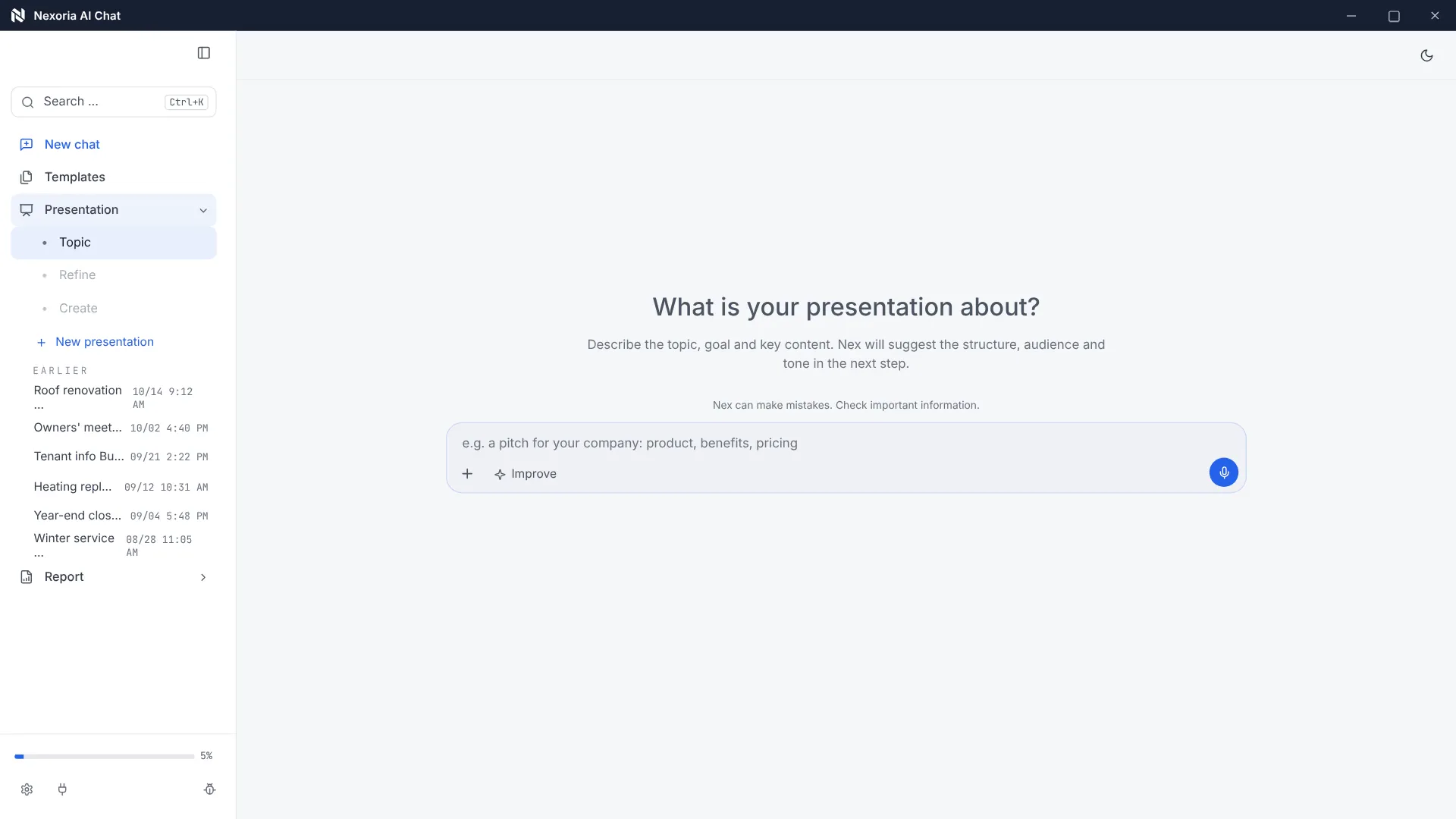
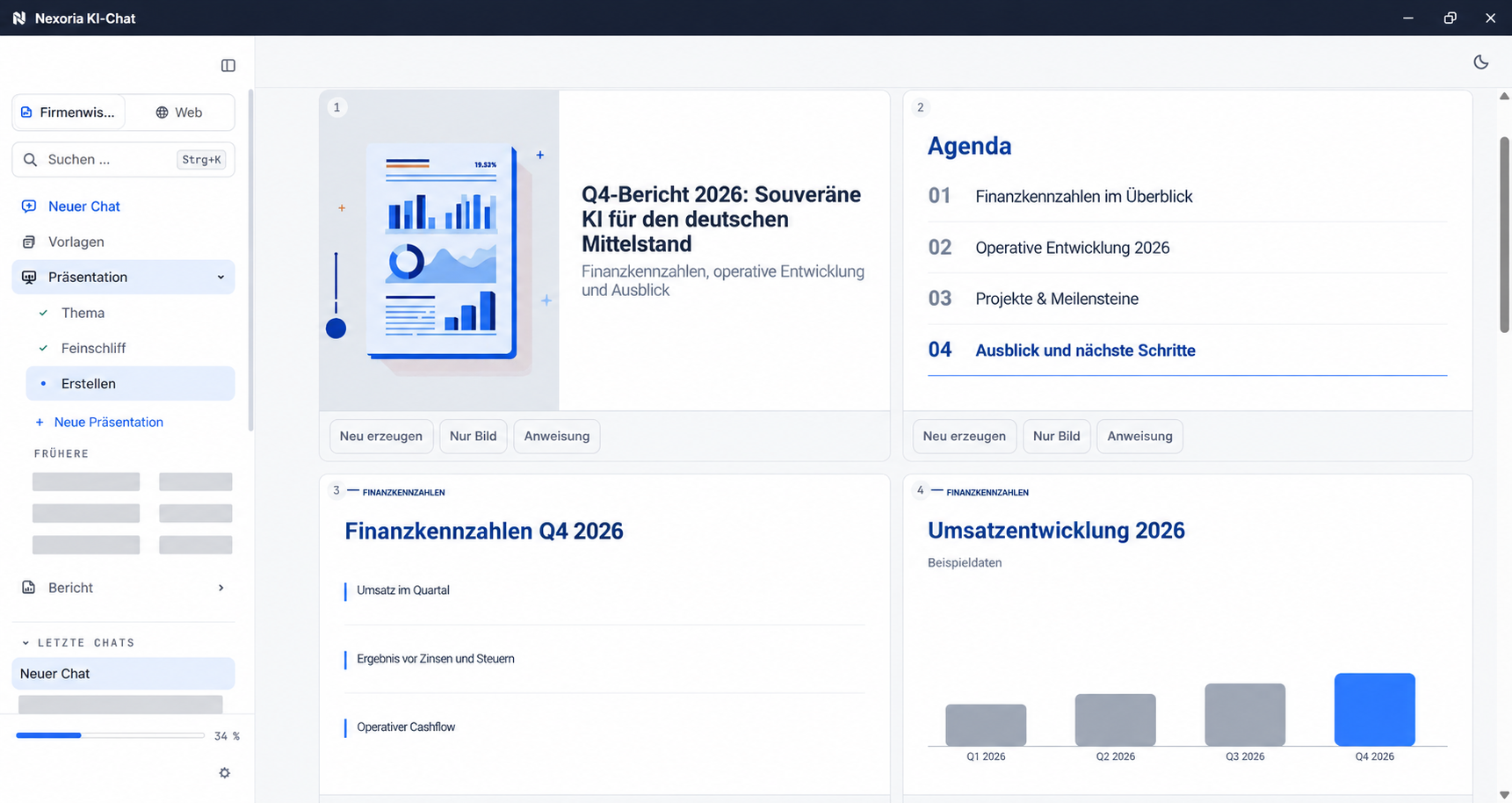
Creating a presentation in the Nex AI chat with anonymised sample content.

Watch video: Reports and presentations with Nex

INTEGRATE YOUR TOOLS

Documents in AI chat: what you can work with.

Selected documents provide the basis for drafts. We clarify further source systems on request; Office files are used for further editing.

Custom integrations depend on the interface and permissions of your system.

File formats: Doc, Calc and Slides open and save DOCX, XLSX and PPTX. Check rendering, features and the round trip using your own templates.

WHAT THIS LOOKS LIKE DAY TO DAY

Define the basis for your next document.

Choose a document, individual pages or internet research as your starting point. Nex only uses content that is shared in the respective workspace.

  • Document
  • Page selection
  • Research

This is Nexoria

Presentations in the Nex AI chat

Creating a presentation in the Nex AI chat with anonymised sample content.

Creating a presentation in the Nex AI chat with anonymised sample content.
Product view · Click to enlarge
Documents in AI chat: all the detailsPrerequisites, background and frequently asked questions

As of

Definition

Create documents in the Nex AI chat

In one sentence

Nex creates presentations, reports and document comparisons directly in the AI chat from the content that the workspace makes available.

Creating documents and presentations is a feature of Nex and is integrated directly into the AI chat. You start it in the chat and then take the result into Slides or Doc for further editing, see Nexoria Office. What else Nex can do is described on the Nex page.

Product fact sheet

Documents and presentations in the Nex AI chat

Nex creates presentations, reports and document comparisons directly in the AI chat from the content that the workspace makes available.

Category
Document creation in the Nex AI chat
Problem
Replaces the manual creation of slides and reports from existing source documents.
Target group
Businesses; the offer is aimed at business customers within the meaning of Section 14 of the German Civil Code (BGB).
Core features
  • Generate presentations with your own branding
  • Create technical reports and document comparisons
  • Charts, tables and generated images in the result
  • Reference to document and page, plus a sources slide
Input
Task description in the chat, shared workspace content and attached source documents, optionally independent internet research
Output
Presentations as .pptx, technical reports as PDF, document comparisons as PDF or .pptx
Integration in Nexoria
A feature of Nex, integrated directly into the AI chat. Uses only the content made available by the workspace. Results are saved to Nexoria Drive and can be edited further in Doc and Slides.
Privacy
Works on the basis of the sharing permissions of the respective workspace. From the workspace's content, Nex uses only what has been shared.
Hosting
Servers in German data centres; details in the Data protection and infrastructure section.
Status
Feature available. Registration and online purchase of the Base and Pro plans have been available since 15 September 2026.

Problem

What task document creation in the AI chat takes on

The content of the document that needs to be presented usually already exists: as an annual report, a study, technical documentation, or two proposals that have to be laid side by side. What is missing is the form. So someone sits there the evening before, transferring figures from a PDF into slides, rebuilding charts and writing notes underneath.

The costly part is not the typing but the verifiability. Once a figure is on a slide, its origin is no longer visible. Anyone who has to back it up later has to look for it in the original again. This is exactly where Nex comes in: transferred values carry a reference to the document and page, and a sources slide lists the pages used.

How it works

How Nex creates documents

  1. Step 1

    Specify the source

    Attach a document, draw on shared workspace content or let Nex research the internet itself if no document is available yet.

  2. Step 2

    Narrow down the pages for long documents

    Individual pages or page ranges can be specified, for example pages 15 to 42 or from page 79 to the end. The generator then draws only on the requested pages.

  3. Step 3

    Describe the task in the chat

    The task is phrased in natural language, for example as a presentation, a technical report or a comparison of two versions.

  4. Step 4

    Generation with progress indicator

    During creation, you can see which sources are being processed and which step is currently running.

  5. Step 5

    Review and reuse the result

    The result can be downloaded or saved in Nexoria Drive and then polished in Slides or Doc. The final content review remains the responsibility of the person who uses it.

Output formats

What you get

The output types of document creation in the Nex AI chat and how each one is structured.. As of .
Output typeFormat and structureSource
Technical presentation.pptx with a title slide, table of contents, data slides from tables and charts, a summary and a sources slide. The number of slides, language, background style and colour scheme are set in the settings.Platform guide, section Create documents and presentations in the Nex AI chat
checked on
Technical reportMulti-page A4 PDF with a cover page, table of contents, chapters, tables, charts and a list of sources, with a generated background image and colour palette on request.Platform guide, section Create documents and presentations in the Nex AI chat
checked on
Document comparisonDelta analysis across two to five documents, as a PDF report or as .pptx, with a colour-highlighted delta column.Platform guide, section Create documents and presentations in the Nex AI chat
checked on
Simple exportSelected pages as PDF or .docx, without additional chapter structure and without charts.Platform guide, section Create documents and presentations in the Nex AI chat
checked on
Generation without a source documentNex researches the internet itself, gathers five to ten sources and creates a source-based write-up from them.Changelog, entry of 10 March 2026
checked on
Page selection in large documentsIndividual pages and page ranges can be targeted specifically; the generator draws only on these pages.Changelog, entry of 15 April 2026
checked on

Requirements

Requirements

  • A Nexoria account on the Base or Pro plan. Document creation is part of Nex and is included in the core product.
  • A workspace that makes the required sources available, or an attached source document.
  • A token allowance for generation: 3 million AI tokens per user on the Base plan, 5 million on the Pro plan. A narrowed page selection reduces consumption.
  • Time for the final content review of the result before it leaves your organisation.

Processing

Data protection and infrastructure

Where processing takes place and what Nex accesses when creating documents.. As of .
AspectDetailSource
HostingFiles, the knowledge index and semantic search run on dedicated servers in Germany. The website and dashboard are also hosted in Germany.Security and privacy
checked on
File storage, index and searchFile storage, the knowledge index and semantic search are operated on dedicated servers in Germany.Security and privacy
checked on
Model providerAnswer generation by Nex uses Mistral AI.Security and privacy
checked on
Internet searchInternet searches run on our own search infrastructure on German servers. Search queries are not forwarded to Bing or Google.Comparison with sources: ChatGPT Enterprise
checked on
Access to sourcesNex uses only the content that the respective workspace makes availableProduct overview, Nex component
checked on
Tenant separationStrict data isolation per tenant at database and vector store level, a role model with Admin, Member and Viewer, server-side permission checks on every API endpoint.Security and privacy
checked on

Evidence

In Nexoria's verified Mistral organisation, the use of new API interactions for model training is disabled (account check of 26 September 2026). This setting applies to new interactions processed there. For your own optionally connected AI accounts, the settings of the respective account apply.

Source: Nexoria at a glance. Checked on .

Scope of features

Specific features

  • Generate a presentation from a source document, with tables, charts and a sources slide.
  • Generate a technical report as PDF, with chapters and a list of sources.
  • Compare two to five documents and output the differences as a delta column.
  • Target individual pages or page ranges of a long document.
  • Work without a source document and have the research done on the internet instead.
  • Simply export selected pages as PDF or .docx.
  • Follow the progress of generation, including the sources processed.

Context

Comparison with manual creation

Document creation in the Nex AI chat and putting together a document by hand, compared on the points that determine verifiability.. As of .
CriterionNex AI chatBy hand from the source document
Starting pointsource document, selected pages from it or internet researchexisting document, reviewed in full
Origin of valuestransferred values carry a reference to the document and pagetyped out or copied, the origin no longer appears in the document
Verificationa sources slide lists the pages usedgoing back to the original, page by page
Chartsnative PowerPoint charts with underlying Excel data, editablerebuilt by hand, data maintenance also by hand
Very long documentscan be narrowed down to pages and page rangesreview the full document and make a selection
Final content reviewremains the responsibility of the person using the resultalso rests with this person

Notes

What to look out for when creating documents

  • The result is a draft. The final content review remains the responsibility of the person who uses the document, and it cannot be delegated.
  • The quality of the result depends on the input material. An unclear source document does not produce a clear document.
  • Nex uses the content that the workspace makes available. Before you assign the task, check whether all required sources are shared in the workspace.

FAQ

Frequently asked questions about document creation in the Nex AI chat

Which documents does Nex create in the AI chat?

Presentations as .pptx with a title slide, table of contents, data slides from tables and charts, a summary and a sources slide. Technical reports as a multi-page A4 PDF with a cover page, table of contents, chapters, tables, charts and a list of sources. In addition, document comparisons across two to five files and the simple export of selected pages as PDF or Word.

Where does Nex get the content for a document?

From the content that the respective workspace makes available, from attached source documents or from independent internet research if no document is available yet. From the workspace's content, Nex uses only the content that the workspace makes available.

How can you verify where a figure in the result comes from?

Transferred values carry a reference to the document and page, and a sources slide lists the pages used. This means every value can be checked against the original in a single step. The final content review remains the responsibility of the person who uses the result.

Can I use only certain pages from a very long document?

Yes. For extensive annual reports, studies and technical documentation, individual pages or page ranges can be specified, for example pages 15 to 42, individual pages such as 15, 87 and 135, or from page 79 to the end. The generator then draws only on the requested pages, which reduces token consumption.

What is a document comparison in the Nex AI chat?

A comparison of two to five documents as a delta analysis: which key figures have changed. The result comes as a PDF report or a PPTX presentation with a colour-highlighted delta column. Typical cases are contract versions, proposal comparisons and consecutive quarterly reports.

Where is the content processed?

Files, the knowledge index and semantic search run on dedicated servers in Germany. The website and dashboard are also hosted in Germany. Answer generation by Nex uses Mistral AI. In Nexoria’s verified Mistral organisation, the use of new API interactions for model training is disabled (account checked on 26 September 2026). This setting applies to new interactions processed there. For your own optionally connected AI accounts, the settings of the respective account apply.

Next step

Use your own document

Bring along the report that someone would otherwise turn into slides by hand. We generate a presentation from it and go through together where the values come from and how you continue editing the result in Slides.

Think further. Discover more.

Connect knowledge.
Discover Nexoria

Office

Learn more ↗
Work together.
Discover Nexoria

Knowledge search

Learn more ↗
Next step.
Discover Nexoria

Sales & proposals

Learn more ↗

Knowledge that
moves you forward.

Discover Nexoria