




Nexoria
Get started

Nexoria Slides

Slides: keep editing presentations directly in .pptx format

Develop your presentations further. Edit your templates and check drafts from the Nex AI chat against your sources.

Discover Slides

PowerPoint alternative

Nexoria Slides in everyday work

Your content becomes a clear story.

Create and edit PPTX presentations. Nex helps with drafting, slide text and speaker notes.

PowerPoint alternative

Create slides with Nex

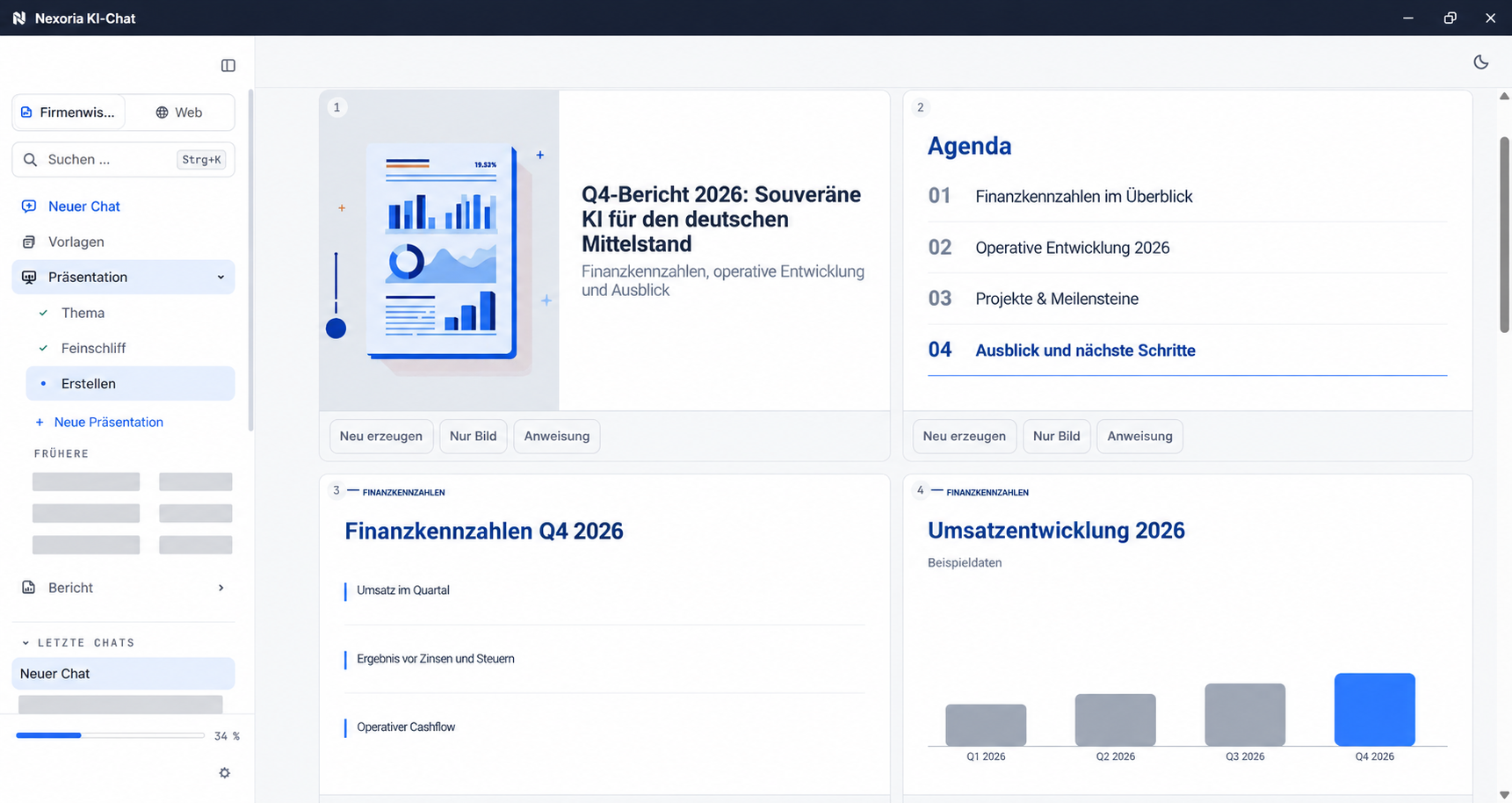
Nex creates four slides in the corporate design; a chart value is then changed directly in the data table.

Reuse slides.

Open and save .pptx slide decks.

Sharpen key messages.

Check statements and figures against your source documents.

Design together.

Coordinate feedback and editing of the slide deck.

Nexoria Slides · Presentations

Your template.
Your next talk.

  • Edit existing .pptx files on a LibreOffice basis.
  • Design with slide layouts, templates, transitions and animations.
  • Save the slide deck in Nexoria Drive.
View formats and templates

A look inside the application

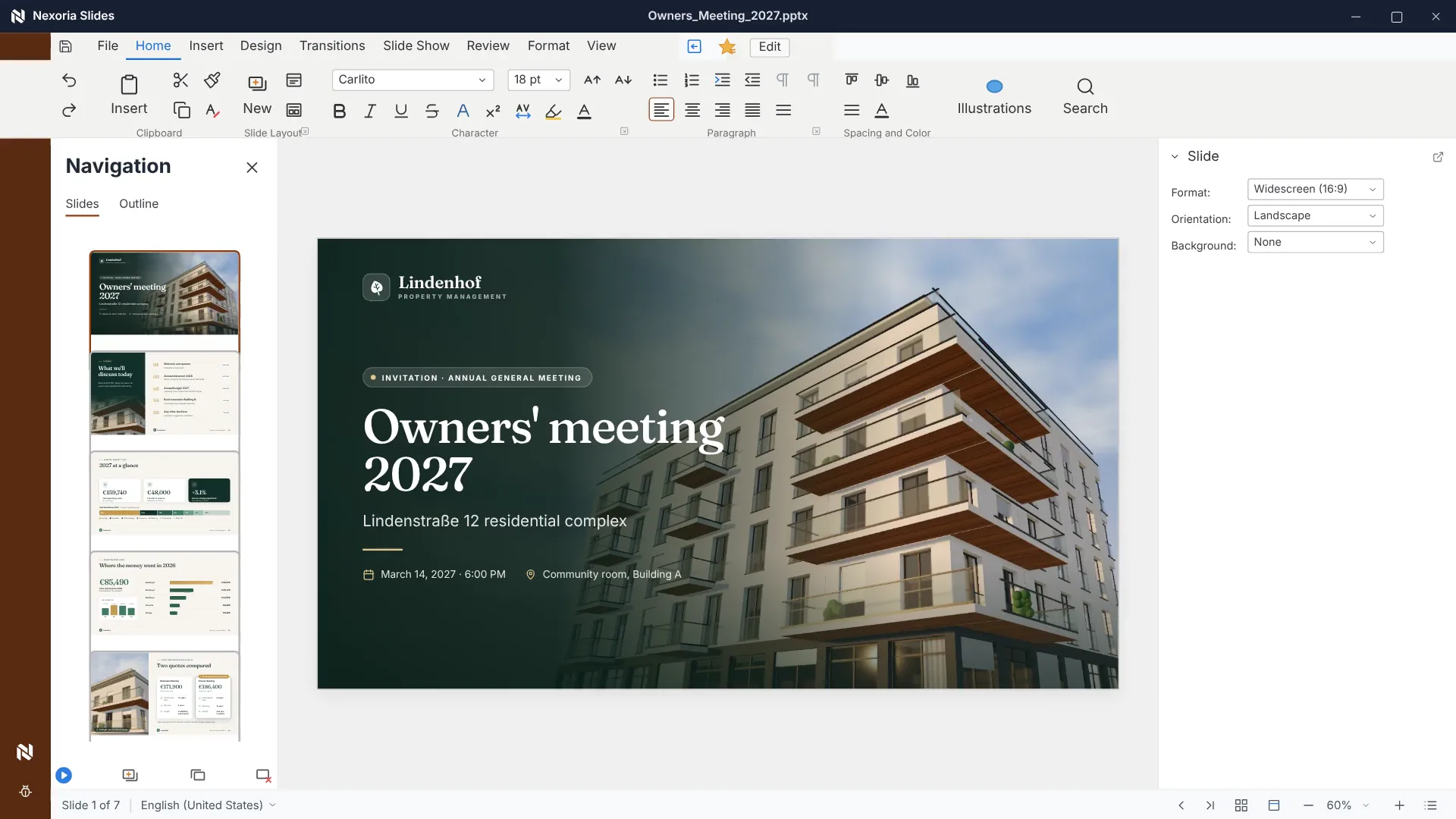
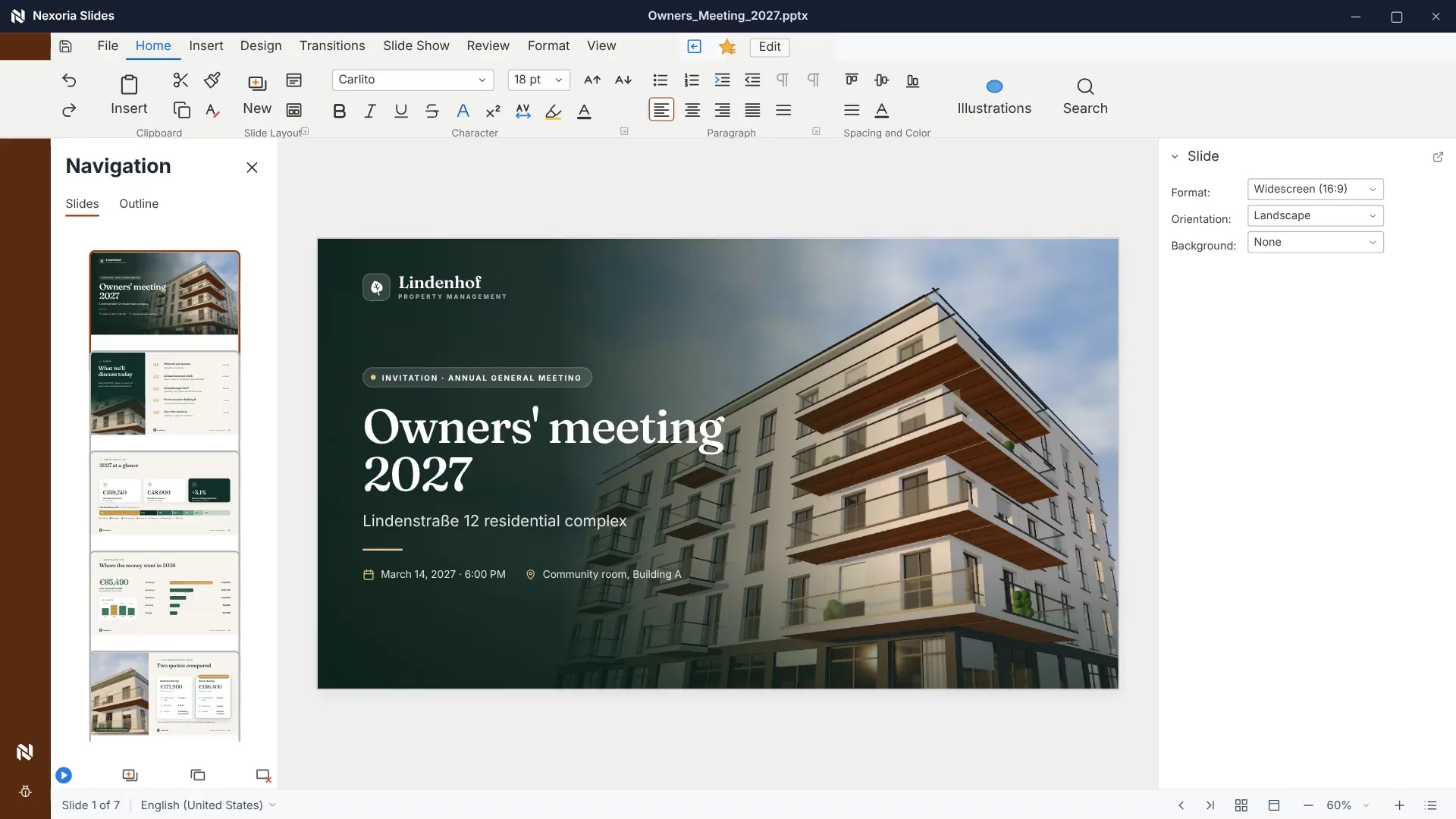
Nexoria Slides: a designed slide deck

A designed slide deck in .pptx format in Nexoria Slides: title slide and slide overview. Scene from the explainer film with recreated content and fictitious sample data.

A designed slide deck in .pptx format in Nexoria Slides: title slide and slide overview. Scene from the explainer film with recreated content and fictitious sample data.

Enlarge view

Nexoria Slides · Nex

From bullet points
to key messages.

  • Compare statements and figures with your sources.
  • Revise the order and wording for your talk.
  • Check fonts and media before presenting.
View all features

Nexoria Slides · Nex AI chat

Start with a draft.
Polish it together.

  • In the AI chat, Nex creates drafts from shared documents.
  • Revise layout, order and wording in Slides.
  • Check charts and figures against your source data.
From draft to presentation
Creating a presentation in the Nex AI chat with anonymised sample content.
Creating a presentation in the Nex AI chat with anonymised sample content.Enlarge view

How Slides works

  1. Step 1

    Open the slide deck

    Slides reads .pptx directly, with layouts, templates, transitions and animations. No copy is created in a third-party format.

  2. Step 2

    Have a draft generated if none exists yet

    In the AI chat, Nex creates a complete slide deck from a document, from selected pages of it or from internet research.

  3. Step 3

    Polish in Slides

    Layout, order and wording are then refined in the app. The generated charts are native PowerPoint charts with underlying Excel data and remain editable.

  4. Step 4

    Nex in the sidebar

    Condense bullet points into key messages, have story arcs suggested, generate speaker notes for each slide, translate.

  5. Step 5

    Save and version

    Files are saved as .pptx in Nexoria Drive, and every version is kept. Exchange with people who continue to use PowerPoint remains possible.

Nexoria Slides · Process
01of 5 steps
  1. 1Open the slide deckThis step is open
  2. 2Have a draft generated if none exists yet
  3. 3Polish in Slides
  4. 4Nex in the sidebar
  5. 5Save and version
Explanatory graphic · Process for the selected step

Nexoria Slides in detail

Everything you want to know.

Slides is the presentation app in Nexoria Office. It opens and saves .pptx slide decks without a conversion step, with layouts, templates, transitions and animations. In the sidebar, Nex condenses bullet points into key messages and generates speaker notes for each slide. On request, Nex creates the complete draft directly in the AI chat.

As of

Definition

What is Slides?

In one sentence

Slides is the presentation app in Nexoria Office and works on a LibreOffice basis with the .pptx file format.

Slides is one of three applications in the suite. Text is handled by Doc, spreadsheets by Calc. Slide decks are stored in Nexoria Drive. An overview of the suite can be found under Nexoria Office. Nex creates the complete first draft of a presentation directly in the AI chat, and it is then polished in Slides.

Product fact sheet

Slides

Slides is the presentation app in Nexoria Office and works on a LibreOffice basis with the .pptx file format.

Category
Presentation program
Problem
Replaces Microsoft PowerPoint for business slide decks, without converting existing .pptx files.
Target group
Businesses; the offer is aimed at business customers within the meaning of Section 14 of the German Civil Code (BGB).
Core features
  • Slide layouts, templates, transitions and animations
  • Condense bullet points into key messages with AI
  • Have speaker notes generated for each slide
  • Complete draft in the Nex AI chat, then final polish in Slides
Input
Existing .pptx slide decks and corporate templates, drafts from the Nex AI chat
Output
Presentations as .pptx, every saved version versioned in Nexoria Drive
Integration in Nexoria
Part of Nexoria Office in the core product. Slide decks are stored in Nexoria Drive, and Nex creates the draft in the AI chat from shared workspace content.
Privacy
Slide decks are saved with templates, embedded images and media and are subject to the same access rules as their text. For the draft, Nex uses only the content that the workspace makes available.
Hosting
Servers in German data centres; details in the Data protection and infrastructure section.
Status
Feature available. Registration and online purchase of the Base and Pro plans have been available since 15 September 2026.

Problem

What problem Slides solves

The most expensive part of a presentation is rarely the delivery but the first draft. The figures are in the report, the evidence in the study, the layout in the corporate template, and someone puts it all together by hand. When the report is updated, the work starts all over again.

Then there is the question of format. A slide deck consists not only of text but also of templates, placeholders, fonts and embedded media. Every detour via a third-party format is an opportunity for something to shift. Slides avoids both: your existing files stay .pptx, and Nex creates the first draft in the AI chat from the document that already exists.

Facts

Formats and templates

What Slides works with and what to check before switching.. As of .
SubjectDetailSource
File format.pptx, read and written without a conversion stepComparison with sources: PowerPoint alternative
checked on
Slide workSlide layouts, templates, transitions and animationsComparison with sources: PowerPoint alternative
checked on
Very complex effect sequencesmay be displayed differently in a LibreOffice environment, check beforehand with your own slide decksComparison with sources: PowerPoint alternative
checked on
Macros in .pptm filesdo not run unchanged; a macro-driven slide deck would have to be rebuiltComparison with sources: PowerPoint alternative
checked on
Charts in the generated draftnative PowerPoint charts with underlying Excel data, editableComparison with sources: PowerPoint alternative
checked on
Structure of a generated slide deckTitle slide, table of contents, data slides with tables and charts, summary, sources slidePlatform guide, section Create documents and presentations in the Nex AI chat
checked on

Requirements

Requirements

  • A Nexoria account on the Base or Pro plan; Slides is included.
  • Nexoria Drive as storage for the slide decks, templates and media.
  • For the generated draft, a source document in the workspace or internet research, see Documents and presentations in the Nex AI chat.
  • An order for the check: first the corporate template with the standard layouts, then the two or three slide decks with the most non-standard layouts and animations.

Processing

Data protection and infrastructure

Where slide decks are stored and what happens to their content. The information on hosting and processing corresponds to Nexoria's approved wording.. As of .
AspectDetailSource
HostingFiles, the knowledge index and semantic search run on dedicated servers in Germany. The website and dashboard are also hosted in Germany.Security and privacy
checked on
File storage, index and searchFile storage, the knowledge index and semantic search are operated on dedicated servers in Germany.Security and privacy
checked on
What belongs to the slide deckTemplates, embedded images and media are saved with the presentation and are subject to the same access rulesComparison with sources: PowerPoint alternative
checked on
AI sidebarAnswer generation by Nex uses Mistral AI.Security and privacy
checked on
Access to sourcesFor the draft, Nex uses only the content that the respective workspace makes availableProduct overview, Nex component
checked on

Evidence

In Nexoria's verified Mistral organisation, the use of new API interactions for model training is disabled (account check of 26 September 2026). This setting applies to new interactions processed there. For your own optionally connected AI accounts, the settings of the respective account apply.

Source: Nexoria at a glance. Checked on .

Scope of features

Specific features

  • Opening, editing and saving .pptx slide decks without a conversion step.
  • Slide layouts, templates, transitions and animations.
  • Have bullet points condensed into key messages.
  • Have story arcs suggested and speaker notes generated for each slide.
  • Translating and summarising in the open slide deck.
  • Complete draft in the Nex AI chat, with tables, charts and a sources slide.
  • Simultaneous editing with live cursors and avatars.

Context

Comparison with the traditional presentation program

Slides and Microsoft PowerPoint on the points that are clarified before switching.. As of .
CriterionSlidesMicrosoft PowerPointSource
File format.pptx on a LibreOffice basis, without a conversion step.pptx nativelyComparison with sources: PowerPoint alternative
checked on
Complete slide deck with AINex AI chat in the core product, from a document or web researchvia Microsoft 365 CopilotComparison with sources: PowerPoint alternative
checked on
AI on individual slidesNex included in every licence, model from Mistral AI in ParisCopilot as a separately licensed add-onComparison with sources: PowerPoint alternative
checked on
Macros in .pptm filesdo not run unchangedsupportedComparison with sources: PowerPoint alternative
checked on
Complex effect sequencesmay be displayed differently, check beforehandRendering in its own application is authoritativeComparison with sources: PowerPoint alternative
checked on
Storage locationNexoria Drive on servers in German data centresStorage via the Microsoft CloudComparison with sources: PowerPoint alternative
checked on

Switching

How to prepare for switching to Slides

  • Macros and add-ins: include slide decks with macros in .pptm files or with PowerPoint add-ins in your inventory. Rebuild macro-driven slide decks when you switch.
  • Animations: open the two or three slide decks with the most complex animation and transition sequences in Slides beforehand and check how they are displayed.
  • Drafts from the Nex AI chat: a generated slide deck contains a sources slide. Check the content against these sources before presenting; the final check of the content is the responsibility of the presenter.

The detailed comparison with Microsoft PowerPoint, including sources and the migration sequence, can be found under PowerPoint alternative.

Evidence

Sources for the statements about Microsoft

Sources

As of

  1. XML file name extension reference for Office. Microsoft Corporation, 2025. https://learn.microsoft.com/de-de/office/compatibility/xml-file-name-extension-reference-for-office Retrieved on .Source for .pptx as the default file format of Microsoft PowerPoint and for .pptm as the format that can store VBA macro code.
  2. Microsoft 365 data storage locations. Microsoft Corporation, 2026. https://learn.microsoft.com/de-de/microsoft-365/enterprise/o365-data-locations Retrieved on .Source for the tenant model: the storage location of customer data depends on the region assigned to the tenant.
  3. Microsoft Product Terms. Microsoft Corporation, 2026. https://www.microsoft.com/licensing/terms Retrieved on .Basis for the statement that the AI licence is purchased separately from the Office licence.
  4. Legal notice. Mistral AI, 2026. https://legal.mistral.ai/legal-noticeCompany name and registered office of the provider that handles answer generation.

FAQ

Frequently asked questions about Slides

Which file format does Slides use?

Slides reads and writes .pptx, the Microsoft PowerPoint format. A slide deck consists of templates, layouts, placeholders, fonts, embedded images and media. Because no detour via a third-party format is needed, there is no opportunity for any of this to shift.

What happens to transitions and animations?

Slide layouts, templates, transitions and animations carry over. It is best to check your two or three most complex slide decks directly in Slides once before switching; on request, we open them with you.

What applies to macros from .pptm files when switching?

Slides is built on LibreOffice, whereas VBA is the macro language of Microsoft Office. You therefore rebuild macro-driven slide decks when you switch. For add-ins developed for PowerPoint, clarify the replacement before switching. A short inventory beforehand shows which slide decks are affected.

What does the Nex AI assistant do on individual slides?

Nex condenses bullet points into key messages, suggests story arcs and generates speaker notes for each slide, plus rewording, summarising and translating. The language model comes from Mistral AI in Paris.

How is the first draft of a slide deck created?

Nex creates the complete slide deck as a draft directly in the AI chat, from an uploaded document, from selected pages of it or from internet research. The draft contains native PowerPoint charts with underlying Excel data, tables and speaker notes. It is then polished in Slides. The feature is part of Nex and is included in the same core product.

Where are slide decks processed?

Files, the knowledge index and semantic search run on dedicated servers in Germany. The website and dashboard are also hosted in Germany. Answer generation by Nex uses Mistral AI. In Nexoria’s verified Mistral organisation, the use of new API interactions for model training is disabled (account checked on 26 September 2026). This setting applies to new interactions processed there. For your own optionally connected AI accounts, the settings of the respective account apply.

Next step

Check your own slide deck

Take your corporate template and the slide deck with the most non-standard layouts. We open both in Slides and generate a draft from one of your reports, so that you see both in a single meeting: how your existing files come across and what a generated first draft looks like.