





Enterprise search solutions: which one is the right fit?
Enterprise search solutions make a company's indexed information findable. What matters when choosing is which sources are searched, how access permissions apply and how changes arrive in the searchable content. There are four options: the existing search, a search system alongside the sources, an in-house build or a platform in which storage and search belong together. A DMS manages documents from capture to archiving, while an enterprise search makes existing content findable across sources; the two can be combined. Test your shortlist with your own documents and test accounts.
Nexoria for Knowledge search
Knowledge search: what it brings to your team.
WHAT THIS LOOKS LIKE DAY TO DAY
Ask your question in your own words.
Find relevant content in the shared document collection by asking a question in your own words. Semantic search also finds passages that are worded differently.
- Question about content
- Exact identifier
- Relevant results
See the result in its context.
Each result links to a corresponding document. The preview shows tables, images and formatting so that you can check the matching passage before reusing it.
- Source
- Preview
- Source document
Search within your shared knowledge spaces.
Each workspace has a separate knowledge base. Document search respects these sharing settings and remains available even when the AI token allowance has been used up.
- Workspace
- Knowledge base
- Permission
This is Nexoria
Nex: Document search
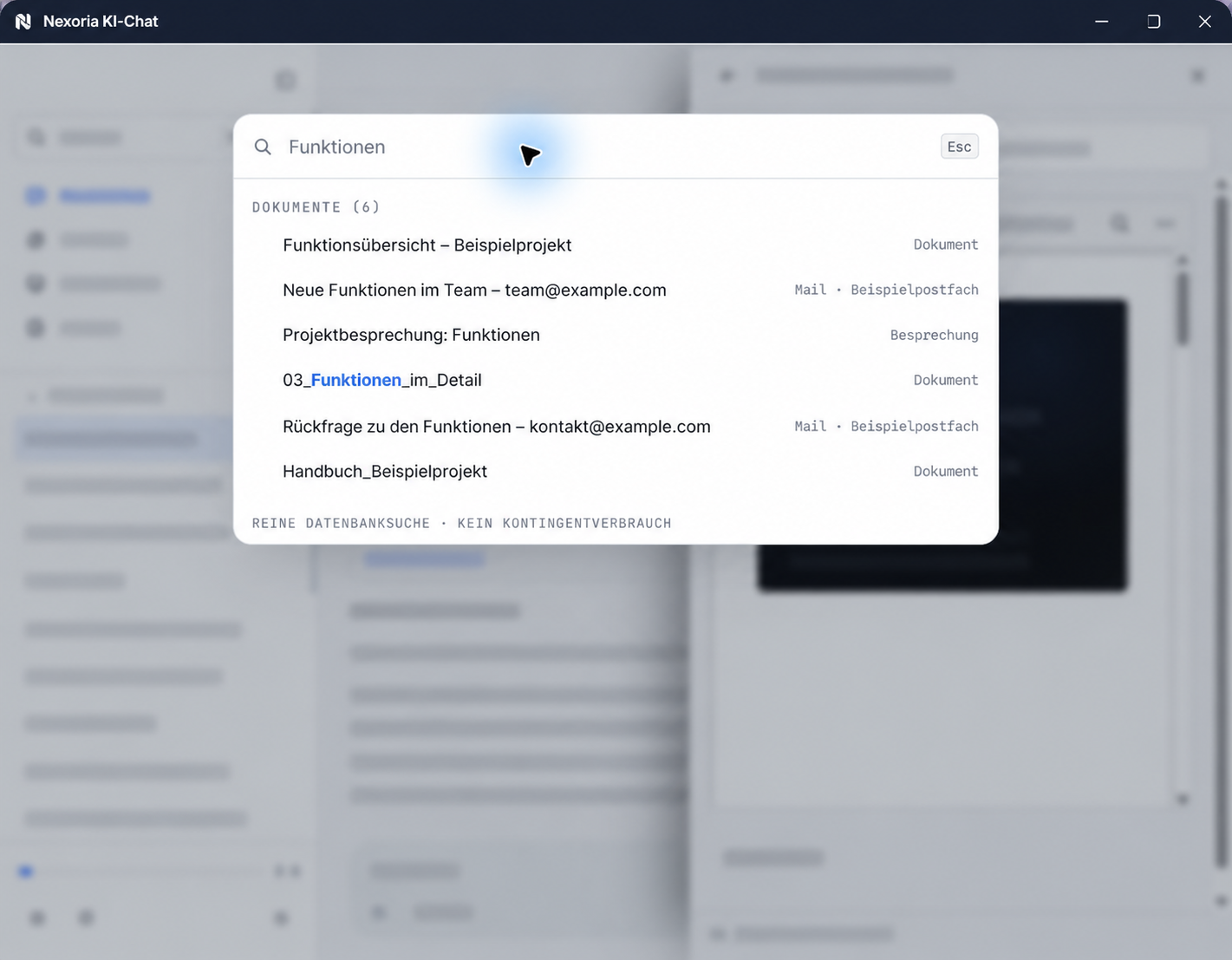
Document search in Nex: results from documents, emails and meetings. Sample content anonymised for publication.
In brief: which enterprise search solution is right for you?
At Nexoria, document search is the platform's enterprise search. It searches your own knowledge store in Nexoria Drive and cites the source for every result.
Enterprise search in three sentences
Enterprise search refers to searching an organisation's body of information, as opposed to searching the open web. This body of information is closed and heterogeneous, from text documents and spreadsheets to scans and recordings, and not every person is allowed to see every document. An enterprise search solution must therefore make different formats accessible and check permissions every time content is retrieved.
The glossary explains its origins, structure and permission checks in detail: What is enterprise search?
What types of enterprise search solutions are there?
There are four ways to search your own content. They differ less in their search method than in where the content stays and who is responsible for integration, updates and permission checks. The add-on layer, integrated platform and in-house build architectures are also described in the glossary entry AI knowledge management. The products named are examples based on vendor information (retrieved 24 September 2026), not a ranking and not a recommendation.
Staying with the existing search
The file storage or platform where your documents are kept comes with a built-in search. According to Microsoft, Microsoft Search, for example, searches content from Microsoft 365, such as SharePoint, as well as external content indexed via connectors. The results depend on existing access permissions. First check which of your sources and search tasks the solution you already use covers.
A search system alongside the sources: the add-on layer
A standalone search system connects the existing sources via connectors and makes them findable in a single search; the files remain in their systems. IntraFind describes iFinder as permission-based search across data sources such as file shares, intranets, wikis and email systems. INTERGATOR lists DMS, databases, specialist applications, file servers, wikis and emails, among others, as connected systems. searchit describes full-text search across many connectors, including in scans and images. With this approach, check the integration of each individual source, how access permissions are taken over, how the index is updated and where processing takes place.
A search tool for the file server
Tools that search network drives and file servers where they are located are a variant of the add-on layer. JAM Software describes UltraSearch as a file search that searches locally or on a company's network drive by file name or content and can be extended with a central search index. According to the vendor, Lookeen Server finds documents and emails on the corporate network, taking Active Directory permissions into account. Clarify two questions before choosing: How large is the data volume, and should the search cover file names only, or full text as well?
If the content is to be moved into a platform, the product page describes this approach: Make file server content searchable with document search
Building it yourself: the in-house build
Search libraries and search platforms are available as building blocks. By its own account, the Apache Lucene project develops open-source search software; Apache Solr describes itself as an open-source search platform based on Lucene, OpenSearch as an open-source search and analytics suite under the Apache 2.0 licence, and Elastic describes Elasticsearch as a distributed search and analytics engine. For AI answers, you add a language model to the search; for semantic vector search, an embedding model and a suitable vector index are also needed. The building blocks can be assembled and operated to suit your own content. This gives you full control over every building block; operation, updates and permission checks are then handled in-house. How self-hosting, hosting and choosing a platform differ is shown in the Nextcloud comparison.
Storage and search in one platform: the integrated platform
With an integrated platform, storage, index, search and assistant come from one provider with uniform permission checks. Search is based on the content held in the platform; when you switch, you map content and access permissions accordingly. Nexoria belongs to this architecture: your own knowledge store in Nexoria Drive is the basis for search. More on this in the section Where Nexoria fits in this selection.
The decision rarely comes down to the range of features, but to three questions: Does the content have to move or not? Where may it be processed? And who holds the access permissions when an AI answers?
Enterprise search, document management or wiki: which does what?
A document management system (DMS) can search too, and an enterprise search can connect a DMS as a source. The difference lies in the focus: a DMS manages documents from capture through distribution to archiving, a wiki is used to create, organise and share knowledge together, and an enterprise search makes existing content findable by content across sources. The table matches typical tasks to tools; many companies combine two of these tools.
| Task | Typical tool | How you handle the task in Nexoria |
|---|---|---|
| Capture documents and make scans readable | DMS; enterprise search with text recognition | Text recognition for PDF, JPG, PNG, BMP and WebP and transcription for MP3, WAV, M4A and OGG feed the content into the same index. |
| Store and organise documents centrally | DMS, file server, cloud storage | Nexoria Drive is the platform's cloud storage and appears as a drive in File Explorer on Windows; shared content is indexed. |
| Find by content, with source | Enterprise search; search in the DMS | Document search, the platform's enterprise search, finds content by its meaning and cites the source for every result, without consuming AI tokens. |
| Get questions answered from the content | AI assistant on top of the content; some enterprise search solutions include one | Nex answers with source citations, within the permissions of the person asking. |
| Control access | each of these tools with its own permissions model | Workspaces determine which people and which chatbots see which content; the same sharing settings apply to document search, Nex and chatbots. |
| Write and maintain knowledge editorially | Wiki | You edit texts, spreadsheets and presentations in Nexoria Office with Doc, Calc and Slides; you create documents, reports and presentations directly in the Nex AI chat. A wiki and Nexoria can be combined. |
| Connect an existing DMS as a source | Enterprise search with a connector | On request, we look into connecting further storage and your own systems, depending on the environment and permissions. |
The description of the tools follows the Gabler Wirtschaftslexikon (entries on document management and document management systems) and information from Atlassian, IntraFind, INTERGATOR and Microsoft (retrieved 24 September 2026); the references are listed under Sources.
Which type of knowledge management tool suits your documents overall is shown in the guide Choosing knowledge management software. For a detailed comparison of how a wiki and Nexoria differ, see the pages Confluence alternative and Notion alternative.
Criteria for choosing your enterprise search
Four criteria are particularly important for an enterprise search. Before comparing, define a workflow and the sources you need, and test every solution with the same questions.
| Criterion | Specific check | How Nexoria fits in |
|---|---|---|
| Integrations | For each source, record which content is taken over and which remains in the original system; clarify how permissions and changes arrive from each source. | The basis is the shared content in Nexoria Drive. SharePoint, OneDrive and Google Drive can be connected as knowledge sources on request, depending on the environment and permissions; scope, updates and permissions are defined for each integration. |
| Timing of the permission check | Ask the same question with one authorised and one unauthorised test account, including after sharing has been revoked; ask whether the system checks permissions already in the search step or only filters results afterwards. | Workspaces determine the searchable content. Workspace sharing settings define the body of knowledge for document search, Nex and assigned chatbots. |
| Index updates | Change and delete a test file and log the time at which results and answer sources show the new state. | Supported, shared content in Nexoria Drive is indexed without a separate upload. You measure the timing in the pilot. |
| Natural-language search with evidence | Test a rephrased question and an exact identifier such as a file reference; for each result, check whether the source is cited and supports the statement. | Document search is available in the AI chat with Nex and in a dedicated search window, and cites the source for every result. |
A connector name alone does not answer these questions. According to Elastic's connector documentation, connectors create searchable, read-only copies of the data, and according to its security notes, document-level permissions are only available for some of the connectors. Microsoft explains how permissions from sources outside Microsoft Entra are mapped via external groups . Both sets of documentation (retrieved 24 September 2026) refer to the systems of these providers and serve here as general examples. Why the timing of the permission check is so important is explained in the glossary under Permission checks in enterprise search.
Check the location and scope of sources, the operating model, export and switching, and costs using the selection criteria for knowledge management software.
How to test an enterprise search in a pilot
A pilot with your own documents shows whether a solution meets the four criteria in your workflow. For search, four checkpoints matter:
- Integration for each source: Bring in a shared sample collection from each planned source, including typical spreadsheets and difficult scans, and check the extracted content rather than just the file extension.
- Changes and deletion: Change and delete a test file and record when the old version disappears from results and answer sources.
- Revoking permissions: Ask the same question with two test accounts, before and after sharing has been revoked, and note the time of the observation.
- Results with sources: For each result, open the cited source and check whether it supports the statement found.
Test questions, assessment of answers and sign-off are described in the pilot guide with 20 test cases. You record your results in the test log with 20 test cases . For how to carry out these checks in Nexoria, see the document search test tasks.
From search result to usable outcome
Choose a question that your team has to answer in day-to-day work and record the expected valid source. Then check whether the passage found shows the required content in the correct version and whether the authorised person can continue working with it. For an additional storage location, clarify its integration and sharing in advance. The existing pilot template helps you record this use case and its repetition on your own content.
Where Nexoria fits in this selection
This guide is from Nexoria Systems, a provider in this selection. The criteria and checkpoints apply to every solution, including Nexoria.
Nexoria is a European work platform and one of the integrated platforms: storage and search are in one platform. The core consists of your own knowledge store with Nexoria Drive, document search (enterprise search) and the AI assistant Nex:
- Nexoria Drive is the platform's cloud storage. On Windows, Nexoria Drive appears as a drive in File Explorer; shared content is indexed and forms your own knowledge store.
- The Document search is the platform's enterprise search. It finds content by its meaning, cites the source for every result and is available in the AI chat with Nex and in a dedicated search window. It does not consume AI tokens and remains usable when the token allowance has been used up.
- Nex, the AI assistant, answers questions based on the shared content, with source citations and within the permissions of the person asking.
Built on top of this are: Nexoria Office with Doc, Calc and Slides, documents in Nex, Workspaces and permissions, Text recognition (OCR) and transcription, tasks, chatbots and configurable automations. Nexoria Mail, Nexoria Meet and the VoiceBot optionally complement the platform; the VoiceBot requires a Nexoria subscription. For an overview of all components, see the page Platform.
For details of what search can do, see Document search features.
Explore document search with a concrete search scenario
Example of a joint demo: a shared proposal PDF is the starting point. You follow the same content from the search query to the answer with its source:
- Proposal as the basis: The proposal PDF is in the shared body of knowledge.
- Find the delivery time: You search for the agreed delivery time and see the matching result.
- Open the source: You open the corresponding proposal and read the agreement in context.
- Ask Nex: You ask Nex the question “What delivery time is agreed in this proposal?” and check the source for the answer.
Nexoria Base costs €29 per user per month plus VAT and includes Nexoria Drive, document search and Nex. Setup is quoted individually according to the work required. You can find plans and allowances under Pricing.
Integrations with your systems
SharePoint, OneDrive and Google Drive can be connected as knowledge sources on request. We set up the integration depending on your environment and permissions. On request, we also check integrations with further storage, CRM, ERP and own systems. Scope, updates and permissions are defined for each integration.
With the optional add-ons, you can selectively add relevant attachments to your company knowledge via Nexoria Mail and store transcripts and summaries from Nexoria Meet in the shared workspace. For details of all integrations, see the page Integrations with your systems.
What should be settled before rollout
- Location of content: Search covers supported content that is stored in Nexoria Drive or made accessible through a configured integration and that is shared with a workspace.
- Permission structure: Decide which teams and projects get their own workspaces, because visibility in search depends on this.
- Scans and recordings: Scans and images go through text recognition, and recordings through transcription, before their content appears in the index.
- Setup: It is charged individually according to the work involved, depending on the amount of data to be indexed.
You will find plans, storage allowances and terms under Pricing.
Your data and the right AI integrations
For a search across the entire document collection, the processing location is not a side issue. For each provider, distinguish between two steps: the search itself and the formulation of an answer.
At Nexoria, files and the knowledge index are stored on servers in Germany, and search runs there too. Document embeddings and semantic search run on servers in Germany, using models that Nexoria operates there itself. Text recognition and transcription make content from scans and recordings usable for search. Nex's answers are generated by Mistral AI by default.
ChatGPT (OpenAI), Claude (Anthropic), Gemini (Google) and Langdock can optionally be connected to Nexoria; Nexoria also works without these integrations. With an integration, shared content is transferred to the respective provider, and that provider's terms, processing locations and settings apply. Technical error monitoring and enabled add-on services such as Nexoria Mail, Nexoria Meet or the VoiceBot also have their own data flows; the service providers involved are listed in the processing register.
For a step-by-step view of the search data flow, see Document search data flow in detail. For processing locations and safeguards for each component, see Security and privacy. Questions from your evaluation are answered in the Evaluator FAQ.
Search by meaning and answers with sources, briefly explained
A full-text search matches the query against the words in the index. How it finds file references, numbers and proper names depends on factors such as indexing and search syntax; therefore test typical identifiers from your own content. A semantic search compares meanings and also finds sections that are worded differently; the two methods can be combined. If a formulated answer with a source is generated from the results, it is based on the RAG method (Retrieval Augmented Generation), which Lewis and others described in 2020: a search step retrieves relevant sections, and a language model formulates the answer from them. The methods are explained in detail in the glossary entries semantic document search and RAG.
Frequently asked questions about choosing enterprise search solutions
Which sources can an enterprise search solution connect?
That depends on the type of system and the available integrations. A search system alongside the sources connects, for example, file shares, intranets, wikis, email systems or a DMS via connectors; an integrated platform mainly searches the content stored in it. For each source, check which content is taken over, how permissions arrive and how changes are kept in sync; a connector name alone does not prove this. At Nexoria, the shared content in Nexoria Drive is the basis; SharePoint, OneDrive and Google Drive can be connected as knowledge sources on request, depending on the environment and permissions.
Cloud or self-hosted: what suits your enterprise search?
The operating model is a selection criterion in its own right. An in-house build or a self-operated search system moves operation, updates and permission checks in-house; with a service operated by the provider, operation lies with the provider. What self-hosting means in detail is shown in the Nextcloud comparison. At Nexoria, files, the knowledge index and search are hosted on servers in Germany; Nex's answers are generated by Mistral AI by default.
Do I need a DMS or an enterprise search?
That depends on the task. If archiving documents or distributing them in business processes is the focus, a DMS is the right choice; if existing content is to be made findable by content across sources, an enterprise search is the right fit. The two can be combined, because an enterprise search can connect a DMS as a source. The individual tasks are set out in the section Enterprise search, DMS or wiki: which does what? .
What costs are involved in enterprise search solutions?
Compare the cost components separately and for the same scope of use: licence or subscription, setup, storage, AI usage and your own effort for operation and maintenance. The selection criteria for knowledge management software help with the comparison. At Nexoria, document search does not consume AI tokens, and setup is charged individually according to the work involved, depending on the volume of data to be indexed. Plans and allowances are listed under Pricing.
Which solution suits which company size?
What matters is less the number of employees than the size and distribution of the content and the search task. If a few well-maintained documents are kept in one place, the existing search may be enough; if many documents are spread across several sources, it is worth testing an enterprise search with your own content. Which type of tool suits your documents is shown in the guide Choosing knowledge management software.
What content does Nexoria's document search cover?
Document search covers supported content that is stored in Nexoria Drive or made accessible through a configured integration and that is shared with a workspace. Recordings in MP3, WAV, M4A and OGG are transcribed, and scans and images in PDF, JPG, PNG, BMP and WebP are made accessible through text recognition; the results go into the same index. With the optional add-ons, you can selectively add relevant attachments to your company knowledge via Nexoria Mail and store transcripts and summaries from Nexoria Meet in the shared workspace.
Where does Nexoria's search run technically?
Files and the knowledge index are stored on servers in Germany, and search runs there too. Document embeddings and semantic search run with models that Nexoria operates there itself. Nex's answers are generated by Mistral AI by default. Document search itself does not consume AI tokens and remains available when the allowance for AI chat has been used up.
Does search give employees content they are not allowed to see?
Visibility depends on the workspace: workspaces determine which people and which chatbots see which content. Workspace sharing settings define the body of knowledge for document search, Nex and assigned chatbots. In the pilot, use one authorised and one unauthorised test account to check the result heading, preview, cited passages and the answer in Nex already before a source document is opened. Repeat the same use case after sharing has been revoked. Use controlled test content for this.
How do I check the quality of the results?
Check the results with typical questions from your own document collection. Define the expected source and the valid document version in advance; add a question with no documented answer and an access attempt with an unauthorised test account. The test log with 20 test cases helps you record the actual result and any deviations.
Sources
The sources describe tool types, products and methods from the perspective of their respective publishers. Third-party information may change. All sources retrieved on 24 September 2026.
- Document management and Document management system (Gabler Wirtschaftslexikon; authors Prof. Dr. Richard Lackes and Dr. Markus Siepermann, Technische Universität Dortmund). Tasks of document management and functions of a DMS.
- Overview of Microsoft Search (Microsoft). Built-in search in Microsoft 365, results only with existing access.
- iFinder (IntraFind). Permission-based search across file shares, intranets, wikis and email systems.
- INTERGATOR (INTERGATOR). Connected systems such as DMS, databases, specialist applications, file servers, wikis and emails.
- searchit (searchit). Full-text search via connectors, including in scans and images.
- UltraSearch (JAM Software). File search locally and on network drives by file name or content, extendable with a central search index.
- Lookeen Server (Lookeen). Search across the corporate network, taking Active Directory permissions into account.
- Apache Lucene and Apache Solr (Apache Software Foundation). Open-source search software and search platform.
- OpenSearch (OpenSearch Project). Open-source search and analytics suite under the Apache 2.0 licence.
- Elasticsearch (Elastic). Distributed search and analytics engine.
- Content connectors and Connectors security (Elastic). Searchable, read-only copies; document-level permissions for some of the connectors.
- Use external groups to manage permissions (Microsoft). Mapping permissions from sources outside Microsoft Entra.
- Knowledge management with Confluence and Confluence permissions structure (Atlassian). Wiki for creating, organising and sharing information; its own permissions model.
- Lewis et al., Retrieval-Augmented Generation for Knowledge-Intensive NLP Tasks (NeurIPS 2020). First description of the RAG method.
Your next step
First, see in a demo how Nexoria finds information and shows the source for the answer. Afterwards, we plan the pilot together, using your own documents and suitable test accounts.
More help for your evaluation: Evaluator FAQ · Pricing
Nexoria in action
See how companies use Nexoria in our Customer stories. CSA Group describes its use of company knowledge, interfaces and individually implemented email automation in the customer story. New Fire reports on a chatbot and an individually developed maturity assessment platform. For your team, in a demo, we discuss which components suit your tasks.