





The Nexoria platform
Nexoria: your company knowledge in one place, with AI and Office
Store files, find knowledge and keep working together. Cloud, AI and Office connect your everyday work in one platform.
Discover the componentsOne shared body of content.
Drive provides file storage. Shared content is made accessible for search and Nex.
Reuse knowledge.
Answers with sources, new documents and Office files in the same working context.
Permissions as the foundation.
Workspaces determine which content is accessible to which people and bots.
Files · Search · Nex
From storing to understanding.
Your knowledge does not stay stuck in individual folders. The platform connects the file with the question your team is currently working on.
- Store files in Nexoria Drive.
- Index shared content and search it semantically.
- Nex answers based on the accessible content.
- 01Store file
- 02Index content
- 03Check permissions
- 04Answer with sources
Doc · Calc · Slides
Continue working with the result.
A piece of information you find becomes the next draft, an analysis or a presentation.
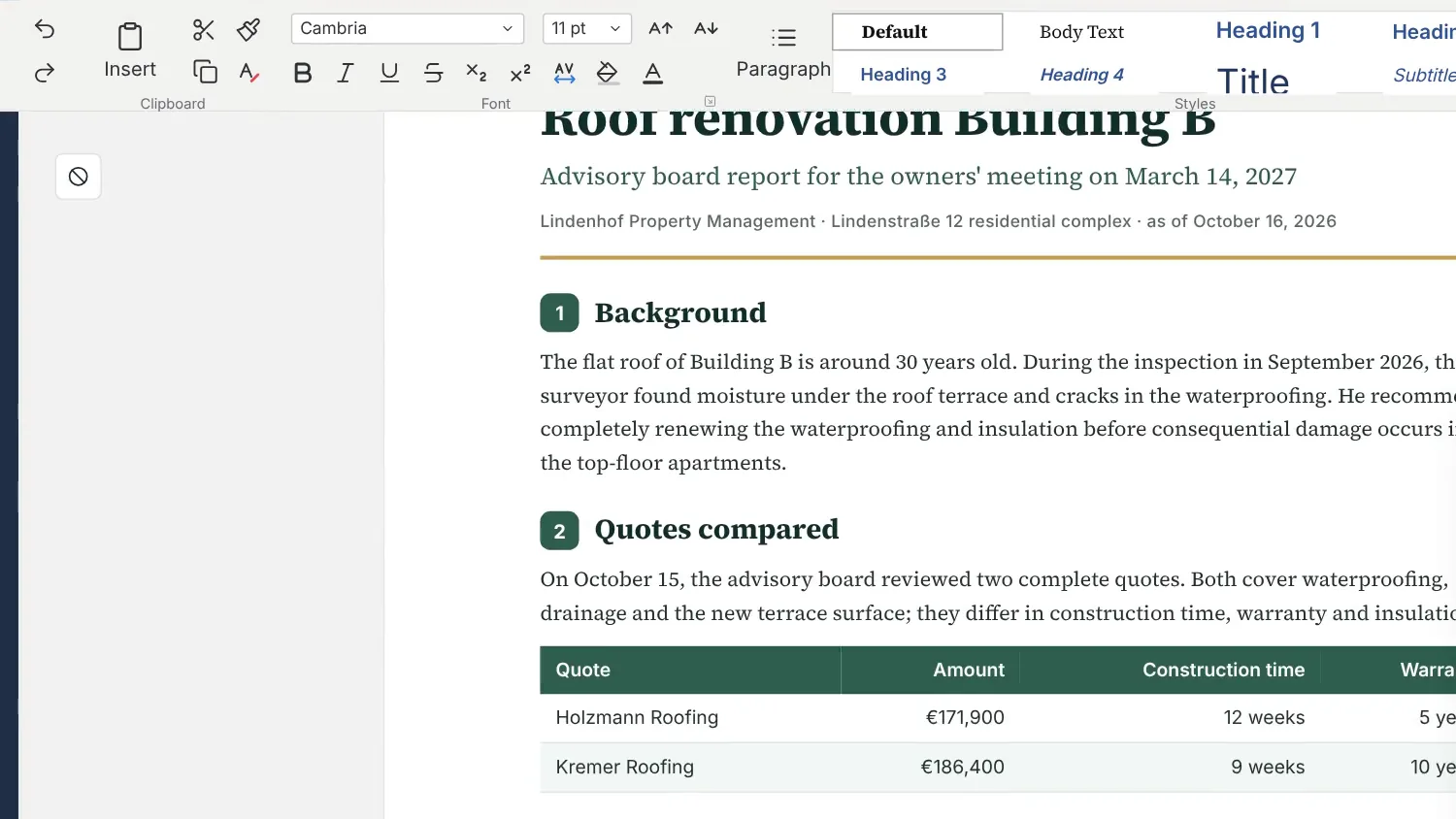
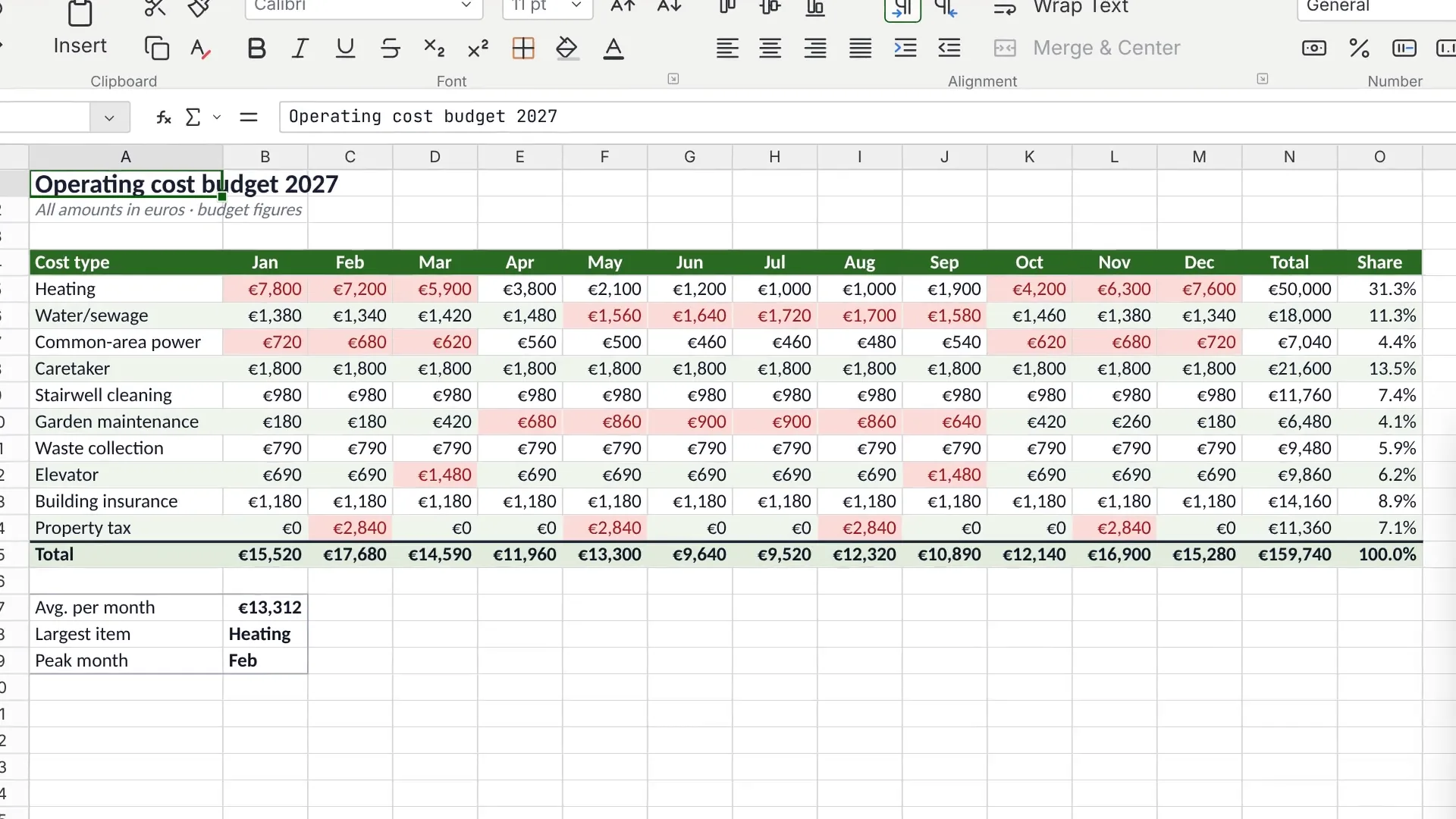
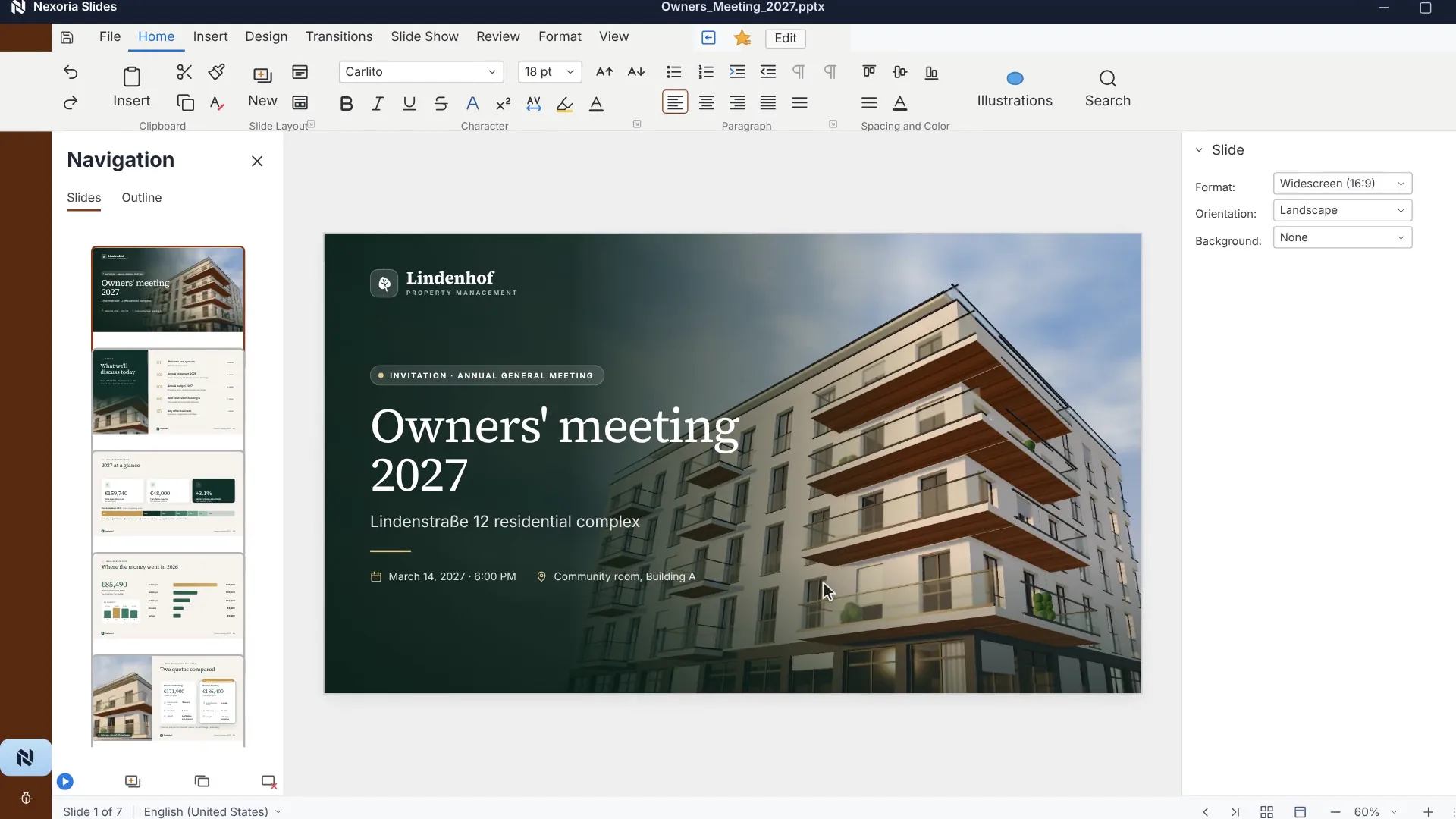
- Edit text in Doc, spreadsheets in Calc and presentations in Slides.
- Use Nex in the sidebar for assistance.
- Edit files together and save them in Drive.
Components · Add-ons
As much platform as your daily work needs.
Knowledge spaces, customer contact and collaboration complement the shared content.
- Workspaces bring together content, members and access permissions.
- Chatbots make shared knowledge available on your website.
- See where Mail, Meet and VoiceBot fit in as optional add-ons.
The Nexoria platform in detail
The platform in detail.
Nexoria is a European platform for your company knowledge. Its core consists of three components: files are stored in Nexoria Drive, their content is indexed, and you query this knowledge in natural language through document search and the Nex AI assistant, with source citations. Built on this are the Office apps Doc, Calc and Slides, which edit the same files, plus workspaces, chatbots and automations. Eleven components belong to the platform, eight of them to the core product.
Canonical definition
Nexoria is a European work platform: its own knowledge store with Nexoria Drive, document search (enterprise search), the AI assistant Nex with document creation in the chat, and Nexoria Office with Doc, Calc and Slides. Nexoria Mail, Nexoria Meet and VoiceBot are optional.
Definition
Definition and context
Two names, two levels: Nexoria Systems is the company, registered as Nexoria Systems UG (haftungsbeschränkt) with its registered office in Kelkheim im Taunus. Nexoria is the platform operated by this company. All eleven components on this page belong to Nexoria and are operated by Nexoria Systems.
The main category is: European work platform with knowledge store, document search (enterprise search) and the AI assistant Nex. This places Nexoria between four categories that are usually purchased separately: cloud storage, Enterprise Search, AI knowledge management and office suite. It is precisely this separation that causes most of the friction this page describes.
The interface employees work in is Nex. The main interface is the Nex AI chat. Document search is also available as a separate search window outside the chat.
Problem
What problem the platform solves
In most companies, knowledge is not kept in one place, but in a file store, an inbox, meeting minutes and a contracts folder. Each of these tools only knows its own content. Anyone looking for an answer therefore has to know beforehand where it is.
A second problem arises as soon as AI is added. A general AI chat does not know the company. It becomes useful when someone finds the right documents and attaches them for it, in other words doing exactly the work the AI chat was supposed to take off their hands. Anyone who takes this route regularly also moves company documents, file by file, into an external environment.
Nexoria starts with storage rather than with chat. The storage itself becomes the source of knowledge, and search, AI and Office access the same content.
How it works
How the platform works
Step 1
Store
Files go into Nexoria Drive. On Windows computers, the storage appears as a drive in File Explorer, and the familiar way of working with folders, renaming and moving stays the same.
Step 2
Index
Shared content is indexed. The platform computes the embeddings required for this locally on its own servers in Germany, and the files do not leave the environment to do so.
Step 3
Find
Document search works on this index. It searches by meaning rather than by character strings and names the source document for each result. It is available in the AI chat and in a dedicated search window.
Step 4
Process further
Nex answers questions on the same basis, summarises, creates documents, presentations and reports directly in the AI chat and triggers automations. Doc, Calc and Slides continue working on the files directly.
Workspaces sit above everything. They define which people and which chatbots may see which content. These permissions apply equally to search, Nex and chatbots. They are therefore not a setting alongside Nex, but the boundary within which Nex answers.
Entity hierarchy
The components: core and extensions
Nexoria Systems is the company, Nexoria the platform. All eleven components belong to Nexoria. The core consists of Nexoria Drive, document search and Nex. Eight components are part of the core product, three are booked in addition. The table lists the official name, the category and the one-sentence definition for each component. Each name links to the corresponding page.
| Component | Category | What it is |
|---|---|---|
| Nexoria OfficeApps: Doc, Calc, Slides | Office apps | Nexoria Office is the platform's office suite and comprises the standalone apps Doc, Calc and Slides for text documents, spreadsheets and presentations. |
| Nexoria Drive | Nexoria core product | Nexoria Drive is the platform's cloud storage and also the source of company knowledge; shared content is indexed. |
| Nex | Nexoria core product | Nex is the AI assistant and main interface of Nexoria; it works with the shared company knowledge of the respective workspace and creates documents, presentations and reports directly in the chat. |
| Document search | Nexoria core product | Document search looks through the content of a workspace semantically, in the AI chat and in a dedicated search window, and cites the source for every result. |
| Workspaces and databases | Nexoria core product | Workspaces determine which people and which chatbots may see which content; databases structure the knowledge within them. |
| Chatbots | Nexoria core product | Chatbots answer visitor questions on the company's own website using the knowledge of the workspace assigned to them. |
| Automations | Processing | Automations use company knowledge as context for recurring workflows and connect the platform to external software. |
| Speech and text recognition | Processing | Transcription and text recognition make audio, scans and images searchable and usable as company knowledge. |
| Nexoria Mail | Add-ons | Nexoria Mail connects inboxes to Nex via SMTP and IMAP and automates email workflows; relevant threads extend company knowledge. |
| Nexoria Meet | Add-ons | Nexoria Meet handles video conferences and calls with live transcription; the minutes go into the knowledge base and can be queried with AI. |
| Nexoria VoiceBot | Add-ons | The Nexoria VoiceBot answers calls, responds to questions, books appointments and creates tasks. |
In the core product, 8 components
Nexoria Office, Nexoria Drive, Nex, document search, workspaces and databases, chatbots, automations, speech and text recognition.
Bookable as add-ons, 3 components
Nexoria Mail and Nexoria Meet form a single combined add-on. The Nexoria VoiceBot is booked per bot and is never activated automatically. A Nexoria subscription is required to book the VoiceBot. Customers on Nexoria Pro receive a 10 per cent discount on all VoiceBots.
Requirements
Requirements
- Nexoria is aimed at businesses. The offer applies to business customers within the meaning of Section 14 of the German Civil Code (BGB), and all prices are net prices.
- The platform runs on the web. Nexoria Drive also integrates into Windows File Explorer as a drive, which requires the Drive app.
- One user corresponds to one device. The same user cannot be used on several devices at the same time.
- The smallest bookable quantity is one user on the Base plan; the Pro plan includes five users.
- The scope of setup depends on how much data is to be indexed. Setup is charged individually according to the effort involved.
What the plans include and what add-ons cost is set out on the pricing page. Once the token allowance is used up, tokens can be topped up automatically or manually. Without a top-up, new AI requests are paused. Document search continues to work and does not consume any tokens.
Processing
Data protection and infrastructure
The following details apply to the entire platform. Each row names the place where it can be read in detail.
| Subject | Detail | Source |
|---|---|---|
| Files, index and search | Files, the knowledge index and semantic search run on dedicated servers in Germany. The website and dashboard are also hosted in Germany. | Security and privacy checked on |
| Embeddings | Document embeddings and semantic search run on servers in Germany, using models that Nexoria operates there itself. | Security and privacy checked on |
| Answer generation | Answer generation by Nex uses Mistral AI by default. | Security and privacy checked on |
| Use for training | The processing of inputs is governed by the terms and settings of the AI service used in each case. | Nexoria at a glance checked on |
| Optional external AI models | ChatGPT (OpenAI), Claude (Anthropic), Gemini (Google) and Langdock can optionally be connected to Nexoria. Nexoria also works without these integrations. When connected, shared content is transferred to the respective provider. That provider's terms, processing locations and settings apply. | Interfaces and actions checked on |
| Tenant separation | Strict data isolation per tenant at database and vector store level, a role model with Admin, Member and Viewer, server-side permission checks on every API endpoint. | processing register checked on |
| Encryption | TLS 1.3 for all connections, WireGuard VPN between servers, AES-256 for OAuth tokens, daily encrypted backups with AES-256. | processing register checked on |
| Service providers used | Eight subprocessors, all named in the processing register under Art. 30: Netcup, Hetzner, Stripe Payments Europe, Mistral AI, Telnyx, Functional Software (Sentry), Microsoft Corp. and Google LLC. The figure of eight reflects the status as of 23 August 2026; it changes, and the register remains authoritative. | processing register checked on |
| Involvement of US legal entities | Files, the knowledge index and semantic search run on dedicated servers in Germany. Answer generation by Nex uses Mistral AI. Other services and enabled integrations involve additional providers: error monitoring via Sentry, based in the USA, without access to document contents, payment processing via Stripe, and Microsoft Graph and Gmail when the email integration is enabled. For the optional VoiceBot, telephony is provided via Telnyx (headquarters USA, EU branch Ireland). Speech recognition and speech output are handled by Voxtral from Mistral AI. Mistral Large is integrated via Telnyx. The components and providers involved are listed under Security and privacy and in the processing register. | processing register checked on |
| Security documentation | Technical and organisational measures and information on data processing are documented in our security overview. | Security and privacy checked on |
Citations of laws and standards document the content of the respective provision, not Nexoria's compliance with it. Statements about our own architecture, operating processes and availability targets are our own statements and have not yet been externally audited.
Features
Specific features
The following list sets out what the platform does in its components, first the core of Nexoria Drive, document search and Nex, then the extensions. The details are on the linked product pages.
- Nexoria Drive: Storage in Windows File Explorer, synchronisation, versioning, offline availability, indexing of shared content. Go to the product page
- Document search: semantic search across the workspace, hybrid retrieval combining keyword and meaning-based search, source citation for each result, document preview with tables and images. Go to the product page
- Nex: Answers from shared company knowledge with source references, summaries, tasks and appointments, web research on request. Go to the product page
- Documents and presentations in the Nex AI chat: Presentations as .pptx, reports as PDF and document comparisons, each with source references, created directly in the AI chat. Go to the page
- Nexoria Office: Doc for text, Calc for spreadsheets, Slides for presentations, with support for .docx, .xlsx and .pptx files and real-time collaboration. Check layouts, formatting, formulas and macros with your own sample files. Notes on switching from Microsoft 365.
- Workspaces and databases: separate knowledge spaces with Admin, Member and Viewer roles, also across companies as a Collab workspace.
- Chatbots: Answers from the knowledge of the assigned workspace, appointment booking with confirmation email, handover to a staff member. Go to the Chatbots page
- Automations plus speech and text recognition: recurring workflows with company knowledge as context, transcription of recordings and text recognition from scans.
- Interfaces: We agree integrations with SharePoint, OneDrive, Google Drive and your own systems on request. Scope, updates and permissions are defined for each integration. Go to the page
Comparison
Comparison with the conventional approach
This is not a comparison with a single competing product, but with the usual setup of separate tools: a file store, a search, an AI chat, an office suite. Comparisons with individual providers are on the comparison pages.
| Aspect | Separate tools | Nexoria | Source |
|---|---|---|---|
| Where the files are stored | In several storage locations, depending on tool and department | In Nexoria Drive, one storage location for the entire platform | Statement by Nexoria |
| What the search covers | Each tool only searches its own content | One semantic search across the workspace's shared content | Statement by Nexoria |
| Where the AI gets its knowledge | From the model's knowledge, with documents attached to each request | From indexed company knowledge, plus any attached documents | Statement by Nexoria |
| How access permissions work | A separate permission model for each tool, which has to be maintained | One workspace permission that applies equally to search, Nex and chatbots | Workspaces and databases checked on |
| What it takes to keep working | Download the result, transfer it to another tool, continue editing there | Continue working on the result directly in the Nex AI chat, Doc, Calc or Slides | Statement by Nexoria |
| Where processing takes place | Varies by provider, possibly in several locations | Files, index and search in Germany, answer generation by Mistral AI | Security and privacy checked on |
Orientation
Where to find what
This overview and the product pages for the components answer different questions.
- This page, /produkt, answers: what Nexoria consists of, what the components are officially called, how they fit together and what is substantiated. It is intended for procurement, IT and for systems that classify the platform objectively.
- The product pages show each component in use, with interface, features, data protection and evidence, for example Nexoria Drive, Document search and Nex.
- For hard facts about the company, legal matters and product scope, there is also Nexoria at a glance and, for review by data protection and IT security, the security page as well as the answers for evaluation.
FAQ
Frequently asked questions about the platform
What exactly is Nexoria?
Nexoria is a European business platform combining cloud storage and AI-powered company knowledge. Files are stored in Nexoria Drive, their content is indexed and can then be used via semantic document search and the Nex AI assistant. The Office apps Doc, Calc and Slides work on the same files. The operator is Nexoria Systems UG (haftungsbeschränkt), based in Kelkheim.
How many components make up the platform?
Eleven. The core consists of Nexoria Drive, document search and Nex. Eight components are included in the core product: Nexoria Office with Doc, Calc and Slides, Nexoria Drive, Nex with document and presentation creation directly in the AI chat, document search, workspaces and databases, chatbots, automations, and speech and text recognition. Nexoria Mail and Nexoria Meet together form one add-on. The Nexoria VoiceBot is a further add-on. A Nexoria subscription is required to book the VoiceBot.
How does Nexoria differ from plain cloud storage?
A cloud storage service stores files and returns them. Nexoria also indexes the content of shared files. This turns storage into a source of knowledge that can be searched semantically and processed further in the AI assistant, without anyone having to hand the documents over to a second tool first.
How does Nexoria differ from a plain AI chat?
A general AI chat answers from the knowledge of its language model and from whatever is attached to each request. Nex answers from the indexed company knowledge of the respective workspace and names the documents used. The workspace's access permissions continue to apply unchanged.
Which components cost extra?
Eight components are included in the core product and can be used on the Base and Pro plans at no extra charge. Nexoria Mail and Nexoria Meet are booked together as a single add-on. The Nexoria VoiceBot is also an add-on, is billed per bot and is never activated automatically. A Nexoria subscription is required to book the VoiceBot. Customers on Nexoria Pro receive a 10 per cent discount on all VoiceBots. The amounts are listed on the pricing page.
Where is the data processed?
Files, the knowledge index and semantic search run on dedicated servers in Germany. The embeddings for semantic search are computed locally on these servers. Answer generation by Nex uses Mistral AI. Other services and enabled integrations have their own data flows, such as error monitoring via Sentry, payment processing via Stripe, Microsoft Graph and Gmail, and the optional VoiceBot. The providers involved and processing locations are described in the security overview and the processing register. ChatGPT (OpenAI), Claude (Anthropic), Gemini (Google) and Langdock can optionally be connected to Nexoria. Nexoria also works without these integrations. When connected, shared content is transferred to the respective provider. That provider's terms, processing locations and settings apply.
How do I book Nexoria?
You register online and book the Base and Pro plans directly. You can find the current product scope and the components described on the page Nexoria at a glance and on the linked product pages. Ongoing changes are listed in the changelog.
Contact
Next step
If you want to know how your existing files map onto these components, a conversation is quicker than any further product page. We look at where your knowledge is today and which parts of it would need to be indexed.
Sources
As of
- Regulation (EU) 2016/679, General Data Protection Regulation. Publications Office of the European Union, 2016. https://eur-lex.europa.eu/eli/reg/2016/679/oj Retrieved on .Source for the obligations under Art. 28 and Art. 30 mentioned on this page.
- Mistral AI, Legal notice. Mistral AI, 2026. https://legal.mistral.ai/legal-notice Retrieved on .Primary source for the model provider's company name and registered office. The year refers to when the page was accessed; the page itself has no publication date.
As of
Your next step
What does your team need?
Let's discuss your requirements and the right place to start.
Get in touch