




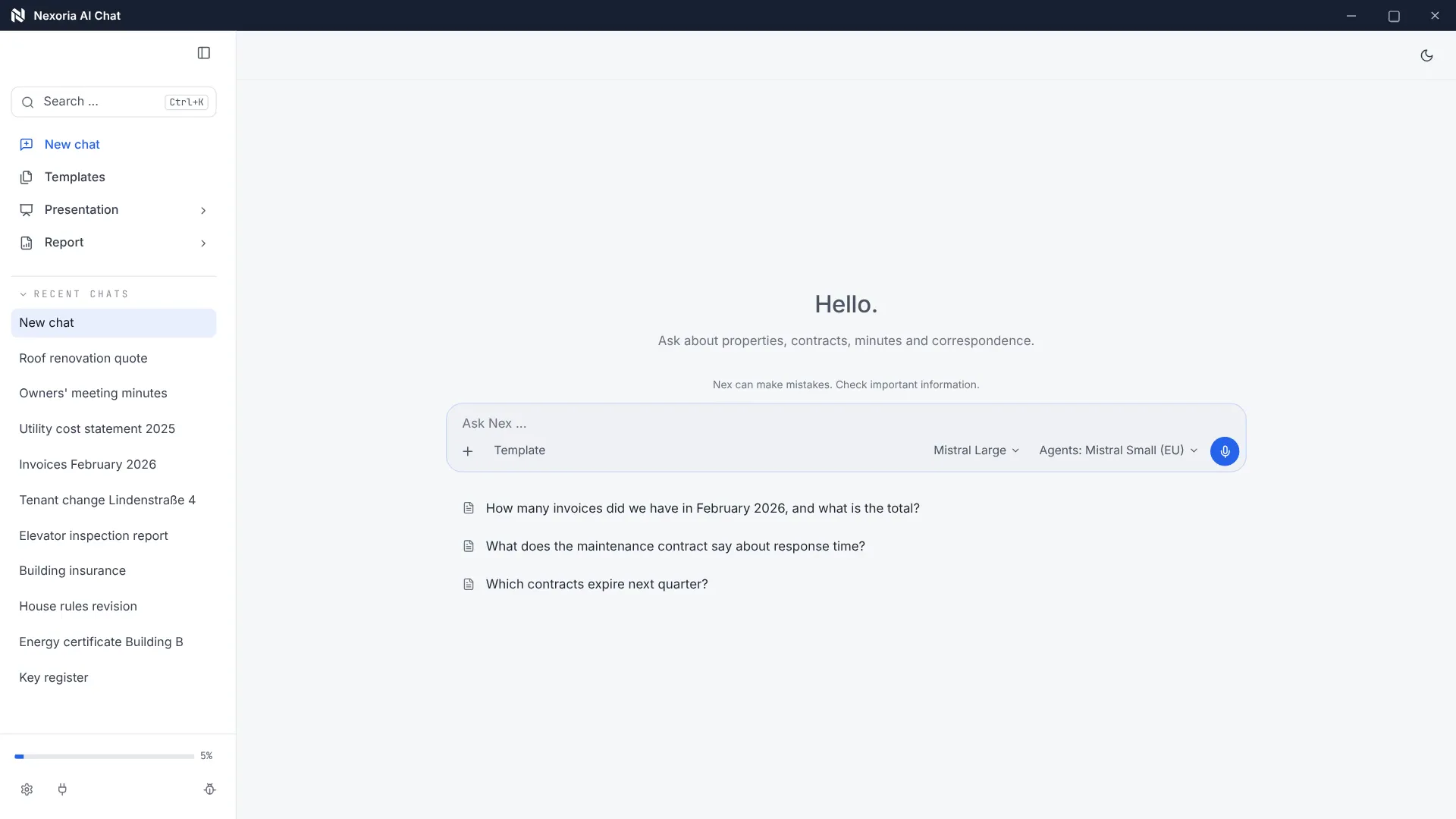
Nexoria
Get started

Automations: start workflows directly from the AI chat

Automations in Nexoria start in a conversation with Nex or through an event in the platform, such as a file upload or a chatbot enquiry. From this, the assistant creates tasks and appointments, sends team messages, transcribes audio and recognises text in scans. They are part of the core product, and the permissions of the respective workspace continue to apply unchanged.

Compared with Power Automate · Workflows The demo goes from the monthly instruction through Calc and Slides to filing and an illustrative email to the advisory board.

Automations in everyday work

Less routine. More work done.

From tasks to multi-step workflows: automations are set up to suit your systems and approvals.

Compared with Trello · Tasks

Create tasks and appointments

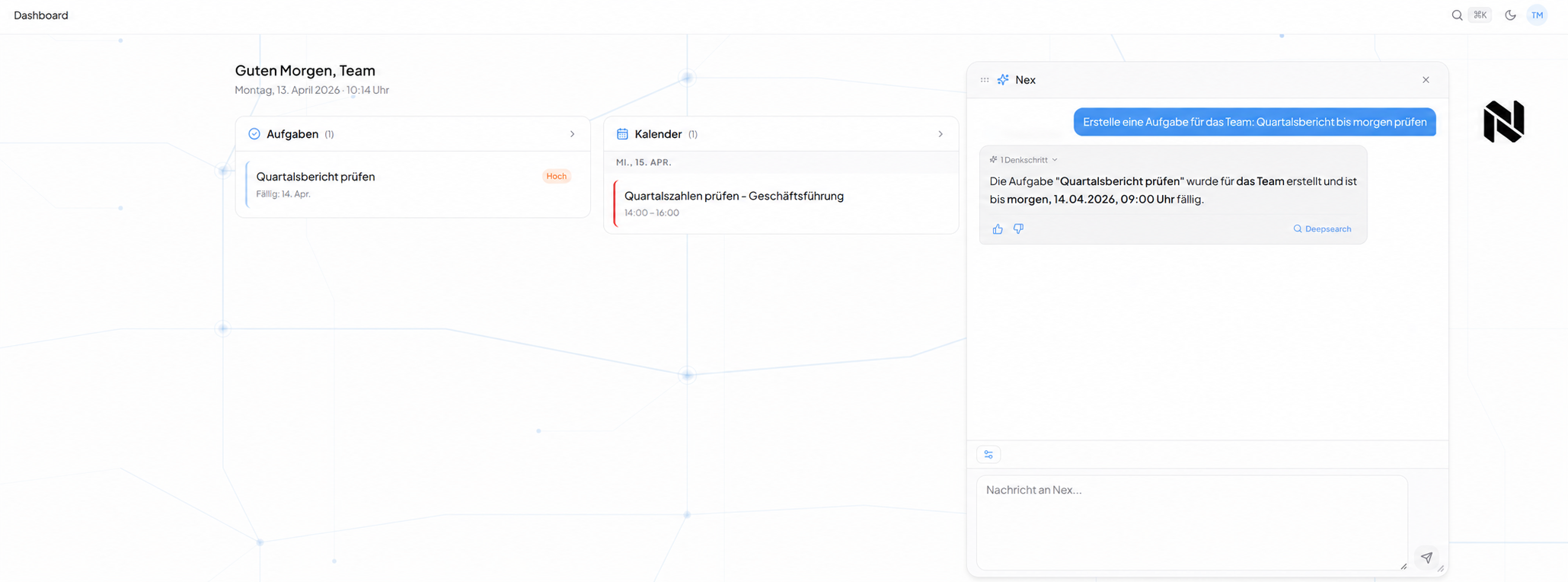
Tell Nex what needs to be done and when. This creates tasks and appointments in the platform.

Task view after an instruction in the Nex AI chat. Sample content anonymised for publication.

Watch video: Automations

INTEGRATE YOUR TOOLS

Email workflows & automation: what you can work with.

You connect inboxes via Nexoria Mail. External calendars, ERP and your own systems are connected on a project basis after the interface has been checked.

Nexoria Mail is an optional add-on. Email integrations are enabled selectively.

Custom integrations depend on the interface and permissions of your system.

WHAT THIS LOOKS LIKE DAY TO DAY

Turn an instruction into a task.

Nex recognises people, deadlines and priorities in natural language. Create tasks or appointments from the chat and assign them to a workspace.

  • Instruction
  • Person
  • Deadline
  • Task
Task view after an instruction in the Nex AI chat. Sample content anonymised for publication.
Task view after an instruction in the Nex AI chat. Sample content anonymised for publication.Enlarge view

This is Nexoria

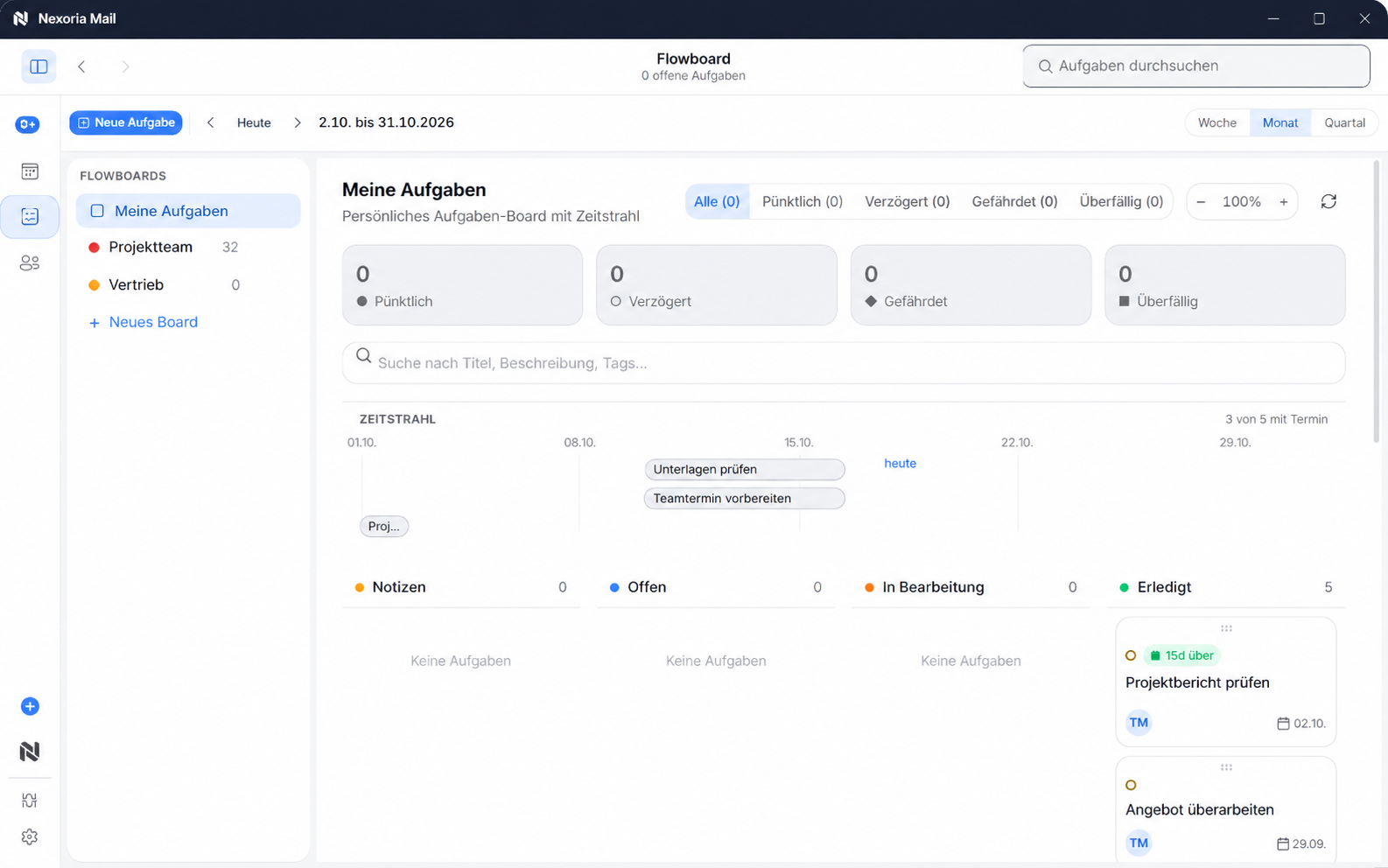
Tasks in Flowboard

Flowboard in Nexoria Mail with timeline and task status. Sample content anonymised for publication.

Flowboard in Nexoria Mail with timeline and task status. Sample content anonymised for publication.
Product view · Click to enlarge
Email workflows & automation: all the detailsPrerequisites, background and frequently asked questions

Definition

What are automations?

Automations use company knowledge as context for recurring workflows and connect the platform to external software.

An automation here is an action that the platform carries out itself instead of leaving it to a person. It differs from an answer in that, at the end, an object is created or changed: a task, an appointment, a message, a transcribed text, an analysis.

The trigger is not a rule editor but one of three ways: a natural language instruction to Nex, an event in the platform such as uploading a file, or a conversation with a Chatbot.

Problem

The problem

Recurring work rarely fails at the individual step, but on the way between steps. A piece of information sits in a document, the resulting task is created in a second tool, the appointment in a third, the message to a colleague in a fourth. Every switch costs context, and every loss of context creates rework.

Traditional automation tools solve this with preconfigured if-then rules. That works for workflows that always look the same. For work with company knowledge, it falls short: there, the triggering sentence is worded differently every time and refers to content that the rule does not know.

How it works

How it works

Nex analyses the input and decides for itself whether a question to the knowledge base, internet research, a task or an appointment is meant. Names, deadlines and priorities are read from the same sentence. There is no command syntax to learn; the guide merely lists trigger words per tool for orientation.

Files uploaded to the knowledge base are processed without any further input: audio is transcribed, and scans and images are made accessible through text recognition. The result goes into the same index that Document search uses.

Nexoria solution

What Nexoria automates

The table shows the trigger, the result and the source for each workflow.

Documented workflows, their trigger and their result. As of .
ProcessTrigger and resultSource
Create taskInstruction in the chat. Person, deadline and priority are read from the sentence, and the task can be assigned to a workspace or a collaboration partner.Platform guide
checked on
Retrieve tasksA question in the chat about open, due or overdue tasks. The result is the filtered list.Platform guide
checked on
Create, change, delete appointmentsInstruction in the chat. Date, time, participants and description are recognised. Calendars can be assigned to a workspace.Platform guide
checked on
Send team messageInstruction in the chat; the recipient is identified from the sentence. The result is the delivered message.Platform guide
checked on
Transcribe audioThe trigger is uploading an audio file to the knowledge base. The result is searchable text.Platform guide
checked on
Text recognition on scansThe trigger is uploading a scanned document or image. The result is recognised, searchable text.Platform guide
checked on
Create analysisInstruction in the chat. The result is aggregations and analysis tables, as a spreadsheet file on request.Platform guide
checked on
Book an appointment via the chatbotThe trigger is a visitor conversation on the website. The bot checks availability, records the contact details and sends the confirmation email.Product overview, Chatbots section
checked on
Handover to a member of staffThe trigger is an enquiry that the chatbot does not resolve. The conversation history is handed over to a member of staff.Product overview, Chatbots section
checked on
Reuse answerThe trigger is a positive thumbs-up rating. For similar questions, the answer is returned without any wait and without additional token costs.Platform guide
checked on

integration

Connect external systems

Connectors are available for chatbots and are set up on request.

Evidence

For chatbots, connectors to databases, calendars, CRM, e-commerce, ERP and a custom API are listed, each marked “on request”.

Source: Product overview, Chatbots section. Checked on .

We decide together in the project which systems you want to connect. Feel free to write to us about this in advance via the contact page.

Product data

Automations fact sheet

Product fact sheet

Automations

Automations use company knowledge as context for recurring workflows and connect the platform to external software.

Category
Process automation based on company knowledge
Problem
Replaces manual recurring workflows and the gap between the platform and specialist software.
Target group
Businesses; the offer is aimed at business customers within the meaning of Section 14 of the German Civil Code (BGB).
Core features
  • Automate recurring workflows
  • Connect external software
  • Nex as the central interface
  • Respect workspace permissions
Input
Rules and triggers, plus the content shared by the workspace
Output
Executed workflows and data passed to external specialist software
Integration in Nexoria
Part of the core product, starts directly from Nex and uses only shared content.
Privacy
Connections use only shared content; workspace permissions continue to apply unchanged.
Hosting
Files, the knowledge index and semantic search run on dedicated servers in Germany.
Status
Feature available. Registration and online purchase of the Base and Pro plans have been available since 15 September 2026.

Requirements

Requirements

  • A Nexoria core product, Base or Pro plan. Automations are included; the terms are on the pricing page.
  • A Workspace, whose shared content the workflow is allowed to use.
  • Sufficient token allowance. Once the token allowance is used up, tokens can be topped up automatically or manually. Without a top-up, new AI requests are paused. Document search continues to work and does not consume any tokens.
  • For email workflows, additionally the optional add-on Nexoria Mail.

Processing

Data protection and infrastructure

An automation is not a second way in that bypasses the permission model. It accesses the same shared content as the person who triggers it.

Evidence

Connections use only shared content; workspace permissions continue to apply unchanged.

Source: Product overview, Automations section. Checked on .

Evidence

In Nexoria's verified Mistral organisation, the use of new API interactions for model training is disabled (account check of 26 September 2026). This setting applies to new interactions processed there. For your own optionally connected AI accounts, the settings of the respective account apply.

Source: Mistral training setting. Checked on .

Transcription, text recognition, embeddings and semantic search run locally on servers in Germany. Answer generation by Nex uses Mistral AI. The full classification can be found on Security and privacy.

Features

Specific features

  • Tasks, appointments and messages from a natural language instruction.
  • Recognition of people, deadlines and priorities in the same sentence.
  • Processing on upload: transcription for audio, text recognition for scans and images.
  • Analyses and aggregations of uploaded data, as a spreadsheet file on request.
  • Appointment booking and handover to a member of staff from within the chatbot.
  • Reuse of positively rated answers without additional token consumption.
  • Integration of external systems via connectors, set up on request.

Where to find the trigger words

The Platform guide lists the trigger words and use case examples for each tool. It is the documented source for everything named as a workflow on this page.

Comparison

Comparison with the conventional approach

The comparison is with the category, not a specific product: a separate rule-based tool that connects applications through if-then chains, versus workflows that start from within the working window.

Separate rule-based tool and automation in Nexoria. As of .
AspectSeparate rule-based toolAutomation in NexoriaSource
TriggerPreconfigured conditionNatural language instruction, platform event or chatbot conversationPlatform guide
checked on
Access to company knowledgeOnly via a purpose-built interfaceThe same indexed content that Nex and document search work withDocument search, Definition section
checked on
PermissionsThe tool's own permission model, often a shared technical accountThe workspace permissions, unchangedWorkspaces and databases
checked on
Maintenance effortEvery new phrasing needs a new ruleDifferent phrasings are recognised; there is no command syntaxPlatform guide
checked on
Integration with third-party systemsUsually a large collection of ready-made building blocksConnectors to databases, calendars, CRM, e-commerce, ERP and a custom API, on requestProduct overview, Chatbots section
checked on

FAQ

Frequently asked questions about automations

Do I need to configure rules for an automation?

Not for the workflows described on nexoria-systems.de. The trigger is the natural language instruction or an event in the platform, such as uploading a file. Nex recognises from the sentence whether a task, an appointment, a message or research is meant.

Which workflows run without any input?

Processing on upload. Audio files are transcribed, and scanned documents and images are made accessible through text recognition. The result can then be found via document search without anyone giving a command.

Can Nexoria pass data to our specialist software?

For chatbots, connectors to databases, calendars, CRM, e-commerce, ERP and a custom API are listed, each marked “on request”. We decide together in the project which target systems are connected.

Does an automation see more than the person who starts it?

No. Automations use only the content shared by the respective workspace. The permissions continue to apply unchanged; a workflow is not a separate way in that bypasses the permission model.

Does using automations cost extra?

No, automations are part of the Nexoria core product. Workflows that involve the AI assistant consume the AI tokens included in the plan. Email workflows also require the Mail and Meet add-on.

What happens with frequently recurring questions?

Answers can be rated with a thumbs up or thumbs down. Positively rated answers are saved and returned immediately for similar questions, without any wait and without additional token costs.

Contact

Next step

In a conversation, we go through your workflow together and clarify which integrations make sense for it.

Sources

As of

  1. Platform guide: tools, trigger words and use case examples. Nexoria Systems UG (haftungsbeschränkt), 2026. /anleitung Retrieved on .Source for tasks, appointments, team messages, transcription, text recognition and analyses.
  2. Product overview of the Nexoria platform. Nexoria Systems UG (haftungsbeschränkt), 2026. /produkt Retrieved on .Source for chatbot appointment booking, handover to a member of staff and the connectors available on request.
  3. Data processing agreement under Art. 28 GDPR. Nexoria Systems UG (haftungsbeschränkt), 2026. /legal/avv Retrieved on .Describes the nature and purpose of the data processing and the subprocessors used.

As of

Think further. Discover more.

Connect knowledge.
Discover Nexoria

Chatbots

Learn more ↗
Work together.
Discover Nexoria

Workspaces

Learn more ↗
Next step.
Discover Nexoria

Check data flows

Learn more ↗

Knowledge that
moves you forward.

Discover Nexoria