





Introducing AI knowledge search in your organisation: start small, test carefully
A pilot for AI knowledge search starts with a limited document collection, clear access permissions and test questions defined in advance. Check not only whether the answer sounds plausible: the source must match, current documents must be taken into account and restricted content must stay restricted. This guide describes a testing process for trying out Nexoria on your own content.
Nexoria for Introduce AI
Introduce AI: what it brings to your team.
INTEGRATE YOUR TOOLS
Introduce AI: what you can work with.
Start with selected documents. Check Office compatibility and additional system integrations separately from the quality of your search results.
Windows File Explorer
Manage files via the virtual Nexoria Drive.
Learn more ↗File formatsDoc, Calc and Slides
Edit DOCX, XLSX and PPTX in Doc, Calc and Slides.
Learn more ↗On requestYour specialist software
Review the existing API, permissions and specific actions together.
Check integration ↗Custom integrations depend on the interface and permissions of your system.
File formats: Doc, Calc and Slides open and save DOCX, XLSX and PPTX. Check rendering, features and the round trip using your own templates.
WHAT THIS LOOKS LIKE DAY TO DAY
Choose a manageable first use case.
Define the task, the document collection and the people involved. Note down how you will tell whether knowledge search usefully supports the use case.
- Task
- Document collection
- Pilot team
- Evaluation criteria
Check results against your own questions.
Collect typical questions and answers known to subject experts. Compare search results, sources and AI answers; document missing content and inadequate results so they can be improved.
- Test questions
- Source passages
- Subject-matter review
- Gaps
Expand use with clear permissions.
Test which content each role is allowed to access. Clarify content maintenance and who is responsible for queries before more teams join.
- Check roles
- Maintain content
- Responsibility
- Expansion
This is Nexoria
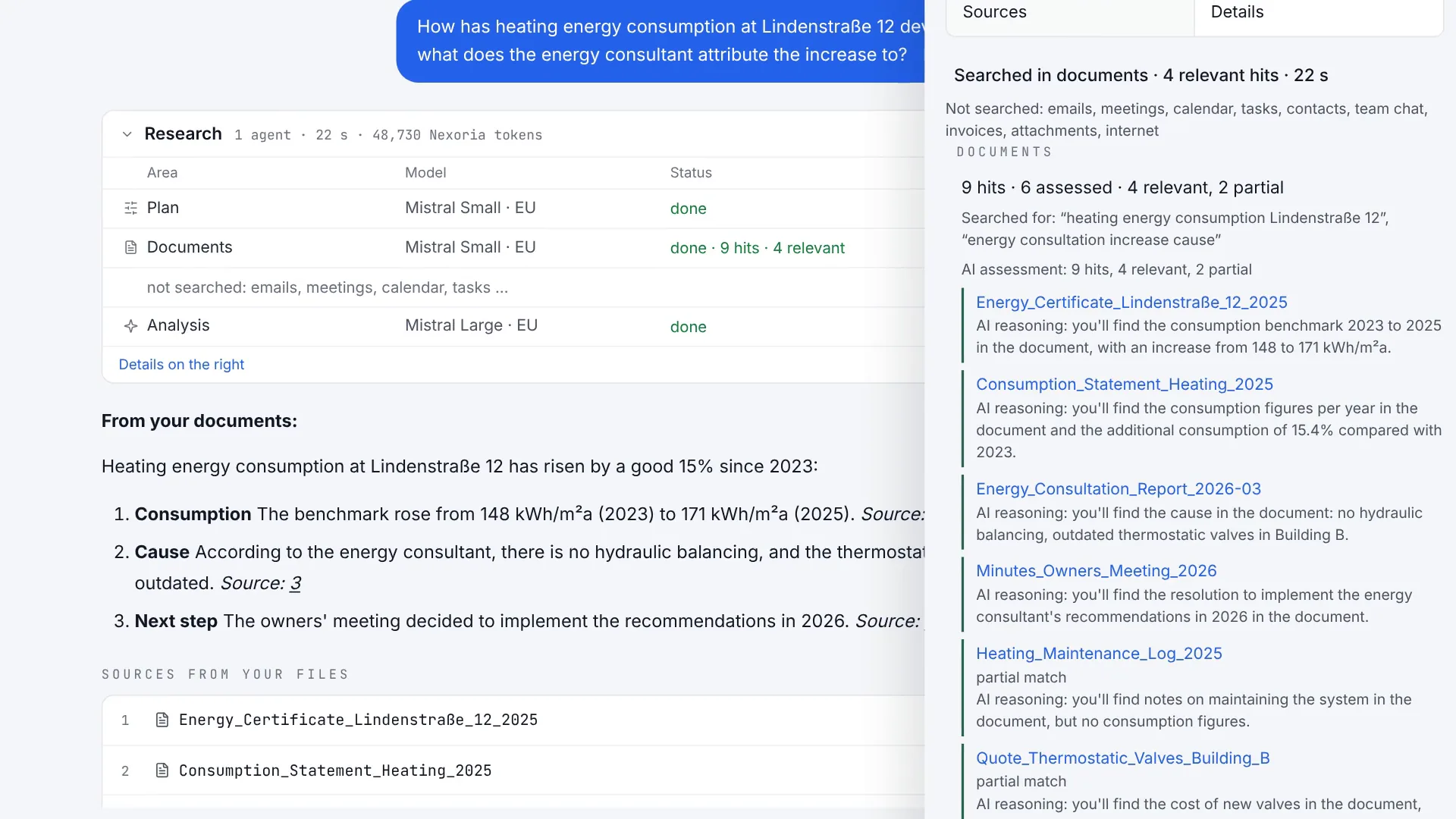
Compare results, sources and answer
Nex shows the answer with evidence from your own content and explains, for the assessed results, whether they are relevant. Scene from the explainer film, fictitious sample data.
Introduce AI: all the detailsPrerequisites, background and frequently asked questions+
Before the pilot
This guide assumes that three decisions have already been made:
- Make your selection in advance: which type of tool suits your documents. You will find tool types, selection criteria and a checklist for comparison under Choosing knowledge management software.
- If existing file stores are to become searchable together, clarify which search system suits those existing stores: Choosing enterprise search solutions.
- Decide where to start in your own organisation, ideally with a recurring process and its valid documents: Defining the first process.
Once these three points are settled, the pilot begins with step 1.
1. Choose a workflow
For example, start with questions about an approved internal handbook. Decide who needs the answers, who is responsible for the documents and who signs off on the result from a subject-matter perspective. A single recurring workflow is easier to test than a vague goal such as “AI for everyone”.
Record the starting point: how do employees find the answer today? How long do they take, including checking? What errors occur? The same tasks later serve as a comparison. For the first run, use synthetic or explicitly approved test documents.
2. Prepare documents and access
Create a list of the test documents with title, version, validity date, responsible person and intended user group. Mark old versions clearly. For scanned PDFs, check whether numbers, tables and text have actually been recognised in readable form.
Nexoria connects files in Drive, Document search and the assistant Nex. Before testing, define which files belong to each knowledge area. An output without a matching source passage does not count as correct simply because it is convincingly worded.
Have the processing of the intended data approved internally in advance. The Evaluator FAQ, the security information and the processing register help with the review. Assess additional integrations and optional modules separately.
3. Define test questions before the first run
For each question, record the expected answer, the source document and the relevant passage. Deliberately add questions whose answer is not in the content. This shows you whether the application flags missing knowledge appropriately.
| Test area | Example with test data | Expected behaviour |
|---|---|---|
| Direct source passage | What deadline does the test handbook state? | Deadline matches the approved source. |
| Different wording | By when must the application be received? | Same statement despite different wording. |
| Version conflict | Which rule currently applies? | The valid version is identified or the conflict is flagged. |
| Knowledge gap | What does an undocumented exception say? | No invented rule; the missing basis is stated. |
| Table or scan | What amount is shown in the test table? | Amount, unit and assignment are correct. |
| Access | Question about a document restricted for the test account | No content or confidential preview is disclosed. |
For this, use the test log with 20 test cases (Markdown file). The examples contain no real customer or personnel data.
4. Assess answers, sources and time separately
Review each answer for subject-matter accuracy and open the cited source passage. A source reference alone does not prove that the source supports the statement. Assess separately: correct answer, matching source passage, correct version, compliance with access permissions and complete flagging of uncertainty.
Measure the total processing time, including looking things up and making corrections. Compare the same set of questions with the previous workflow. Note the date, user role, state of the documents and visible settings so that repeat runs remain comparable.
Define acceptance criteria in advance: which types of error rule out a rollout? Which quality requirements apply to this workflow? Confidential content must not be disclosed through unauthorised test access. A blanket percentage for all use cases is no substitute for this.
5. Run targeted checks on changes
Change an approved rule in the test data and then check which version is found. Also test revoking access and removing a test document. Document the observed time of the update.
Repeat failed cases after a correction. A single successful run is not enough if the problem previously occurred intermittently. Have critical answers checked by a second person with subject expertise.
6. Decide whether to continue or make improvements
Summarise the result on one page: tested workflow, document collection, test accounts, unresolved errors, measured processing time and decision. Roll out only the scope you have tested. Appoint a person responsible for new document versions and recurring checks.
Getting started is governed by the current prices and terms. For operating individual features, use the Platform guide; a suitable starting point is something you can discuss with Nexoria.