




Nexoria
Get started

Nexoria Office: Doc, Calc and Slides in one context

Nexoria Office is the office suite of the Nexoria platform and consists of three standalone apps: Doc for text documents, Calc for spreadsheets, Slides for presentations. The apps open and save .docx, .xlsx and .pptx with no conversion step; they are built on LibreOffice and store files in Nexoria Drive. The AI assistant Nex works alongside you as a sidebar in every app. A Microsoft account is not required.

Nexoria Office in everyday work

Text, figures and slides. Edited together.

Doc, Calc and Slides connect the core tasks of your everyday office work with Drive and Nex.

Word alternative

Doc: Edit text

Edit .docx files together in real time in Doc. Nex helps with wording, shortening, summarising and translating.

Scene from the Doc explainer film: a draft report with heading, outline and text. Fictitious sample data.

Watch video: Doc

INTEGRATE YOUR TOOLS

Office & content: What you can work with.

Office files stay in Drive. For everyday email, Outlook or Gmail can be connected to the optional Nexoria Mail.

Nexoria Mail is an optional add-on. Email integrations are enabled selectively.

File formats: Doc, Calc and Slides open and save DOCX, XLSX and PPTX. Check rendering, features and the round trip using your own templates.

WHAT THIS LOOKS LIKE DAY TO DAY

Three applications for your everyday office work.

Open and save documents, workbooks and presentations in their Office formats. Doc, Calc and Slides are based on LibreOffice and work in separate windows.

  • Doc · .docx
  • Calc · .xlsx
  • Slides · .pptx
Edit files
Doc · .docx
Calc · .xlsx
Slides · .pptx
Functional diagram · Sample data

This is Nexoria

Three applications. One place to work.

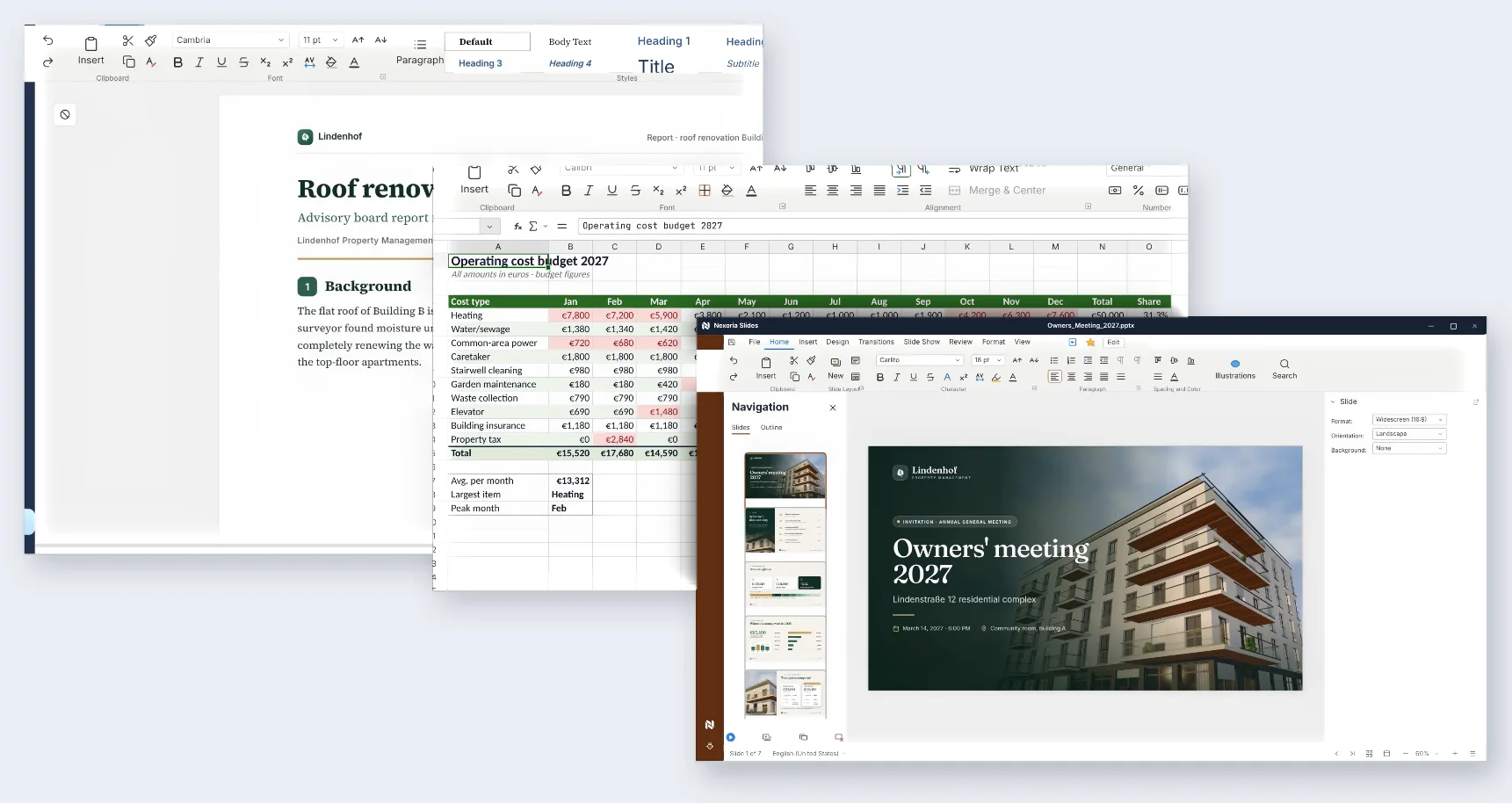
Nexoria Doc, Calc and Slides with a report, an operating cost plan and a slide deck. Fictitious sample data.

Nexoria Doc, Calc and Slides with a report, an operating cost plan and a slide deck. Fictitious sample data.
Scenes from the explainer film
Office & content: all the detailsPrerequisites, background and frequently asked questions

As of

Definition

What is Nexoria Office?

In one sentence

Nexoria Office is the platform's office suite and comprises the standalone apps Doc, Calc and Slides for text documents, spreadsheets and presentations.

The suite is not an add-on but part of the core product. It sits alongside the other building blocks of the platform: Nexoria Drive for storage, the AI assistant Nex as the main interface and the Document search as a separate search window. Anyone who subscribes to Nexoria gets the three apps as well, without licensing them individually.

Product fact sheet

Nexoria Office

Nexoria Office is the platform's office suite and comprises the standalone apps Doc, Calc and Slides for text documents, spreadsheets and presentations.

Category
Office apps
Problem
Replaces Microsoft 365 as an office suite and stores files where company knowledge is created.
Target group
Businesses; the offer is aimed at business customers within the meaning of Section 14 of the German Civil Code (BGB).
Core features
  • Support for .docx, .xlsx and .pptx files
  • AI sidebar in every application
  • Real-time collaboration with live cursors and avatars
  • Usable without a Microsoft account
Input
Existing .docx, .xlsx and .pptx files, New text documents, spreadsheets and presentations
Output
Documents, spreadsheets and slides in their original format, files in Nexoria Drive, versioned
Integration in Nexoria
Included in the Nexoria core product, stores files directly in the environment where company knowledge is created.
Privacy
No Microsoft account required. Details on processing, encryption and tenant separation are in the Data protection and infrastructure section on this page.
Hosting
Servers in German data centres; details in the Data protection and infrastructure section.
Status
Feature available. Registration and online purchase of the Base and Pro plans have been available since 15 September 2026.

Problem

What problem the suite solves

In most companies, documents, spreadsheets and slide decks live in one office world and the knowledge about them in another: on the file server, in the inbox, in the heads of individual people. The report is created in one program, the search for a figure in it happens in another, and AI support is bought on top as a third product.

Then there is the question of accounts. In the traditional set-up, anyone who wants to edit a document needs an account with the suite provider, and that account also determines where the file is stored and whose law governs access to it. This is exactly where Nexoria Office comes in: the same file, the same formats, but stored in the environment where document search and Nex also work.

How it works

How the suite works

The three apps are built on LibreOffice. They read and write the Microsoft formats directly: there is no intermediate step via a foreign format and therefore no second version of a file.

Before switching, open your own sample files with your layouts, formatting, formulas and macros in Doc, Calc and Slides, together with us if you like. The Comparison with Microsoft 365 puts the differences into context, and the FAQ on this page describes how to deal with macros and add-ins.

  1. Step 1

    File is stored in Nexoria Drive

    Nexoria Drive appears as a drive in Windows File Explorer. Documents are kept in a familiar place and open with a double-click.

  2. Step 2

    Open in Doc, Calc or Slides

    Every document opens in its own window. Text documents, spreadsheets and slide decks stay open side by side instead of hiding one another in tabs.

  3. Step 3

    Edit, alone or together

    Several people work on the same file at the same time, with live cursors and avatars. In Collab workspaces, this includes partners outside your organisation.

  4. Step 4

    Nex in the sidebar

    The AI assistant sits in the sidebar of each of the three applications and works on the open file with you, without content being copied into a second tool.

  5. Step 5

    Save in the original format

    Files are saved as .docx, .xlsx or .pptx. Nexoria Drive versions every revision, and earlier versions can be restored.

  6. Step 6

    Feeding back into company knowledge

    Whatever is shared in the workspace is indexed and then available in document search and in Nex, with sources cited.

Nexoria solution

The three apps in detail

The apps share storage, permissions and AI integration, and differ in format and purpose. That is why each has its own page.

Doc, for text documents

Contracts, reports, letters and templates. Works with .docx, and several people write on the same draft at the same time. Doc in detail.

Calc, for spreadsheets

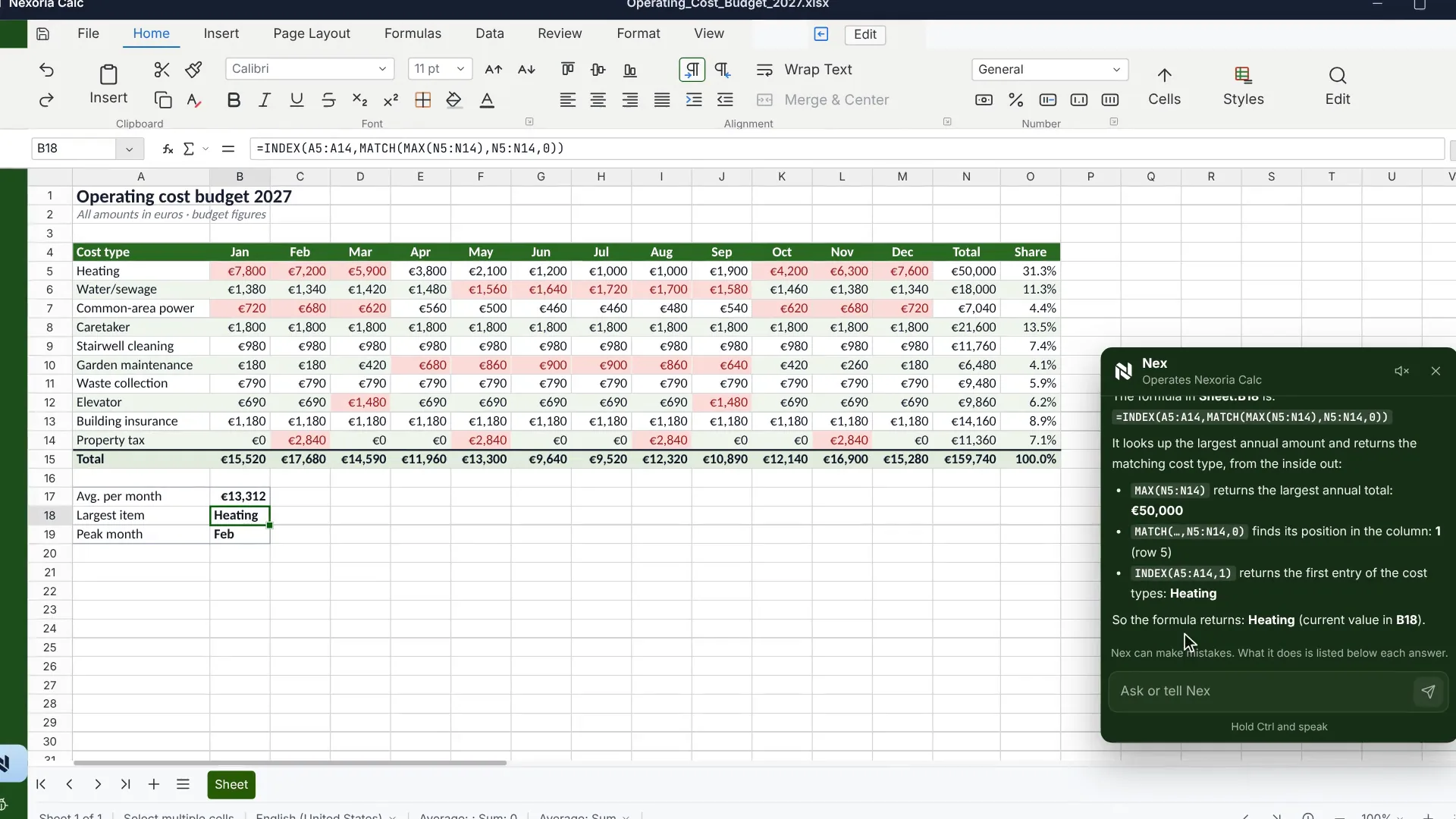
Formulas across multiple sheets, conditional formatting, charts and pivot tables. Works with .xlsx. Calc in detail.

Slides, for presentations

Layouts, templates, transitions and animations. Works with .pptx, and Nex can create the complete first draft on request directly in the AI chat. Slides in detail.

Requirements

Requirements

  • A Nexoria account on the Base or Pro plan, which includes the suite.
  • Nexoria Drive for storage, which appears as a drive in Windows File Explorer.
  • No Microsoft account and no Microsoft 365 tenant.
  • Before switching, take an inventory: which files contain VBA macros, and which workflows depend on add-ins. How to deal with them is explained under How to prepare for the switch.

Processing

Data protection and infrastructure

Where content from Nexoria Office is processed and what is contractually guaranteed.. As of .
AspectDetailSource
HostingFiles, the knowledge index and semantic search run on dedicated servers in Germany. The website and dashboard are also hosted in Germany.Security and privacy
checked on
File storage, index and searchFile storage, the knowledge index and semantic search are operated on dedicated servers in Germany.Security and privacy
checked on
AI in the sidebarAnswer generation by Nex uses Mistral AI.Security and privacy
checked on
EncryptionTLS 1.3 for all connections, WireGuard VPN between servers, AES-256 for OAuth tokens, daily encrypted backups with AES-256.processing register
checked on
Tenant separationStrict data isolation per tenant at database and vector store level, a role model with Admin, Member and Viewer, server-side permission checks on every API endpoint.Security and privacy
checked on

Evidence

In Nexoria's verified Mistral organisation, the use of new API interactions for model training is disabled (account check of 26 September 2026). This setting applies to new interactions processed there. For your own optionally connected AI accounts, the settings of the respective account apply.

Source: Nexoria at a glance. Checked on .

Scope of features

Specific features

  • Open and save .docx, .xlsx and .pptx with no conversion step.
  • One window per document, so several files can stay open at the same time.
  • Real-time collaboration with live cursors, avatars and conflict-free merging.
  • AI sidebar in each of the three applications, with no second licence.
  • Access to the platform via the tray menu: new document, AI chat, FlowHub.
  • Templates for recurring documents, such as contracts, reports and letters.
  • Versioning of every saved version via Nexoria Drive.

Context

Comparison with a traditional Office installation

Nexoria Office and Microsoft 365 compared on the features checked first when switching.. As of .
CriterionNexoria OfficeMicrosoft 365Source
AccountNexoria account, no Microsoft account neededMicrosoft account in the tenantComparison with sources: Microsoft 365 alternative
checked on
File formats.docx, .xlsx and .pptx, based on LibreOffice, with no conversion step.docx, .xlsx and .pptx nativelyComparison with sources: Microsoft 365 alternative
checked on
AI in the documentNex included in every licence, model from Mistral AI in ParisMicrosoft 365 Copilot as a separately licensed add-onComparison with sources: Word alternative
checked on
Macros and add-insdo not run unchanged, adaptation or replacement neededVBA and add-ins are part of the ecosystemComparison with sources: Microsoft 365 alternative
checked on
File storage locationNexoria Drive on servers in German data centresMicrosoft Cloud, storage location depends on the tenantComparison with sources: Microsoft 365 alternative
checked on
Pricing model€29 per user per month on the Base plan, AI includedSeparate Office licence and AI licencePricing
checked on

Switching

How to prepare for the switch

  • Macros: Doc, Calc and Slides are built on LibreOffice, and Calc comes with its own macro language, LibreOffice Basic. Adapt existing VBA code accordingly or rebuild the workflow.
  • Add-ins: Add-ins developed for Word, Excel or PowerPoint are tied to those programs. Record which add-ins your departments use, and clarify before switching how the affected workflows will run in future.
  • Analyses: Power Query and Power Pivot are components of Excel. Include analyses built on them separately in your inventory.
  • Templates: Open elaborate templates and slide decks with effect sequences in Doc, Calc and Slides beforehand. That way, you can see page breaks and rendering in your own files before you switch.
  • Mail merges: Recipient lists from Outlook address books or Exchange distribution lists are tied to the Microsoft account and therefore also belong in the inventory.

Evidence

Sources for the statements about Microsoft

Sources

As of

  1. Microsoft Product Terms. Microsoft Corporation, 2026. https://www.microsoft.com/licensing/terms Retrieved on .Basis for the statement that the Office licence and the AI licence are purchased separately.
  2. XML file name extension reference for Office. Microsoft Corporation, 2025. https://learn.microsoft.com/de-de/office/compatibility/xml-file-name-extension-reference-for-office Retrieved on .Source for .docx, .xlsx and .pptx as the default file formats of Microsoft Word, Excel and PowerPoint.
  3. Microsoft 365 data storage locations. Microsoft Corporation, 2026. https://learn.microsoft.com/de-de/microsoft-365/enterprise/o365-data-locations Retrieved on .Source for the tenant model: the storage location of customer data depends on the region assigned to the tenant.
  4. Legal notice. Mistral AI, 2026. https://legal.mistral.ai/legal-noticeCompany name and registered office of the provider that handles answer generation.

FAQ

Frequently asked questions about Nexoria Office

Which applications make up Nexoria Office?

Three standalone apps: Doc for text documents, Calc for spreadsheets and Slides for presentations. All three are part of the Nexoria core product. Each app opens every document in its own window, so a text document, spreadsheet and slide deck can stay open side by side.

Do I need a Microsoft account for Nexoria Office?

No. Nexoria Office is built on LibreOffice and works with the .docx, .xlsx and .pptx formats without involving a Microsoft account or a Microsoft 365 tenant. The other party does not need any particular program to open the saved files either.

How much does Nexoria Office cost?

Nexoria Office has no separate price: it is included in the core product. The Base plan costs €29 per user per month, the Pro plan €299 per month with five users, and each additional user €20 per month. No second licence is required for the AI sidebar.

Where are the files stored?

In Nexoria Drive, the platform's cloud storage. Files, the knowledge index and semantic search run on dedicated servers in Germany. The website and dashboard are also hosted in Germany. Answer generation by Nex uses Mistral AI. Other services and enabled integrations are described in the security overview and the processing register.

How do I deal with existing macros and add-ins?

Macros written in VBA and add-ins developed for Word, Excel or PowerPoint need to be adapted or replaced when you switch. Calc comes with its own macro language, LibreOffice Basic. Plan separately for analyses using Power Query and Power Pivot, both components of Excel. An inventory before the switch shows which files and workflows are affected.

Is content from Nexoria Office used to train AI models?

In Nexoria's verified Mistral organisation, the use of new API interactions for model training is disabled (account check of 26 September 2026). This setting applies to new interactions processed there. For your own optionally connected AI accounts, the settings of the respective account apply.

Next step

Test the switch with your own files

Bring the file most likely to cause problems: the contract template, the workbook that has grown over time, the slide deck with custom layouts. We open it in Doc, Calc or Slides, and you see on your own document what works and what does not.

Think further. Discover more.

Connect knowledge.
Discover Nexoria

Word alternative

Learn more ↗
Work together.
Discover Nexoria

Excel alternative

Learn more ↗
Next step.
Discover Nexoria

PowerPoint alternative

Learn more ↗

Knowledge that
moves you forward.

Discover Nexoria