





Teams alternative: meetings with Nexoria Meet
Nexoria connects Drive, document search, Nex, Office and Workspaces. Nexoria Meet extends the platform as part of the optional Mail and Meet add-on: video conferencing, screen sharing and live transcription via the Mistral AI API after every participant has consented. You store the transcript and summary in the shared workspace. Compare how these features support your meetings and further collaboration.
Nexoria for Teams alternative
Teams alternative: what it brings to your team.
INTEGRATE YOUR TOOLS
Teams alternative: what you can work with.
Mail and Meet are an add-on. Outlook and Gmail relate to inboxes; we check external calendar integrations separately on request.
Windows File Explorer
Manage files via the virtual Nexoria Drive.
Learn more ↗With Nexoria MailMicrosoft Outlook
Microsoft inboxes via the documented Graph integration.
Learn more ↗With Nexoria MailGmail
Google inboxes once the email integration is enabled.
Learn more ↗On requestYour calendar
Connect appointment data depending on the calendar and available interface.
Check integration ↗Nexoria Mail is an optional add-on. Email integrations are enabled selectively.
Custom integrations depend on the interface and permissions of your system.
WHAT THIS LOOKS LIKE DAY TO DAY
Bring meetings into your everyday work.
Use Nexoria Meet to organise your appointments and meetings. The calendar view shows the weekly schedule; test the workflow with your own team.
- Calendar
- Appointment
- Participants
- Meeting
Use shared results after the conversation.
You store the transcript and summary in the shared workspace. Decide which content should be available and who may access it.
- Transcript
- Approval
- Company knowledge
Review your collaboration as a complete workflow.
Connect video conferencing, screen sharing and transcription via the Mistral AI API with your everyday work. Test Nexoria Meet together with your team using a specific meeting workflow.
- Meetings
- Integrations
- Use cases
- Requirements
This is Nexoria
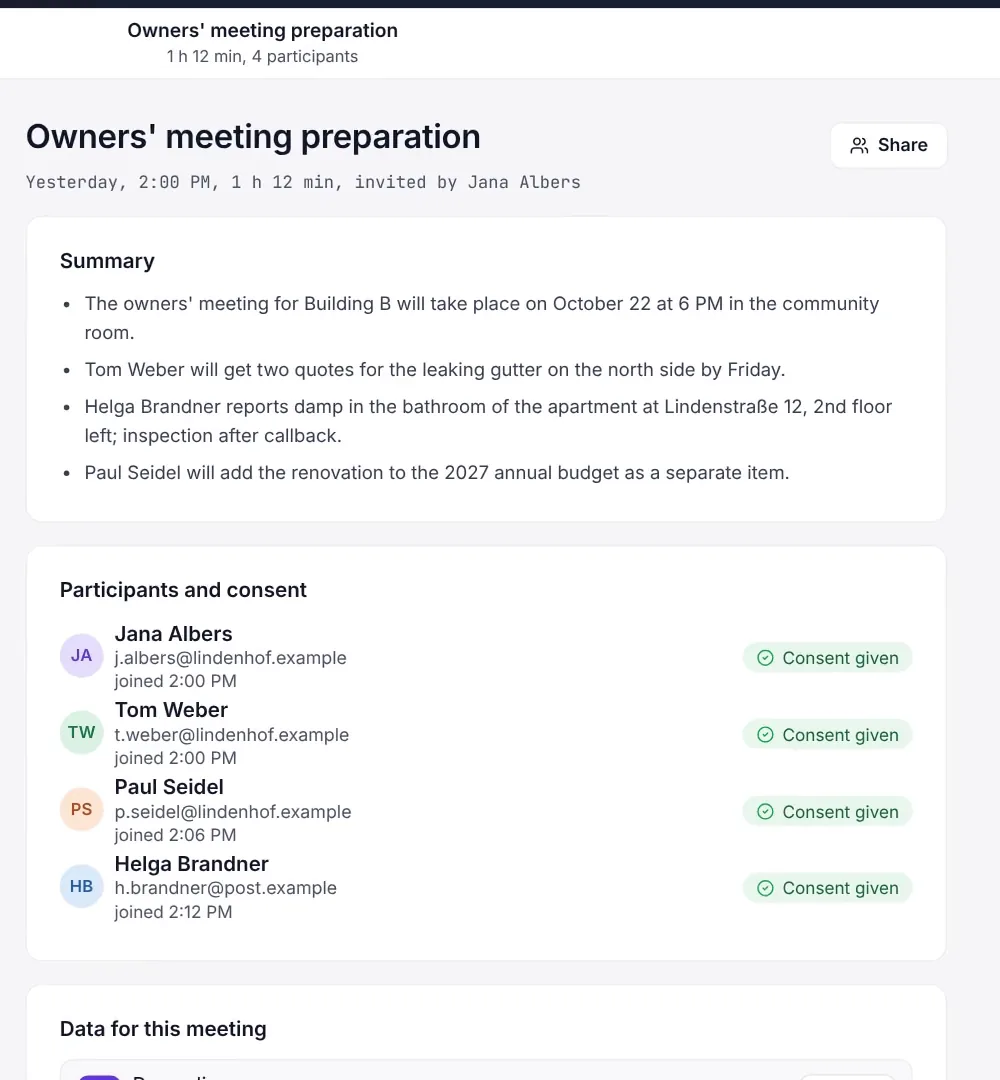
Meetings with summary and consent
Archive view of a meeting in Nexoria Meet with a summary and the participants' consent status. Scene from the explainer film with a recreated interface and fictitious sample data.
Teams alternative: all the detailsPrerequisites, background and frequently asked questions+
What is a Teams alternative for business meetings?
Editorially updated on
If you are looking for a Teams alternative, it usually comes down to three questions: Where do your meetings run and where are the recordings stored? Do you get modern features such as screen sharing and transcription? And what about data protection and consent? This page answers all three, with sources for the information about Microsoft.
Microsoft Teams vs. Nexoria Meet compared
| Aspect | Microsoft Teams | Nexoria Meet |
|---|---|---|
| Data location | Storage commitments depend on the tenant, data type and contract terms. Germany is a Local Region Geography; Advanced Data Residency offers additional commitments for covered services. The actual location is shown in the Admin Center | Recordings and backups in Germany, according to the operator; transcription and summary via the Mistral AI API |
| US CLOUD Act | Where its conditions are met, 18 U.S.C. § 2713 also covers data outside the USA, provided it is in the possession, custody or control of the provider concerned. The storage location alone does not rule out an obligation to disclose | A German storage location alone does not settle the question of possible access rights. Mistral AI and other activated services must be considered separately: Security and privacy |
| AI features | Copilot Business as an add-on licence to a qualifying Microsoft 365 subscription or in packages explicitly offered as Copilot bundles. Intelligent recap depends on the Teams Premium/Copilot licence and policies | Live transcription via the Mistral AI API in the Mail and Meet add-on; check specific allowances and terms |
| Meeting minutes | Recordings and transcripts in OneDrive or SharePoint: regular meetings in the organiser's OneDrive, channel meetings in SharePoint | You store the transcript and summary in the shared workspace |
| Video and calls | Video conferencing and calls in Teams, landline calls via Teams Phone | Video conferencing, screen sharing and live transcription |
| Meeting: duration and number of participants | Up to 300 participants with Business Basic, Business Standard, Business Premium and Teams Essentials, up to 1,000 with selected Enterprise, education and Teams EEA plans. Time limit of 30 hours per meeting | We clarify requirements for the number of participants and duration in a discussion with you |
| Chat hub with channels and apps | Up to 1,000 channels per team and up to 25,000 members per team, plus its own developer platform for agents and apps | Nexoria Meet is focused on meetings; transcript and summary stored in the workspace |
| Large events | With Teams Enterprise, up to 1,000 participants interactive, up to 3,000 with limited interaction, up to 10,000 view-only with Q&A, up to 100,000 with the Attendee Capacity Pack | We clarify requirements for large-scale events in a discussion with you |
| Breakout rooms | Breakout rooms for up to 1,000 participants; not in events optimised for large audiences | We clarify requirements for workshops with small groups in a discussion with you |
| Calls to landlines | Teams Phone licence plus PSTN solution required. Four documented ways to connect to the landline network: Microsoft Calling Plan, Operator Connect, Teams Phone Mobile and Direct Routing via a certified Session Border Controller with the existing telephony provider | For customer enquiries by phone, Nexoria offers the VoiceBot as a separate add-on; it requires a Nexoria subscription |
| Recording and consent | User-controlled recording or automatic compliance recording via third-party providers. Both notify participants. Microsoft lists a technical consent feature only for the user-controlled option; the legal basis must be clarified separately | Recording and transcription after every participant has consented; check data flows and agreements separately |
| Retention of communication content | Retention policies via Microsoft Purview for chats, channel messages and call logs. Copies of messages are kept in hidden mailbox folders. Recordings and transcripts require separate OneDrive/SharePoint retention policies | Check retention, deletion and periods after the end of the contract against the applicable agreements and configuration |
| AI training on data | For the specific AI feature in use, check the applicable product terms, the Data Protection Addendum and settings | Check use for training against the specific contract and settings |
| List price | Teams Essentials €3.50; Microsoft 365 Business Basic with Teams €6.07 per user per month, annual billing, annual subscription with automatic renewal, plus VAT. Additional licences as required | Mail and Meet as an add-on: €19 on the Base plan and €9 on the Pro plan per user per month, plus VAT, in addition to the core product |
Nexoria Meet is part of the Mail and Meet add-on. Transcripts can extend the company knowledge in the Nexoria core product. You will find details in the Product overview.
What matters when switching your meetings
Test video conferencing with your workflow
Test Nexoria Meet with a typical meeting: screen sharing, participation, transcription and subsequent filing. You clarify the number of participants, duration, external guests and special event formats based on your requirements. For customer enquiries by phone, you can explore the VoiceBot as well.
Transcription only with every participant's consent
Recording and transcription take place after every participant has consented. Clarify the purpose, access permissions, retention and the applicable agreements in advance. The agreed settings form the basis for shared use.
Transcript and summary in the workspace
You store the transcript and summary in the shared workspace. Using Workspaces and permissions you control access. In a test with different roles, check who can access the stored content.
Data flow and services involved
According to the operator, recordings and backups are stored in Germany. Live transcription and summaries use the Mistral AI API; relevant content is transferred to this service for that purpose. Storage location and processing by external services must be considered separately. The security overview describes the services involved and their role in the data flow.
You will find further information in the security overview, in the processing register and in the Evaluator FAQ.
Add-on to the Nexoria core product
Nexoria Meet is part of the combined Mail and Meet add-on. The core product includes Drive, Nex and document search, as well as Doc, Calc and Slides. You store the transcript and summary in the shared workspace. For further content and integrations, clarify the specific scope of the setup.
How much does the Teams alternative cost?
Mail and Meet costs €19 on the Base plan and €9 on the Pro plan per user per month. The add-on requires the Nexoria core product: Base costs €29 per user per month, Pro €299 per month with five users included. All Nexoria prices stated are exclusive of VAT. You will find all terms on our pricing page.
What Microsoft Teams costs
Microsoft offers Teams, among other options, as Teams Essentials and within Microsoft 365 plans. On 25 September 2026, the German comparison page lists Teams Essentials at €3.50 and Microsoft 365 Business Basic with Teams at €6.07 per user per month. Both prices are based on annual billing and an annual subscription with automatic renewal, and are exclusive of VAT. Business Basic EEA without Teams is listed at €4.67. The price difference between these packages is not a separately bookable Teams plan. Compare the full scope of services you need; telephony and more advanced AI features may require additional licences.
When Microsoft Teams is the better choice
- Your collaboration runs through channels, not meetings. For Teams, Microsoft states up to 1,000 channels per team and up to 25,000 members per team, plus agents and custom apps via the Teams developer platform. If your project communication, including files and third-party apps, takes place in such channels, Teams is the better choice here. Nexoria Meet is focused on meetings; you store the transcript and summary in the workspace.
- You host large-scale events. With Teams Enterprise, Microsoft documents events for up to 1,000 participants with full interaction, up to 3,000 with limited interaction and up to 10,000 in a view-only role with Q&A. With the Attendee Capacity Pack, up to 100,000 are possible. If you regularly plan events with four-figure audiences, Teams is the better choice here.
- You work with breakout rooms. Microsoft documents breakout rooms for up to 1,000 participants; they do not support events optimised for large audiences. Creating breakout rooms limits the number of participants to 1,000. If workshops and training sessions with small-group work are part of your everyday routine, Teams is the better choice here.
- You make calls to landlines from the meeting client. For Teams Phone, Microsoft documents four ways to connect to the landline network: Microsoft Calling Plan, Operator Connect, Teams Phone Mobile and Direct Routing. With Direct Routing, any telephony provider can be connected via a certified Session Border Controller that you, your integrator or a service provider procures and operates. No calling feature of Nexoria Meet is promised here. The VoiceBot is a separate add-on and requires a Nexoria subscription. If you want to keep using an established phone system, Teams is the better choice here.
- You manage retention and eDiscovery centrally. For this, Microsoft documents two components for Teams: compliance recording, which automatically records calls, meetings and events via a third-party solution, and retention policies in Microsoft Purview for chats, channel messages and call logs, whose content remains discoverable via eDiscovery until it is permanently deleted. If your organisation has such requirements, check the appropriate licences and policies. Recordings and transcripts require separate OneDrive/SharePoint retention policies.
- Your company is closely integrated into the Microsoft ecosystem (Microsoft Entra ID, SharePoint, channels with many third-party apps), and your organisation wants to keep collaboration within this ecosystem.
- You have checked data flows, contracts and possible access rights of public authorities for your use case.
When Nexoria Meet is right for you
- You want to add video conferencing and transcription to the Nexoria core product.
- You want to store the transcript and summary together with other documents in one workspace.
- You want to use Mail and Meet as a combined add-on and test the scope of features with a real meeting.
- Your requirements for the number of participants, retention, access permissions and data flows match the specific offer that has been agreed.
Other service providers and optional integrations
The Mistral AI API is used for AI processing. Other services and activated integrations must be considered separately. Technical error monitoring runs via Sentry, based in the USA, without access to document content. For the optional VoiceBot, Telnyx (headquarters USA, EU branch Ireland) provides the telephone connection. ChatGPT (OpenAI), Claude (Anthropic), Gemini (Google) and Langdock can optionally be connected with your own customer account via a Nexoria MCP integration. In this case, shared content is transferred to the respective provider. That provider's terms, processing locations and settings apply. Nexoria also works without these optional integrations.
According to the operator, passing Meet content to optional external AI requires separate approval by the company admin. Check the actual configuration before use. The Mistral AI API for transcription and summaries must be considered separately from this.
Frequently asked questions about the Teams alternative
Which meetings is Nexoria Meet suitable for?
Nexoria Meet adds video conferencing, screen sharing and live transcription to the Nexoria core product. Check the number of participants, duration, guests, breakout rooms and other features you need with a typical meeting. The focus is on your meetings and the subsequent work with the transcript and summary.
Where are my recordings stored and how is content processed?
According to the operator, recordings and backups are stored in Germany. Transcription and summaries use the Mistral AI API. Relevant content is transferred to the service for this purpose. Check the services involved, contract terms, retention and account settings for your specific use.
How does live transcription work?
Nexoria Meet uses the Mistral AI API for this. Recording and transcription take place after every participant has consented. You store the transcript and summary in the shared workspace. Try out the workflow from the conversation to shared storage using a typical meeting.
What should be checked regarding data protection in a meeting?
Clarify the purpose and legal basis, participants' consent, data flows, access permissions and retention periods. Check the applicable agreements and settings of all services involved. The security overview and the processing register support this clarification.
Can Nexoria Meet be used on its own, or is it part of a suite?
Meet is offered together with Mail as an add-on to the Nexoria core product. Mail and Meet cost €19 on the Base plan and €9 on the Pro plan per user per month, plus VAT and the core product. The full terms are on the pricing page.
More comparisons
- Nextcloud comparison: put self-hosting, hosting and AI components in context
- OneDrive alternative: compare file storage and company knowledge
- All comparisons at a glance
Disclaimer
This comparison is based on publicly available information about Microsoft Teams (as of 25 September 2026) and on the documented features of Nexoria Meet. Microsoft regularly updates its product scope and terms. Check the current Microsoft documentation for Microsoft's position at any given time.
Sources
- Microsoft Teams for small and medium-sized businesses: plans and features. Microsoft, no stated year of publication. Compare Teams offers. Teams Essentials €3.50, Business Basic with Teams €6.07, Business Basic EEA without Teams €4.67 per user/month, annual billing, annual subscription with automatic renewal, plus VAT. Retrieved on 25 September 2026.
Every statement about Microsoft is individually supported below by a source, with title, publisher, year or stated date, full web address and date of retrieval. If a source does not state a date itself, this is explicitly noted here. We do not substantiate information about Nexoria with third-party sources; it refers to the documented scope of services of our platform, publicly available in the security overview and in the processing register.
- Limits and specifications for Microsoft Teams. Microsoft, 2026. learn.microsoft.com/en-us/microsoftteams/limits-.... Evidence for up to 1,000 channels per team and up to 25,000 members per team, for up to 300 participants per meeting with Business Basic, Business Standard, Business Premium and Teams Essentials and up to 1,000 with the Enterprise, education and Teams EEA plans listed in the Microsoft documentation, for the time limit of 30 hours per meeting, webinar and town hall, and for the fact that breakout rooms support up to 1,000 participants, but not in events optimised for large audiences. Retrieved on 25 September 2026.
- Plan for Teams events. Microsoft, 2026. learn.microsoft.com/en-us/microsoftteams/plan-events. Evidence that organisers with Teams Enterprise can hold events for up to 1,000 participants with full interaction, up to 3,000 with limited interaction and up to 10,000 in a view-only role with Q&A, and that up to 100,000 participants are possible with the Attendee Capacity Pack. Retrieved on 25 September 2026.
- PSTN connectivity options. Microsoft, 2026. learn.microsoft.com/en-us/microsoftteams/pstn-co.... Evidence for the four documented ways to connect to the landline network, Microsoft Calling Plan, Operator Connect, Teams Phone Mobile and Direct Routing, and for the fact that Direct Routing requires a certified Session Border Controller that the customer, their integrator or a service provider procures, installs and operates. Date stated on the page: 6 August 2026. Retrieved on 25 September 2026.
- Introduction to recording Microsoft Teams calls, meetings, and events. Microsoft, 2026. learn.microsoft.com/en-us/microsoftteams/teams-r.... Evidence for the distinction between convenience recording by users and compliance recording, which runs automatically via a third-party solution without any action by users, and for the statement in the same table that participant consent is supported for convenience recording but not for compliance recording. Date stated on the page: 9 July 2026. Retrieved on 25 September 2026.
- Teams meeting recording and transcript storage and permissions in OneDrive and SharePoint. Microsoft. Storage locations and permissions. Regular meetings are generally stored in the organiser's OneDrive, channel meetings in SharePoint. Special cases and permissions are described in the source. Retrieved on 25 September 2026.
- Learn about retention for Teams. Microsoft, 2026. learn.microsoft.com/en-us/purview/retention-poli.... Evidence for retention policies via Microsoft Purview for chats, channel messages and call logs, for the additional storage of messages in hidden mailbox folders, and for the fact that the content remains discoverable via eDiscovery until it is permanently deleted. Date stated on the page: 3 June 2026. Recordings and transcripts are subject to their own OneDrive/SharePoint policies. Retrieved on 25 September 2026.
- Microsoft 365 data locations. Microsoft, 2026. learn.microsoft.com/en-us/microsoft-365/enterpri.... Evidence that the storage location depends on the tenant and that Germany is listed as a Local Region Geography for which Advanced Data Residency is offered. Date stated on the page: 1 April 2026. Retrieved on 25 September 2026.
- Data Residency for Microsoft Teams. Microsoft, 2026. learn.microsoft.com/en-us/microsoft-365/enterpri.... Evidence of which Teams data is covered by the data residency commitments, that chat and channel messages are stored in an Azure-based chat service, and which requirements apply to these commitments. The specific storage of recordings and transcripts is evidenced by the separate storage documentation. Date stated on the page: 11 April 2026. Retrieved on 25 September 2026.
- Microsoft Teams Developer Platform. Microsoft, 2026. learn.microsoft.com/en-us/microsoftteams/platfor.... Evidence that Teams provides its own developer platform for agents and apps, and that it extends beyond Teams to Outlook and Microsoft 365. Date stated on the page: 14 July 2026. Retrieved on 25 September 2026.
- Microsoft 365 Business: plans and pricing. Microsoft. Plans and add-on services. As an add-on service, Copilot Business requires a qualifying subscription. Separate bundles combine Business Standard or Premium with Copilot Business; this does not imply a Copilot commitment for every Standard or Premium plan. Retrieved on 25 September 2026.
- Microsoft Product Terms, Privacy and Security Terms. Microsoft, no stated year of publication. microsoft.com/licensing/terms/product/Privacyan.... The licensing and usage terms for Microsoft Online Services, including Microsoft 365 and Microsoft Teams, with the section Location of Customer Data at Rest for Core Online Services. The commitments concern certain data at rest and apply under the conditions stated there; the DPA and product-specific exceptions must also be taken into account. Retrieved on 25 September 2026.
- 18 U.S.C. § 2713: Required preservation and disclosure of communications and records. Office of the Law Revision Counsel, U.S. House of Representatives. Official statutory text. Obligations under Chapter 121 for data in the provider's possession, custody or control, regardless of whether it is located inside or outside the USA. Retrieved on 25 September 2026; version of the law shown: 21 September 2026.
Microsoft, Microsoft 365, Teams, Outlook, OneDrive, SharePoint, Word, Excel, PowerPoint, Azure and Copilot are trademarks of Microsoft Corporation. They are mentioned solely for the purpose of objective comparison. Information about Nexoria refers to the documented scope of services of Nexoria Systems UG (haftungsbeschränkt), Kelkheim.
Discuss getting started with Nexoria Meet
In a consultation, we show you how Nexoria Meet works in your setup and work out together which solution suits your workflows. Bring your questions and a typical meeting workflow with you.