




Nexoria
Get started

Nexoria Calc: spreadsheets for .xlsx workbooks

Calc is the spreadsheet application of Nexoria Office. It opens, calculates and saves .xlsx workbooks without a conversion step, with formulas across multiple worksheets, conditional formatting, charts and pivot tables. The AI assistant Nex builds spreadsheets from natural language and explains existing formulas step by step. Macros written in VBA do not run unchanged, and there is no equivalent for Power Query and Power Pivot.

Excel alternative · Spreadsheets The example analysis is built with values, totals, key figures and a chart; formulas remain verifiable.

Nexoria Calc in everyday work

Many figures turn into clear answers.

Edit XLSX files and bring structure to your figures with formulas, analyses and charts.

Excel alternative · Spreadsheets

Calc: Analyse figures

Edit .xlsx files in Calc and analyse figures with formulas, charts and pivot tables.

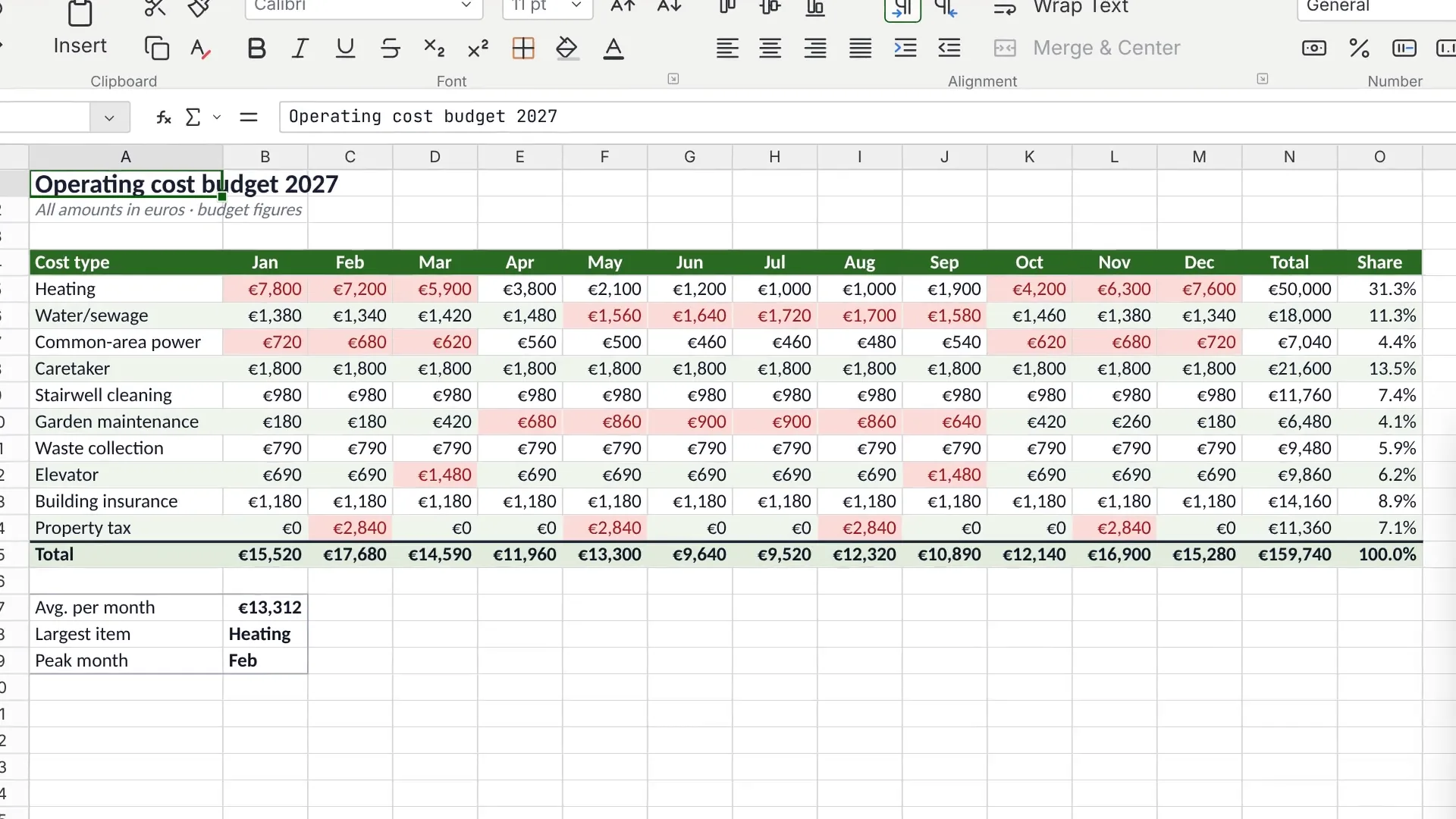
Scene from the Calc explainer film: operating cost plan with monthly values, totals and shares. Fictitious sample data.

Watch video: Calc

INTEGRATE YOUR TOOLS

Analytics: what you can work with.

Edit existing workbooks in Calc. On request, we agree ERP and database integrations with you.

Custom integrations depend on the interface and permissions of your system.

File formats: Doc, Calc and Slides open and save DOCX, XLSX and PPTX. Check rendering, features and the round trip using your own templates.

WHAT THIS LOOKS LIKE DAY TO DAY

Turn workbooks into a clear overview.

Edit XLSX files with formulas and references across multiple worksheets. Use pivot tables, charts and conditional formatting for your own analyses.

  • Workbook
  • Pivot table
  • Chart
  • Formatting
Analyse figures
Example trend↗
Workbook·
Pivot table·
Chart·
Formatting·
Functional diagram · Sample data

This is Nexoria

Nexoria Calc: Analyse figures

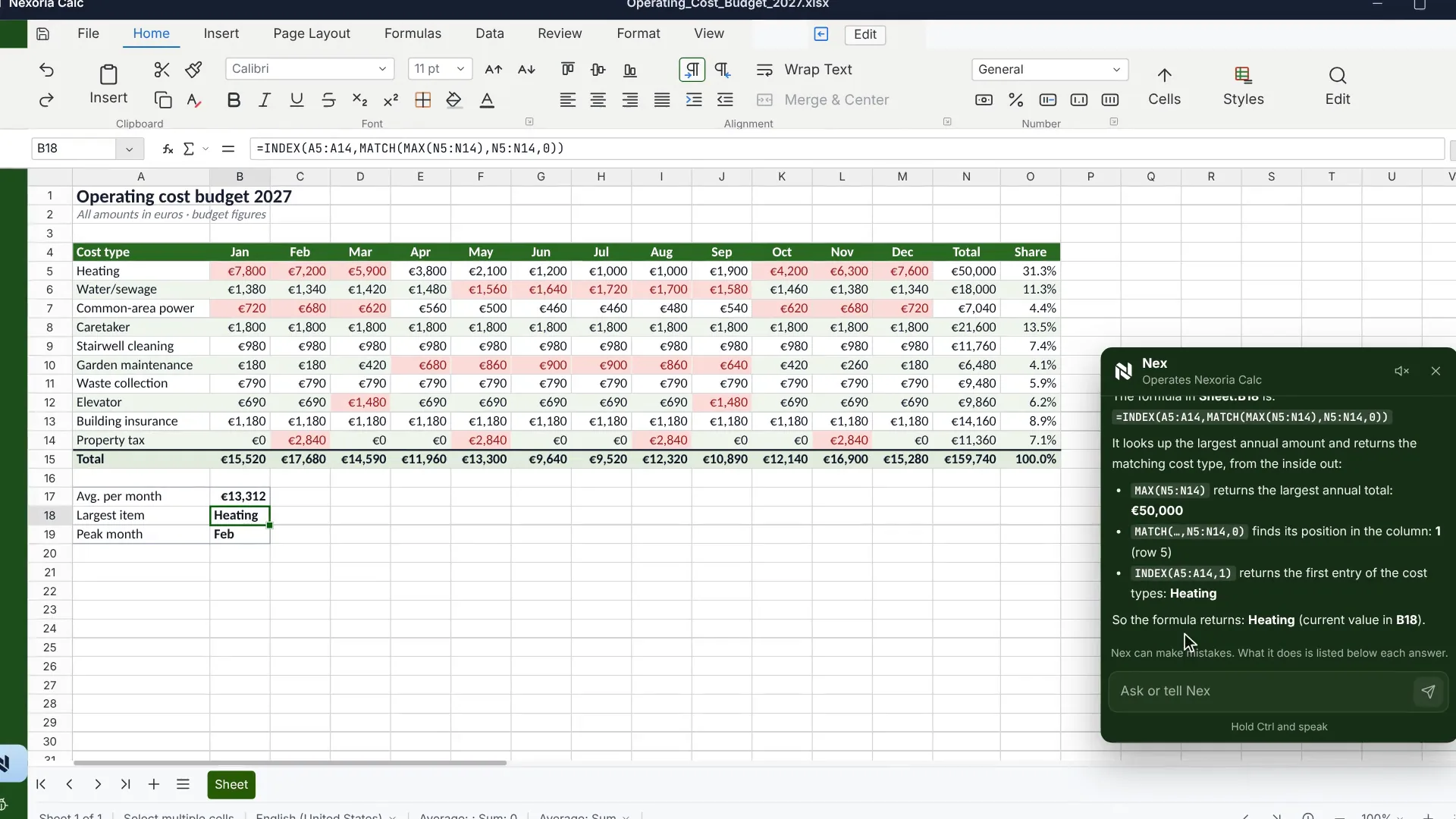
An operating cost plan in Nexoria Calc with monthly values, totals and shares. Scene from the explainer film with a recreated interface and fictitious sample data.

An operating cost plan in Nexoria Calc with monthly values, totals and shares. Scene from the explainer film with a recreated interface and fictitious sample data.
Scene from the explainer film · Click to enlarge
Analytics: all the detailsPrerequisites, background and frequently asked questions

As of

Definition

What is Calc?

In one sentence

Calc is the spreadsheet application of Nexoria Office and works on a LibreOffice basis with the .xlsx file format.

Calc is one of three applications in the suite. Text is handled by Doc, presentations by Slides. Workbooks are stored in Nexoria Drive, and AI assistance comes from Nex. An overview of the suite can be found under Nexoria Office.

Product fact sheet

Calc

Calc is the spreadsheet application of Nexoria Office and works on a LibreOffice basis with the .xlsx file format.

Category
Spreadsheet
Problem
Replaces Microsoft Excel for workbooks that consist of formula and pivot table work, without converting existing files.
Target group
Businesses; the offer is aimed at business customers within the meaning of Section 14 of the German Civil Code (BGB).
Core features
  • Formulas and cell references across multiple worksheets
  • Conditional formatting and charts
  • Pivot tables, including in existing .xlsx workbooks
  • Nex builds spreadsheets from natural language and explains formulas step by step
Input
Existing .xlsx workbooks, newly created spreadsheets and analyses
Output
Workbooks as .xlsx, every saved version versioned in Nexoria Drive
Integration in Nexoria
Part of Nexoria Office in the core product. Workbooks are stored in Nexoria Drive; shared content is indexed and can then be found in document search and in Nex.
Privacy
With spreadsheets, what matters besides the storage location is who is allowed to see them. Access depends on the workspace; an HR workbook does not have to sit in the same access area as a revenue overview.
Hosting
Servers in German data centres; details in the Data protection and infrastructure section.
Status
Feature available. Registration and online purchase of the Base and Pro plans have been available since 15 September 2026.

Problem

What problem Calc solves

A workbook is not a layout but a calculation model. Formula references, named ranges and pivot source ranges refer to one another, and every detour via a third-party format is exactly where such references get shifted. Anyone switching spreadsheet environments therefore risks more than with text: what is at stake is not the appearance but the result.

The second point is version chaos. Planning workbooks are sent by email, returned filled in and drift apart into five copies, none of which is clearly the valid one. And the third point concerns the content itself: spreadsheets often contain staff lists, applicants, clients or patients, in other words exactly the data for which storage location and access rights are not side issues.

How it works

How Calc works

  1. Step 1

    Open the workbook, without conversion

    Calc reads .xlsx directly, including formulas, references across multiple worksheets and existing pivot table analyses.

  2. Step 2

    Calculate and analyse

    Formulas, conditional formatting, charts and pivot tables keep working in the opened workbook, without analyses having to be rebuilt.

  3. Step 3

    Working together on one workbook

    Several people edit the same file at the same time, with live cursors and conflict-free merging. No second version is created by email.

  4. Step 4

    Nex in the spreadsheet

    The AI assistant builds spreadsheets from natural language, explains existing formulas step by step and generates sample data for pivot table analyses.

  5. Step 5

    Save and version

    Files are saved as .xlsx in Nexoria Drive. Every version is kept and can be restored.

Facts

Formats and features

What Calc works with and what should be checked before switching.. As of .
SubjectDetailSource
File format.xlsx, read and written without a conversion stepComparison with sources: Excel alternative
checked on
Formulas and referencesFormulas and cell references across multiple worksheets, conditional formatting, chartsComparison with sources: Excel alternative
checked on
Pivot tablessupported, including in existing .xlsx workbooksComparison with sources: Excel alternative
checked on
MacrosLibreOffice Basic instead of VBA; existing VBA code must be adapted or rebuiltComparison with sources: Excel alternative
checked on
Power Query and Power Pivotinclude separately in the inventoryComparison with sources: Excel alternative
checked on
Add-ins for Microsoft ExcelClarify replacements before switchingComparison with sources: Excel alternative
checked on
Very large workbooks that have grown over timetest in advance with the real file in CalcComparison with sources: Excel alternative
checked on

Requirements

Requirements

  • Calc is included in the Base and Pro plans.
  • Nexoria Drive as storage for the workbooks.
  • An inventory of macros before the move: which workbooks contain VBA code, and which of them are still in use.
  • For AI assistance, a token allowance: 3 million AI tokens per user on the Base plan, 5 million on the Pro plan. Once it is used up, Nex no longer accepts further requests; document search continues to work and does not consume any tokens.

Processing

Data protection and infrastructure

Where workbooks are stored and who can access them.. As of .
AspectDetailSource
HostingFiles, the knowledge index and semantic search run on dedicated servers in Germany. The website and dashboard are also hosted in Germany.Security and privacy
checked on
File storage, index and searchFile storage, the knowledge index and semantic search are operated on dedicated servers in Germany.Security and privacy
checked on
Access to a workbookcontrolled through workspaces; an HR workbook does not have to sit in the same access area as the sales team's revenue overviewComparison with sources: Excel alternative
checked on
Tenant separationStrict data isolation per tenant at database and vector store level, a role model with Admin, Member and Viewer, server-side permission checks on every API endpoint.Security and privacy
checked on
AI assistance in the spreadsheetAnswer generation by Nex uses Mistral AI.Security and privacy
checked on

Evidence

In Nexoria's verified Mistral organisation, the use of new API interactions for model training is disabled (account check of 26 September 2026). This setting applies to new interactions processed there. For your own optionally connected AI accounts, the settings of the respective account apply.

Source: Nexoria at a glance. Checked on .

Scope of features

Specific features

  • Calculate with formulas and cell references across multiple worksheets.
  • Conditional formatting, charts and pivot tables, including in existing workbooks.
  • Simultaneous editing of the same workbook with live cursors and conflict-free merging.
  • Have spreadsheets built from natural language.
  • Have existing formulas explained step by step, useful for inherited workbooks.
  • Generate sample data for pivot table analyses.
  • Versioning of every saved version via Nexoria Drive.

Context

Comparison with the traditional spreadsheet

Calc and Microsoft Excel on the points that determine the effort of switching.. As of .
CriterionCalcMicrosoft ExcelSource
File format.xlsx based on LibreOffice, without a conversion step.xlsx nativelyComparison with sources: Excel alternative
checked on
Macro languageLibreOffice Basic; VBA code must be adaptedVBA is an integral partComparison with sources: Excel alternative
checked on
Power Query and Power Pivotno equivalentPart of ExcelComparison with sources: Excel alternative
checked on
AI in the spreadsheetNex included in every licence, model from Mistral AI in ParisMicrosoft 365 Copilot as a separately licensed add-onComparison with sources: Excel alternative
checked on
Access controlper workspace, HR workbook separate from the revenue overviewPermissions in the Microsoft 365 tenantComparison with sources: Excel alternative
checked on
Storage location of workbooksNexoria Drive on servers in German data centresMicrosoft Cloud, storage location depends on the tenantComparison with sources: Excel alternative
checked on

Switching

How to prepare for switching to Calc

  • Macros: Calc comes with its own macro language, LibreOffice Basic. You adapt macros that format cells or move values between sheets. Plan a macro landscape that has grown over time, with its own input forms, as a separate project.
  • Analyses: Power Query, Power Pivot and Power BI are Microsoft components. Include analyses built on them separately in your inventory.
  • Add-ins: for every Excel add-in used in day-to-day business, clarify the replacement before switching.
  • Large workbooks: test very large workbooks with many chained formulas in advance using the real file in Calc.

The detailed comparison with Microsoft Excel, including sources and the migration process, can be found under Excel alternative.

Evidence

Sources for the statements about Microsoft

Sources

As of

  1. XML file name extension reference for Office. Microsoft Corporation, 2025. https://learn.microsoft.com/de-de/office/compatibility/xml-file-name-extension-reference-for-office Retrieved on .Source for .xlsx as the default file format of Microsoft Excel and for .xlsm as the format that can store VBA macro code.
  2. Excel reference for Visual Basic for Applications (VBA). Microsoft Corporation, 2018. https://learn.microsoft.com/de-de/office/vba/api/overview/excel Retrieved on .Source for VBA as the macro language of Microsoft Excel.
  3. What is Power Query?. Microsoft Corporation, 2026. https://learn.microsoft.com/de-de/power-query/power-query-what-is-power-query Retrieved on .Source for Power Query as part of Microsoft Excel.
  4. About the PowerPivot model object in Excel. Microsoft Corporation, 2021. https://learn.microsoft.com/de-de/office/vba/excel/concepts/about-the-powerpivot-model-object-in-excel Retrieved on .Source for Power Pivot as an add-in for Microsoft Excel.
  5. Microsoft 365 data storage locations. Microsoft Corporation, 2026. https://learn.microsoft.com/de-de/microsoft-365/enterprise/o365-data-locations Retrieved on .Source for the tenant model: the storage location of customer data depends on the region assigned to the tenant.
  6. Microsoft Product Terms. Microsoft Corporation, 2026. https://www.microsoft.com/licensing/terms Retrieved on .Basis for the statement that the AI licence is purchased separately from the Office licence.
  7. Legal notice. Mistral AI, 2026. https://legal.mistral.ai/legal-noticeCompany name and registered office of the provider that handles answer generation.

FAQ

Frequently asked questions about Calc

Which file format does Calc use?

Calc reads and writes .xlsx, the Microsoft Excel format. Formulas, references across multiple worksheets and pivot table analyses are retained because no detour via a third-party format is needed. It is precisely at this detour that named ranges and pivot source ranges otherwise get shifted.

How do I deal with my Excel macros when switching to Calc?

VBA is the macro language of Microsoft Excel; Calc comes with its own, LibreOffice Basic. You therefore adapt existing VBA macros. A macro that formats cells or moves values between sheets can be adapted with manageable effort. Plan extensive macros with their own input forms or access to other Windows programs as a separate step before switching.

Does Calc support formulas and pivot tables?

Yes. Calc calculates with formulas and cell references across multiple worksheets, offers conditional formatting, charts and pivot tables, and can therefore also open existing .xlsx workbooks. Test very large workbooks that have grown over the years in advance, using a copy of your own file.

What does the AI assistant Nex do in the spreadsheet?

Nex builds spreadsheets from natural language, explains existing formulas step by step and generates sample data for pivot table analyses. This is especially useful for inherited workbooks that still calculate but that nobody can explain in detail any more. The model comes from Mistral AI in Paris.

Who can see a workbook that is saved in Calc?

Access is controlled through workspaces. A payroll or HR workbook therefore does not have to sit in the same access area as the sales team's revenue overview. On top of this, there is separation per tenant at database and vector store level, as well as a server-side permission check on every API endpoint.

Next step

Test your own workbook

Bring the workbook that matters most: the planning workbook, the analysis with the chained formulas, the inherited file that nobody can explain any more. We open it in Calc, and you see with your own figures how Calc works with your workbook.

Think further. Discover more.

Connect knowledge.
Discover Nexoria

Excel alternative

Learn more ↗
Work together.
Discover Nexoria

Office

Learn more ↗
Next step.
Discover Nexoria

Workspaces

Learn more ↗

Knowledge that
moves you forward.

Discover Nexoria