





Microsoft 365 alternative: Office alternative for businesses
An Office alternative for businesses has to fit your files, workflows and administrative requirements. With Nexoria, you edit DOCX, XLSX and PPTX files in Doc, Calc and Slides, find information in your documents and use the AI assistant Nex for your company knowledge. Drive, document search and Office come together in one platform. Doc, Calc and Slides are based on LibreOffice; Mail and Meet are optional. The offer is aimed at business customers within the meaning of Section 14 of the German Civil Code (BGB).
Nexoria for Office alternatives
Office alternatives: what it brings to your team.
WHAT THIS LOOKS LIKE DAY TO DAY
Find the applications for your work.
Doc, Calc and Slides edit DOCX, XLSX and PPTX on a LibreOffice basis. Drive and Nex are part of the core product; Mail and Meet are an add-on.
- Doc
- Calc
- Slides
- Drive & Nex
Test your own team's files.
Check layouts, formulas and recurring workflows with real working files. Record macros and add-ins from Microsoft Office separately.
- Layouts
- Formulas
- Check VBA
- Add-ins
Involve your IT administration too.
Clarify which of your IT administration tools, such as Intune, Entra ID, Purview or the Power Platform, will remain in use, and plan for them separately from everyday document editing.
- Power Platform
- Intune
- Entra ID
- Purview
This is Nexoria
Three applications. One place to work.
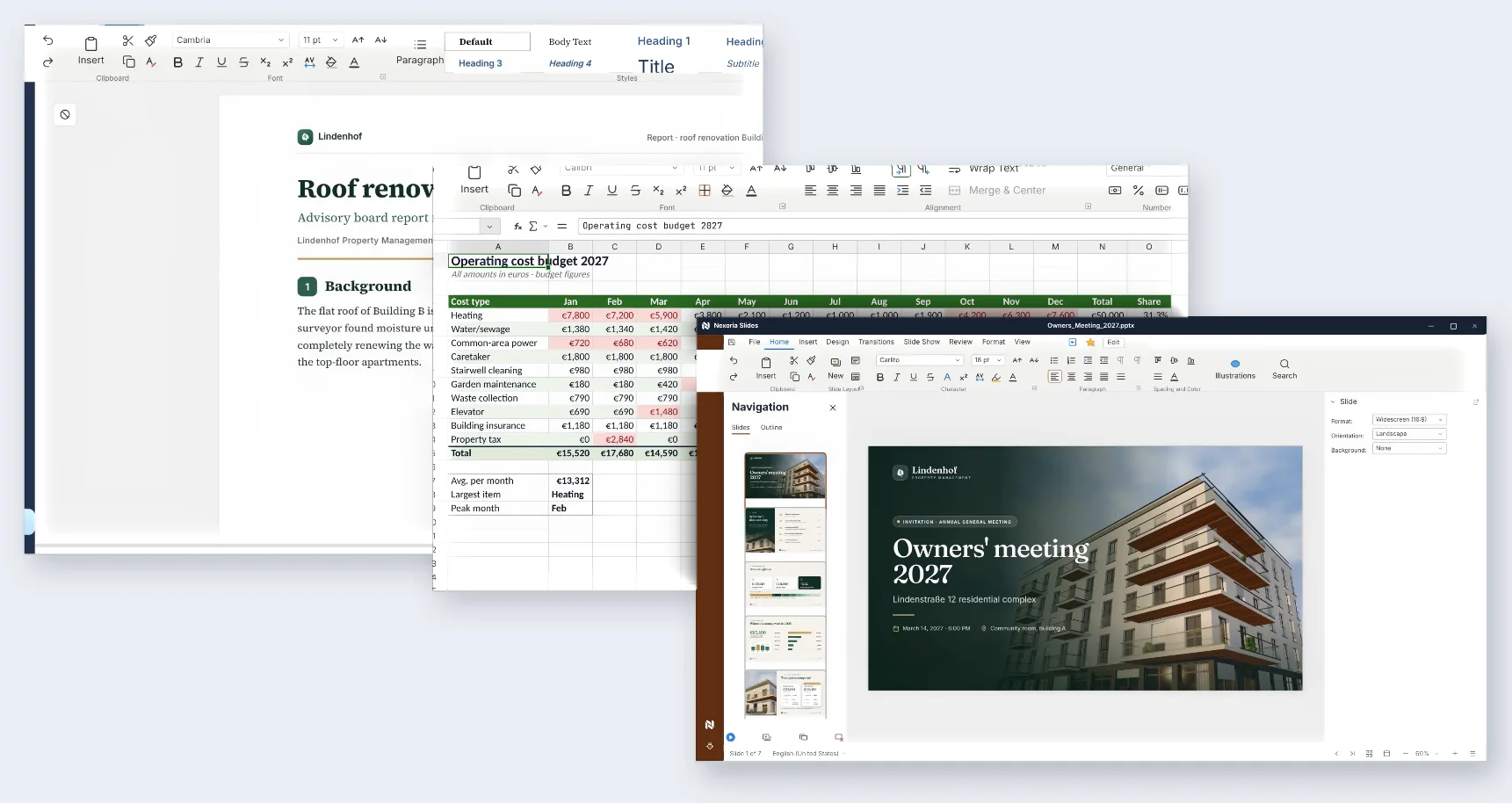
Nexoria Doc, Calc and Slides with a report, an operating cost plan and a slide deck. Fictitious sample data.
What is an Office alternative to Microsoft 365 for businesses?
Switching suites is more than replacing individual programs. Work with your departments to check which files, mailboxes, permissions and connected processes should actually be migrated. A test with your own files shows which adjustments your workflows require.
Nexoria in action
See how companies use Nexoria in our Customer stories. CSA Group describes its use of company knowledge, interfaces and individually implemented email automation in the customer story. New Fire reports on a chatbot and an individually developed maturity assessment platform. For your team, in a demo, we discuss which components suit your tasks.
What types of Microsoft 365 alternatives are there?
Stay with Microsoft: a different plan or a one-time purchase licence
This fits if your most important workflows require Microsoft applications and the discussion is mainly about licence scope or the subscription model. Microsoft offers Office Home & Business 2024 as a one-time purchase for one PC or Mac for private and business use. Also plan for the cloud services your existing environment requires. Source: Microsoft Store, checked on 29 September 2026.
Choose a different online suite
This fits if you want to evaluate a different cloud work environment together with your team. Compare applications, identities, storage and AI together: Google Workspace with Gemini compared.
Run open-source applications yourself or have them run for you
This fits if you want to shape operational responsibility, extensions and maintenance deliberately. Self-hosting requires responsibilities for updates, backups and support. You will find the assessment under Self-hosting open-source suites: Nextcloud comparison.
Combine Office, company knowledge and AI in one platform
This fits if you want to edit and search existing documents and use them for AI-assisted work. Nexoria connects Drive, document search and Nex with Doc, Calc, Slides, Workspaces, text recognition, transcription, tasks, automations and chatbots. The Office scope is described by Nexoria Office, knowledge work by Nex, the AI assistant.
App by app: Microsoft 365 vs. Nexoria
| Work area | Microsoft application | Nexoria component and check step |
|---|---|---|
| Text documents | Word | Doc: check DOCX templates, fields and the round trip with your own documents. |
| Spreadsheets | Excel | Calc: test XLSX results, formulas, pivot tables and automations. |
| Presentations | PowerPoint | Slides: compare PPTX masters, fonts, media and rendering. |
| Storage | OneDrive | Drive: clarify required access, sharing permissions and migration paths in the pilot. |
| Outlook | Mail as an optional add-on; check mailbox workflows and permissions separately. | |
| Meetings | Teams | Meet as an optional add-on with live transcription via Mistral AI; check the specific data flow. |
| AI support | Microsoft 365 Copilot | Nex is included in the Nexoria core product; feature scope and data access should be compared separately. |
The table maps tasks and helps you plan the feature scope and the transition for your team. The file tests are on Word alternative: Doc and .docx, Excel alternative: workbook test with Calc and PowerPoint alternative: Slides and .pptx. For file storage: OneDrive alternative and Nexoria Drive.
Decision points compared
| Criterion | What you should check before choosing |
|---|---|
| Files | Open, edit and save representative originals, then reopen them in your existing application. |
| Processes | Record macros, add-ins, data connections and approval steps individually. |
| Administration | Document device management, identities, retention and audit logs as separate requirements. |
| Collaboration | Have simultaneous editing, version history and sharing demonstrated using your specific workflows. |
| AI | Check data access, source references, permissions, providers and contractual terms. |
| Costs | Add up licences, add-ons, transition, training and any systems you still need. |
What businesses look out for when switching
Consider storage and AI processing separately
According to the operator, documents are stored in Germany. For AI answers, relevant content may be transferred to the Mistral AI API. Technical error monitoring runs via Sentry, based in the USA, without access to document content. For the optional VoiceBot, Telnyx (headquarters USA, EU branch Ireland) provides the telephone connection. Check the features you need and the data flows under Security and privacy.
ChatGPT, Claude, Gemini and Langdock can optionally be connected via your own provider account and a Nexoria MCP after approval by the company administrator. For transmitted content, the terms and settings of the respective provider must be checked. You choose the optional connections that suit your business.
Assess data protection based on the specific use case
Clarify the data concerned, recipients, access permissions, retention and contractual bases for the features you use. For your internal review, Answers for your evaluation and the processing register are available. Use these documents to assess your specific use case.
Plan integrations individually
SharePoint, OneDrive and Google Drive can be connected as knowledge sources on request. We set up the integration depending on your environment and permissions. On request, we also look into connecting other storage, CRM, ERP and in-house systems.
Discuss scope and access permissions via Integrations with your systems. Plan the migration of files, mailboxes and permissions as separate work steps alongside connecting your knowledge sources.
Test the round trip before switching
LibreOffice-based applications support common Office file formats. Complex formatting, macros and extensions still require their own tests. LibreOffice Help describes limited VBA support; Office add-ins have their own Microsoft runtime environments. Agree on a file export and reopening test with clear acceptance criteria for your existing files.
How much does the Microsoft 365 alternative cost?
Nexoria Base costs €29 per user per month. Pro costs €299 per month for five users; each additional user costs €20 per month. Mail and Meet are an optional combined add-on: €19 on Base or €9 on Pro per user per month. All Nexoria prices stated are plus VAT. Current scope of services and terms: Take a look at the pricing.
Microsoft lists €11.00 per user per month for Apps for Business on an annual subscription billed annually with automatic renewal. Business Standard with Teams costs €12.13 per user per month on an annual subscription billed annually with automatic renewal, or €14.56 per user per month on a monthly subscription. All Microsoft prices stated are plus VAT. These are Office package prices. Retrieved: 29 September 2026.
Copilot offerings and bundles must be considered separately from these base plans. For each offering, compare the Copilot features included and the base licence required. Details: AI licence: Microsoft 365 Copilot or Nex.
Compare an overall package that suits your team. Also take into account necessary systems and the effort involved in transition, training and parallel operation.
Safeguard existing Microsoft 365 workflows deliberately
Record the Microsoft add-ins, complex Excel workbooks and connected services that are critical for your team. In particular, take inventory of your use of Intune, Entra ID, Purview, Power Apps and Power Automate. Plan administration and these processes as a separate part of your system landscape alongside Office file editing.
For Exchange and Teams workflows, mailbox delegation, resource booking, meeting features and interfaces should be on your checklist. Switch these workflows over after successful review and acceptance; plan any necessary adjustments or a separate replacement in advance.
When Nexoria is a good fit
Nexoria is an option if your focus is on existing documents, knowledge search, AI support and Office editing. The prerequisite for switching is that your essential files and processes pass the agreed tests. You can then evaluate Mail and Meet as an optional add-on.
In what order should you switch?
- Record inventory and must-have criteria: Document files, macros, mailboxes, integrations, permissions and the people responsible.
- Define a limited pilot: Select real workflows, representative files and measurable acceptance criteria.
- Check files and knowledge access: Compare results and rendering, verify permitted sources and the scope of access.
- Assess communication separately: Check Mail and Meet against your mailbox and meeting workflows.
- Plan the transition and fallback: Agree on responsibilities, training, backups, export checks and parallel operation. Only switch off old systems after acceptance.
Other service providers and integrations
The core platform and enabled additional features may involve different providers. For each service used, check which data is transferred and which contractual terms apply. What matters for the specific review are the current documents under Security and privacy and in the processing register.
Frequently asked questions about the Microsoft 365 alternative
Which Microsoft 365 alternative suits your business?
Start with your workflows: editing Office files, managing emails, holding meetings or finding knowledge in existing documents. Check the features you need and the data flows separately. Nexoria connects Drive, document search and Nex with Doc, Calc and Slides; Mail and Meet are optional add-ons.
Is Nexoria a free Office alternative?
Nexoria is a paid offering for businesses: Base costs €29 net per user per month, Pro €299 net per month for five users. On Pro, each additional user costs €20 per month. Compare the overall scope and add-ons using the current pricing overview.
Do I need a Microsoft account for Nexoria Office?
For Nexoria Office, you need a Nexoria account. A Microsoft account is not required. If you continue to use or connect Microsoft services alongside it, their own access requirements apply.
Can I keep using existing Office files?
Doc, Calc and Slides edit DOCX, XLSX and PPTX files. Before switching, check your own templates, workbooks and slide decks, as well as the round trip back to your existing applications. Macros, add-ins and special data connections require a separate review.
How can the switch be prepared step by step?
First, record files, users, required features and dependent systems. Test representative copies and document any deviations. Plan the migration of content, permissions and workflows as separate steps. We set up integrations depending on your environment and permissions.
Is AI included in Nexoria?
Nex is part of the Nexoria platform. Microsoft 365 Copilot has its own plan and feature conditions; check the base licence, add-on licence or bundle offer separately. You will find a comparison of the AI offerings on a dedicated page. AI licence: Microsoft 365 Copilot or Nex.
Where are files and AI requests processed?
According to the operator, documents are stored in Germany. AI answers may transmit relevant content to the Mistral AI API. Optional integrations with ChatGPT, Claude, Gemini and Langdock use your own provider account and a Nexoria MCP after admin approval. For these, check data flows, contractual terms and settings.
More comparisons
- Outlook alternative: Check mailbox workflows and Nexoria Mail.
- Teams alternative: Check meetings and Nexoria Meet.
- Word alternative: Doc and .docx: Test documents and templates.
- Excel alternative: workbook test with Calc: Compare calculations and data workflows.
- PowerPoint alternative: Slides and .pptx: Check presentations and media.
Sources and comparison date
Sources checked on 29 September 2026. Products, plans and contractual terms may change. The prices stated are a snapshot; check the specific offer before placing an order.
- Microsoft: Office Home & Business 2024: One-time purchase licence and use on one PC or Mac.
- Microsoft: Business plans and pricing: Office packages and separate bundles.
- Microsoft: Business Standard: Base plan with annual or monthly commitment.
- Microsoft Learn: Office Add-ins: Runtime environments and extensions.
- LibreOffice Help: Using Microsoft Office files: File formats and differences.
- LibreOffice Help: VBA support: Limits of macro support.
Explore Office and Nex in a demo
In the demo, we work with you to clarify your most important file formats, workflows and the right place to start. We then define what a pilot should demonstrate.
Explore Office and Nex in a demo