




Nexoria
Get started

AI for consulting and advisory: project knowledge that keeps working

Consulting teams lose time less on thinking than on finding things again. Nexoria stores project documents in Nexoria Drive, indexes their contents and makes them findable through semantic document search and the AI assistant Nex, each time with the source named. Workspaces keep the documents of one engagement separate from those of all others. Content you find can be processed further in Doc, Calc and Slides or directly in the Nex AI chat. This page describes four tasks from everyday project work and the path each of them takes through the platform.

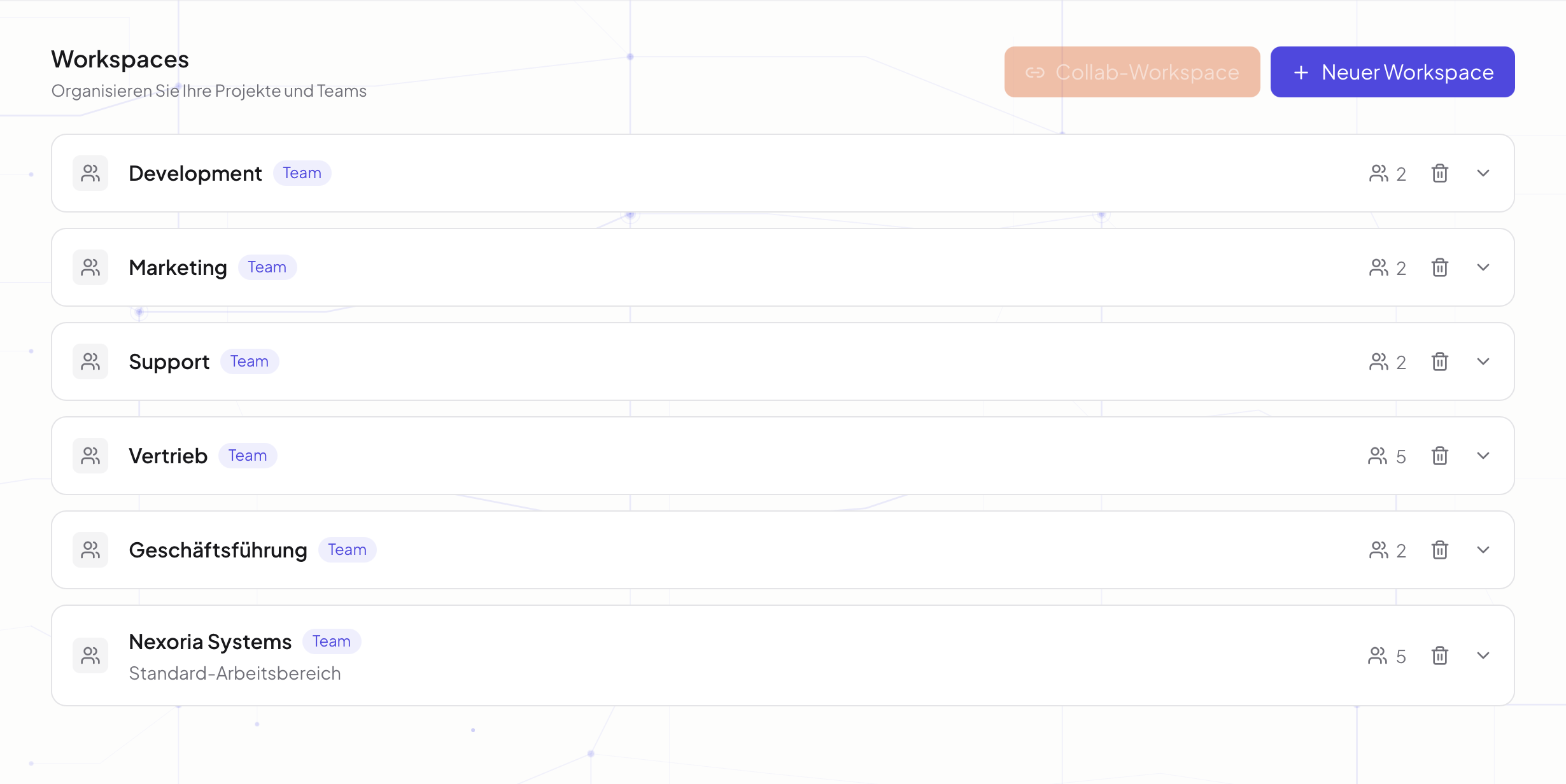
The Workspaces overview in Nexoria: teams, work areas and members at a glance.
The Workspaces overview in Nexoria: teams, work areas and members at a glance.Enlarge view

INTEGRATE YOUR TOOLS

Professional services & consulting: what you can work with.

Project documents and Office files keep engagements together. We connect external customer and scheduling systems on request, after consultation with you.

Custom integrations depend on the interface and permissions of your system.

File formats: Doc, Calc and Slides open and save DOCX, XLSX and PPTX. Check rendering, features and the round trip using your own templates.

WHAT THIS LOOKS LIKE DAY TO DAY

Give every project a shared knowledge space.

Assign documents and members to a workspace. Keep engagements separate and involve external partners through suitable Collab workspaces when needed.

  • Engagement
  • Documents
  • Project team
  • Partners
Organise engagements
Planning
01Engagement
In progress
02Documents
Review
03Project team
Functional diagram · Sample data

This is Nexoria

Presentations in the Nex AI chat

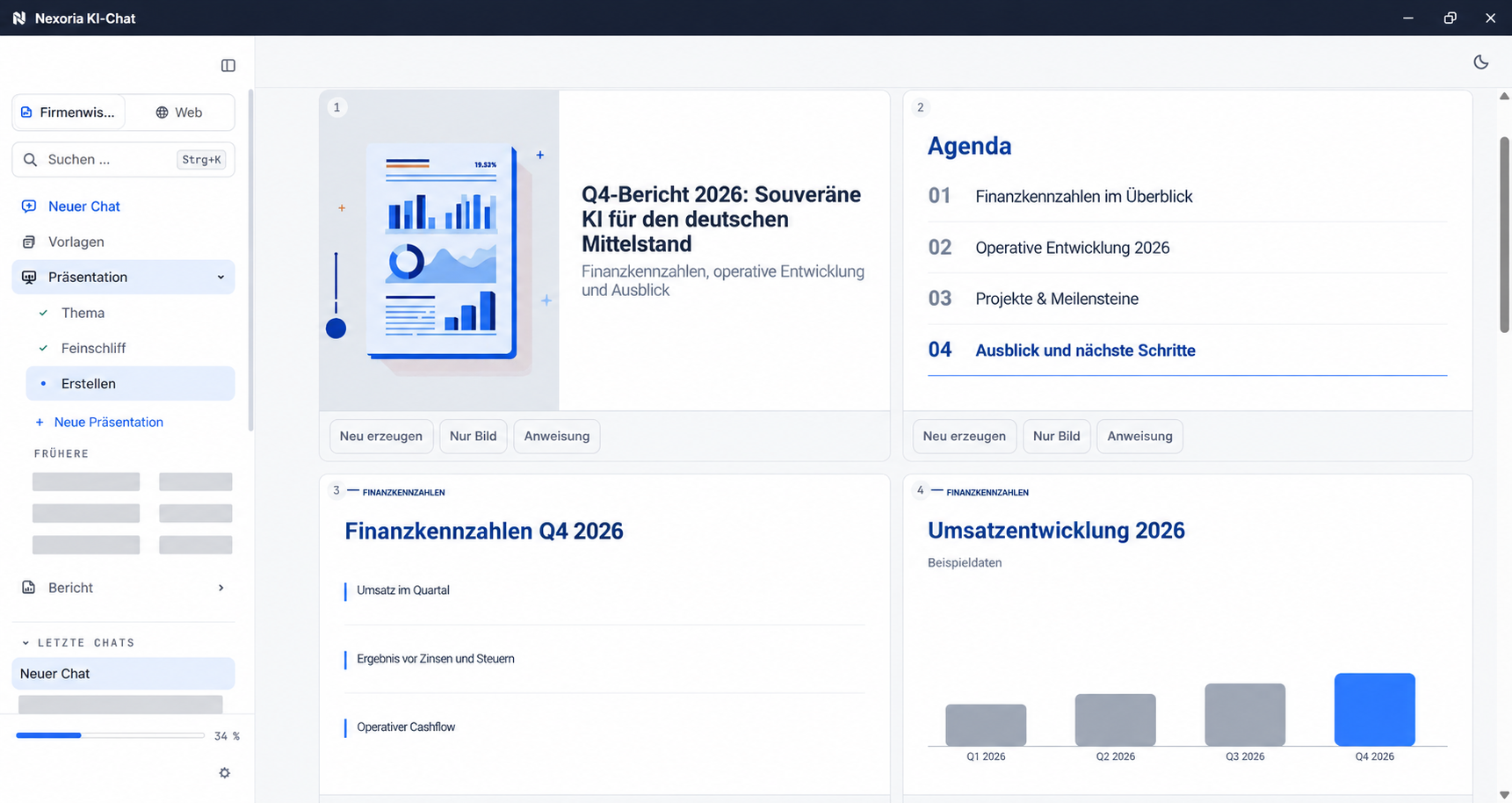
Creating a presentation in the Nex AI chat with anonymised sample content.

Creating a presentation in the Nex AI chat with anonymised sample content.
Product view · Click to enlarge
Professional services & consulting: all the detailsPrerequisites, background and frequently asked questions

The starting point in consulting projects

Consulting is knowledge work on other people's material. Every project produces analyses, interim results, slide decks and minutes, and most of it remains useful beyond the current project. Yet it is rarely reused, because once the project ends it sits in a folder whose structure only those involved understand.

Then there is separation. Consulting teams work for several clients at the same time, often in the same industry. Making knowledge centrally searchable while keeping the documents of each engagement cleanly separated are two requirements that can conflict technically. This is exactly the point that decides whether knowledge search can be introduced or not.

The four tasks below are not categories such as knowledge management, but steps that come up on an ordinary project day. For each one, you will find the path it takes through the platform and what evidence is available.

Four tasks and their path through Nexoria

Job 1

Pick out the slides from completed projects that explain a particular methodology and build a slide deck from them for the next meeting.

Problem

The results of earlier projects sit in project folders from different years and have file names that only their author understands. Anyone who did not create the documents themselves searches through folder paths or asks a colleague who is busy with something else.

Evidence

Nex creates presentations as .pptx directly in the AI chat from the shared content of a workspace, and each slide references the underlying sources.

Source: Documents and presentations in the Nex AI chat. Checked on .

Job 2

Write a proposal for a follow-up project and reuse the scope of services from the last proposal to the same client.

Problem

The last proposal sits in the client folder, usually in several versions with similar file names. Pick the wrong one and you copy over a scope of services that no longer applies, and only notice in the meeting.

Evidence

In the AI chat, Nex compares two documents and highlights the differences, for example two versions of a contract or proposal.

Source: Documents and presentations in the Nex AI chat. Checked on .

Job 3

After a workshop, write the minutes and create the agreed next steps as tasks with due dates.

Problem

The minutes are based on notes typed on the side during the discussion. Commitments that nobody wrote down only resurface when someone asks for them.

Mechanism

  1. Nexoria Meet with live transcription
  2. Minutes in the knowledge base
  3. Nex
  4. Task with due date

Evidence

Nexoria Meet transcribes video conferences and stores the minutes in the knowledge base, and Nex creates tasks and appointments from them. Transcription requires the consent of every participant, and there is no silent recording. Meet is part of the Mail and Meet add-on for €19 on Base and €9 on Pro per user per month.

Source: Nexoria Meet. Checked on .

Job 4

Get a new colleague up to speed on her first project day without anyone explaining the project status to her verbally.

Problem

The project status is spread across minutes, interim results and correspondence. So far, the quickest answer comes from the person who has been involved the longest, and their time is precisely the scarcest.

Mechanism

  1. Project workspace
  2. shared content
  3. Nex
  4. Answer with source

Evidence

Nex answers questions about the project status from the shared knowledge in the project workspace and names the source. This means statements can be traced back to the original file.

Source: Nex, the AI assistant. Checked on .

Which of these workflows suit your daily work becomes clear with your own content. The components involved are described under Product, and what it costs to use under Pricing. If you would rather see it with your own documents, you can do so via Contact.

Requirements that clients in this industry check

For each detail, you will find the source and the date it was last checked.

Details requested from consultancies in tenders and data protection reviews. As of .
RequirementDetailSource
Separation of engagementsStrict data isolation per tenant at database and vector store level, a role model with Admin, Member and Viewer, server-side permission checks on every API endpoint.Security and privacy
checked on
Processing locationFiles, the knowledge index and semantic search run on dedicated servers in Germany. The website and dashboard are also hosted in Germany.Security and privacy
checked on
Answer generationAnswer generation by Nex uses Mistral AI.Mistral AI, Legal notice
checked on
Use for AI trainingIn Nexoria's verified Mistral organisation, the use of new API interactions for model training is disabled (account check of 26 September 2026). This setting applies to new interactions processed there. For your own optionally connected AI accounts, the settings of the respective account apply.Nexoria at a glance
checked on
Data protection documentsFor your data protection review, the data processing agreement under Art. 28, the processing register under Art. 30 and the data protection impact assessment under Art. 35 GDPR are publicly available. The details on this page are Nexoria's own statements; the data flows for each processing step are described in the privacy policy and the processing register.processing register
checked on
EncryptionTLS 1.3 for all connections, WireGuard VPN between servers, AES-256 for OAuth tokens, daily encrypted backups with AES-256.processing register
checked on

Files, the knowledge index and semantic search run on dedicated servers in Germany. Answer generation by Nex uses Mistral AI. Other services and enabled integrations need to be considered separately: error monitoring via Sentry, based in the USA, without access to document content, payment processing via Stripe, as well as Microsoft Graph and Gmail when the email integration is enabled. For the optional VoiceBot, Telnyx (headquarters USA, EU branch Ireland) provides the telephone connection in Frankfurt; speech recognition and speech synthesis are handled by Voxtral from Mistral AI. The components and providers involved are listed under Security and privacy and in the processing register. All service providers used are listed by name in the processing register under Art. 30.

Getting started with Nexoria

Together, we review your data sources, workflows and requirements. Get to know Nexoria through your specific use case and plan the right way to get started with our team.

Frequently asked questions

Are the documents of different clients kept separate from one another?

Yes, through workspaces. Each workspace has its own knowledge base, and the same permissions apply to document search, Nex and chatbots. Strict data isolation per tenant at database and vector store level, a role model with Admin, Member and Viewer, server-side permission checks on every API endpoint.

How can I tell which project an AI answer comes from?

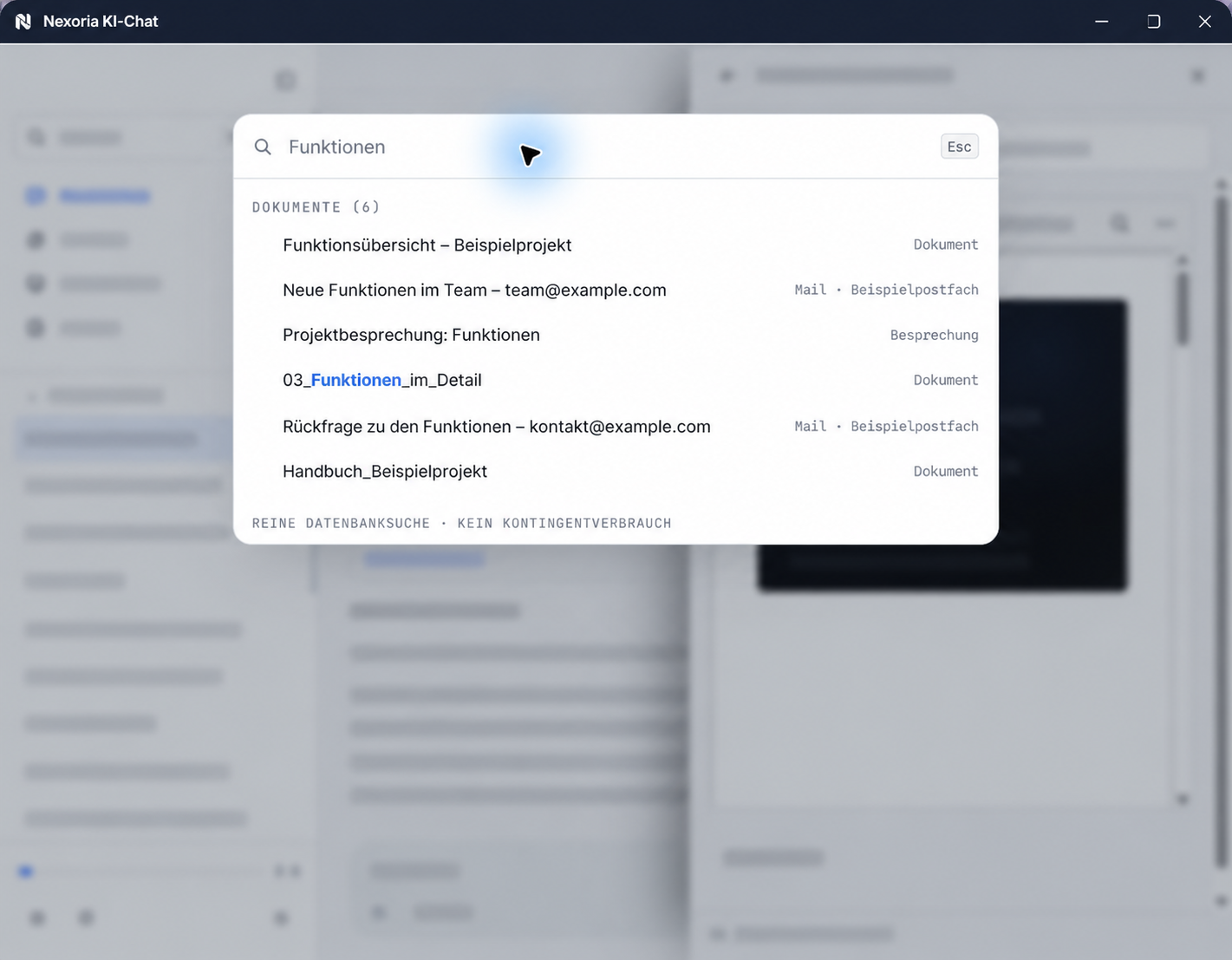
Document search names the source document for each result and shows a preview with tables, images and formatting. Answers from Nex carry the same source reference, as do documents and presentations that Nex creates directly in the AI chat. This means every statement can be traced back to the original file.

Can we edit documents together with a client?

Yes. In addition to team workspaces, there are cross-company Collab workspaces to which external people are invited. Doc, Calc and Slides allow real-time collaboration with live cursors and avatars. The workspace an external guest is assigned to determines which content they see.

How do we assess the benefit for our consulting team?

By means of a demonstration with your own project documents. Document search finds matching passages by meaning and names the source document for each result, and Nex answers questions with source references. This way you can see from your own content how your team works with it.

Are workshop minutes recorded automatically?

Only with the Mail and Meet add-on and only with consent. Nexoria Meet transcribes video conferences, each participant consents individually, and there is no silent recording. The add-on costs €19 on Base and €9 on Pro per user per month. Without this add-on, the minutes are written by hand as before.

Sources

As of

  1. Regulation (EU) 2016/679, General Data Protection Regulation. Publications Office of the European Union, 2016. https://eur-lex.europa.eu/legal-content/DE/TXT/?uri=CELEX:32016R0679 Retrieved on .Source for Articles 28, 30 and 35 cited on this page.
  2. Mistral AI, Legal notice. Mistral AI SAS, 2026. https://legal.mistral.ai/legal-notice Retrieved on .Source for the legal form and registered office of the model provider that handles answer generation.

As of

Next step

The most reliable test is your own project folder. In a conversation, we clarify which engagements get their own workspaces, which past projects are indexed and what the setup costs for your volume of data.

Think further. Discover more.

Connect knowledge.
Discover Nexoria

Workspaces

Learn more ↗
Work together.
Discover Nexoria

Documents in AI chat

Learn more ↗

Knowledge that
moves you forward.

Discover Nexoria