




Nexoria
Get started

Nexoria Doc

Doc: Word processing for .docx, directly in the original format

Write documents and revise them together. Nex helps with wording, shortening and translating, directly in the sidebar.

Discover Doc

Word alternative Format text and tables and see how Nex turns them into a detailed report in the example.

Nexoria Doc in everyday work

Good texts are created together.

Write in familiar DOCX files, work as a team and bring Nex straight into your writing.

Word alternative

Doc: Edit text

Edit .docx files together in real time in Doc. Nex helps with wording, shortening, summarising and translating.

Scene from the Doc explainer film: a draft report with heading, outline and text. Fictitious sample data.

Watch video: Doc

Take your texts further.

Open, edit and save .docx files.

Write together.

Coordinate editing and feedback within your team.

Find the words.

Nex helps with wording, summarising and translating.

Nexoria Doc · Documents

From the first paragraph
to the final version.

  • Format text with styles and numbering.
  • Use templates for contracts, reports and letters.
  • Edit and save .docx files on a LibreOffice basis.
View all features

A look inside the application

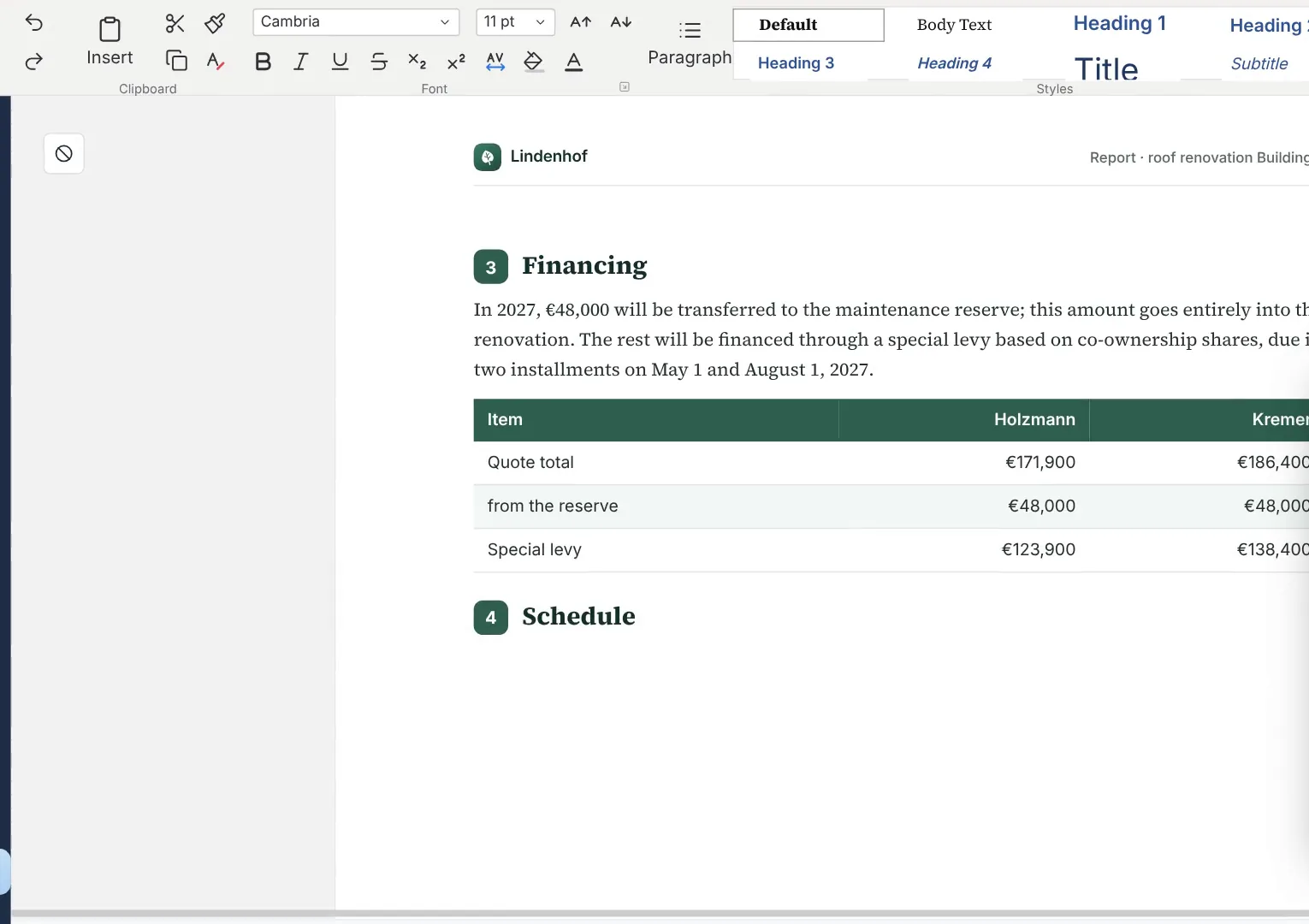
Nexoria Doc: Report with table and schedule

A report in Nexoria Doc with a funding table and schedule. Scene from the explainer film with a recreated interface and fictitious sample data.

A report in Nexoria Doc with a funding table and schedule. Scene from the explainer film with a recreated interface and fictitious sample data.

Enlarge view

Nexoria Doc · Nex

One thought.
The right wording.

  • Have text drafted and reworded directly in the sidebar.
  • Shorten, summarise or translate long passages.
  • Use shared company knowledge with the source passage cited.
How Doc works

Nexoria Doc · Collaboration

Write together.
Keep versions.

  • Coordinate document editing within the team.
  • Involve external partners via Collab workspaces.
  • Check retention and recovery for your use case.
Access and infrastructure

How Doc works

At this point, a scanned contract is not yet text but an image. Only text recognition makes it searchable; see Speech and text recognition.

  1. Step 1

    Open the file, no detours

    Doc reads .docx directly. There is no import and no export to an intermediate format; the file stays the file.

  2. Step 2

    Write together

    Several people edit the same draft. Live cursors show where the others are writing, and simultaneous changes are merged without conflicts.

  3. Step 3

    Nex in the sidebar

    Drafting, rewording, shortening, summarising and translating all happen in the open document. On request, Nex draws on the workspace's shared company knowledge and cites the source passage.

  4. Step 4

    Save and version

    Files are saved as .docx in Nexoria Drive. Every version is retained, and deleted files stay in the recycle bin during the grace period.

  5. Step 5

    Back into company knowledge

    Whatever the workspace shares is indexed. The finished report can then be found via document search and cited in Nex with a source reference.

Nexoria Doc · Process
01of 5 steps
  1. 1Open the file, no detoursThis step is open
  2. 2Write together
  3. 3Nex in the sidebar
  4. 4Save and version
  5. 5Back into company knowledge
Explanatory graphic · Process for the selected step

Nexoria Doc in detail

Everything you want to know.

Doc is the word processor in Nexoria Office. It opens, edits and saves .docx files without a conversion step, because it is built on LibreOffice. Several people write on the same draft at the same time, and the AI assistant Nex helps in the sidebar with wording, shortening and translating. You can carry on using everyday templates for contracts, reports and letters straight away.

As of

Definition

What Doc is

In one sentence

Doc is the word processor in Nexoria Office and works on a LibreOffice basis with the .docx file format.

Doc is one of three applications in the suite. Spreadsheets are handled by Calc, presentations by Slides. All three share storage in Nexoria Drive, the permissions model of Workspaces and the AI sidebar of Nex. An overview of the suite can be found under Nexoria Office.

Product fact sheet

Doc

Doc is the word processor in Nexoria Office and works on a LibreOffice basis with the .docx file format.

Category
Word processing
Problem
Replaces Microsoft Word as a word processor without converting your existing .docx files.
Target group
Businesses; the offer is aimed at business customers within the meaning of Section 14 of the German Civil Code (BGB).
Core features
  • Write, format and edit text together
  • Templates for contracts, reports and letters
  • AI writing help from Nex in the sidebar
  • Live cursors, avatars and conflict-free simultaneous writing
Input
Existing .docx files, newly written texts and templates
Output
Text documents as .docx, every saved version kept in the version history in Nexoria Drive
Integration in Nexoria
Part of Nexoria Office in the core product. Files are stored in Nexoria Drive; shared content is indexed and can then be found in document search and in Nex.
Privacy
Besides the text, a .docx file also contains personal data: author names, revision states, comments and tracked changes. These are saved with the file and are subject to the same access rules.
Hosting
Servers in German data centres; details in the Data protection and infrastructure section.
Status
Feature available. Registration and online purchase of the Base and Pro plans have been available since 15 September 2026.

Problem

What problem Doc solves

Writing in a company is rarely solo work. A draft contract goes to the legal department, a report to two specialist departments, a proposal to management. The usual process, sending the file by email, waiting for feedback, merging two versions back together, takes more time than the writing itself and creates a second truth every time.

The second point is your existing files. Templates that have grown over time contain work that nobody wants to do twice. A switch that requires converting all files is therefore not a switch but a project. This is exactly where Doc comes in: your existing files stay .docx, and collaboration takes place in the same file.

Facts

Formats and compatibility

What Doc works with and what to prepare when switching.. As of .
SubjectDetailSource
File format.docx, read and written without a conversion stepComparison with sources: Word alternative
checked on
Technical basisLibreOffice, open document standardsComparison with sources: Word alternative
checked on
VBA macrosdo not run unchanged, adaptation or rebuild requiredComparison with sources: Word alternative
checked on
Add-ins for Microsoft WordClarify replacements before switching, for example for contract automation or reference managementComparison with sources: Word alternative
checked on
Mail merges from Outlook or ExchangeRecipient lists from the Microsoft account belong in the inventoryComparison with sources: Word alternative
checked on
Collaborative editingLive cursors, avatars, conflict-free merging, also across companies in Collab workspacesProduct overview, Nexoria Office component
checked on

Requirements

Requirements

  • A Nexoria account on the Base or Pro plan; Doc is included there.
  • Nexoria Drive as storage for documents and templates.
  • No Microsoft account, not even on the other side when exchanging files.
  • To get started: store your own templates for letters, reports and contracts in Nexoria Drive and open them in Doc.

Processing

Data protection and infrastructure

Where text documents are stored and what happens to their content. The information on hosting, processing and access is provided by Nexoria.. As of .
AspectDetailSource
HostingFiles, the knowledge index and semantic search run on dedicated servers in Germany. The website and dashboard are also hosted in Germany.Security and privacy
checked on
File storage, index and searchFile storage, the knowledge index and semantic search are operated on dedicated servers in Germany.Security and privacy
checked on
Personal data in the fileAuthor names, revision states, comments and tracked changes are part of the .docx file and are subject to the same access rules as its textComparison with sources: Word alternative
checked on
AI sidebarAnswer generation by Nex uses Mistral AI.Security and privacy
checked on
Access controlStrict data isolation per tenant at database and vector store level, a role model with Admin, Member and Viewer, server-side permission checks on every API endpoint.Security and privacy
checked on

Evidence

In Nexoria's verified Mistral organisation, the use of new API interactions for model training is disabled (account check of 26 September 2026). This setting applies to new interactions processed there. For your own optionally connected AI accounts, the settings of the respective account apply.

Source: Nexoria at a glance. Checked on .

Scope of features

Specific features

  • Writing and formatting text, with styles and numbering.
  • Templates for recurring documents, such as contracts, reports and letters.
  • Simultaneous editing with live cursors and avatars, including with external partners in Collab workspaces.
  • AI writing help in the sidebar: drafting, rewording, shortening, summarising, translating.
  • Access to shared company knowledge with the source passage cited.
  • A separate window for each document, so that text, spreadsheet and slide deck can stay open side by side.
  • Versioning of every saved version via Nexoria Drive.

Context

Comparison with conventional word processing

Doc and Microsoft Word on the points that are clarified first before switching.. As of .
CriterionDocMicrosoft WordSource
File format.docx on a LibreOffice basis, without a conversion step.docx nativelyComparison with sources: Word alternative
checked on
AI in the documentNex in the sidebar, included in every licenceMicrosoft 365 Copilot as a separately licensed add-onComparison with sources: Word alternative
checked on
VBA macros and add-insdo not run unchanged; they have to be replacedrun in the Microsoft ecosystemComparison with sources: Word alternative
checked on
Mail merges with recipients from the address bookRecipient lists from the Microsoft account belong in the inventorylinked to the Microsoft accountComparison with sources: Word alternative
checked on
Very elaborate templatesopen and check in Doc with your own files before switchingRendering in its own application is authoritativeComparison with sources: Word alternative
checked on
StorageNexoria Drive on servers in German data centresMicrosoft Cloud, storage location depends on the tenantComparison with sources: Word alternative
checked on

Switching

How to prepare for the switch to Doc

  • Macros and add-ins: adapt existing VBA macro code for the LibreOffice basis or rebuild it. For add-ins developed for Word, clarify the replacement before switching.
  • Mail merges: recipient lists from Outlook address books or Exchange distribution lists are tied to the Microsoft account and therefore belong in the inventory.
  • Templates: open templates with styles, nested numbering, tables of contents and field codes in Doc beforehand and check the page breaks on your own files.

The detailed comparison with Microsoft Word, including sources and switching scenarios, can be found under Word alternative.

Evidence

Sources for the statements about Microsoft

Sources

As of

  1. XML file name extension reference for Office. Microsoft Corporation, 2025. https://learn.microsoft.com/de-de/office/compatibility/xml-file-name-extension-reference-for-office Retrieved on .Source for .docx as the default file format of Microsoft Word.
  2. Introduction to file collaboration in Microsoft 365, powered by SharePoint. Microsoft Corporation, 2025. https://learn.microsoft.com/de-de/sharepoint/intro-to-file-collaboration Retrieved on .Source for simultaneous editing of an Office file by several people when the file is stored in Microsoft 365.
  3. Microsoft 365 data storage locations. Microsoft Corporation, 2026. https://learn.microsoft.com/de-de/microsoft-365/enterprise/o365-data-locations Retrieved on .Source for the tenant model: the storage location of customer data depends on the region assigned to the tenant.
  4. Microsoft Product Terms. Microsoft Corporation, 2026. https://www.microsoft.com/licensing/terms Retrieved on .Basis for the statement that the AI licence is purchased separately from the Office licence.
  5. Legal notice. Mistral AI, 2026. https://legal.mistral.ai/legal-noticeCompany name and registered office of the provider that handles answer generation.

FAQ

Frequently asked questions about Doc

Which file format does Doc use?

Doc reads and writes .docx, the Microsoft Word format. There is no conversion step and no second version in a foreign format. Anyone who receives a file from Doc can open it with any program that supports .docx.

What happens to styles, numbering and field codes?

They carry over. With everyday letters, reports and contracts, you can carry on working straight away. Elaborately built templates with nested numbering, tables of contents and field codes are best tested once with a real file and the fonts used in it.

What applies to VBA macros and Word add-ins when switching?

Doc is built on LibreOffice, whereas VBA is the macro language of Microsoft Office. You therefore adapt existing macro code for the LibreOffice basis or rebuild it. For add-ins developed for Word, clarify the replacement before switching.

Can several people write in a document at the same time?

Yes. Live cursors show where the others are currently writing, avatars show who is in the document, and simultaneous changes are merged without conflicts. With Collab workspaces, this also works with partners outside your own organisation, without the other side needing a Microsoft account.

What does the AI assistant Nex do in the Doc sidebar?

Nex drafts, shortens, summarises and translates without the text being copied into a second tool. In addition, Nex has access to the workspace's shared company knowledge, so it can draw on existing contracts and reports and cite the source passage. The model comes from Mistral AI in Paris.

How much does Doc cost?

Together with Calc and Slides, Doc is part of Nexoria Office and is therefore included in the core product: €29 per user per month on the Base plan, €299 per month with five users on the Pro plan. No second licence is required for the AI sidebar.

Next step

Have your own template opened

Take the template that contains the most formatting work and have it opened in Doc. That way, you can see directly on your own document how Doc works with your templates.