





Word alternative for businesses: Doc for your .docx files
Get to know Nexoria Doc for existing documents and new texts. Open your own templates directly in Doc and keep working in the familiar .docx format.
Nexoria for Word alternative
Word alternative: what it brings to your team.
WHAT THIS LOOKS LIKE DAY TO DAY
Keep working on your existing texts.
Open and save DOCX files in Nexoria Doc. Use styles and numbering for reports, letters or contracts and check your existing layouts.
- DOCX
- Styles
- Numbering
- Page layout
Check your documents against clear criteria.
Compare styles, numbering, tables of contents and field codes with your existing output. Record adjustments before switching.
- Templates
- Tables of contents
- Field codes
- Acceptance
Test your most demanding templates first.
Doc is based on LibreOffice and works directly with .docx. Begin testing with your most important templates, layouts and automations, then switch over your current files department by department.
- Template
- Layout check
- Automations
- Acceptance
This is Nexoria
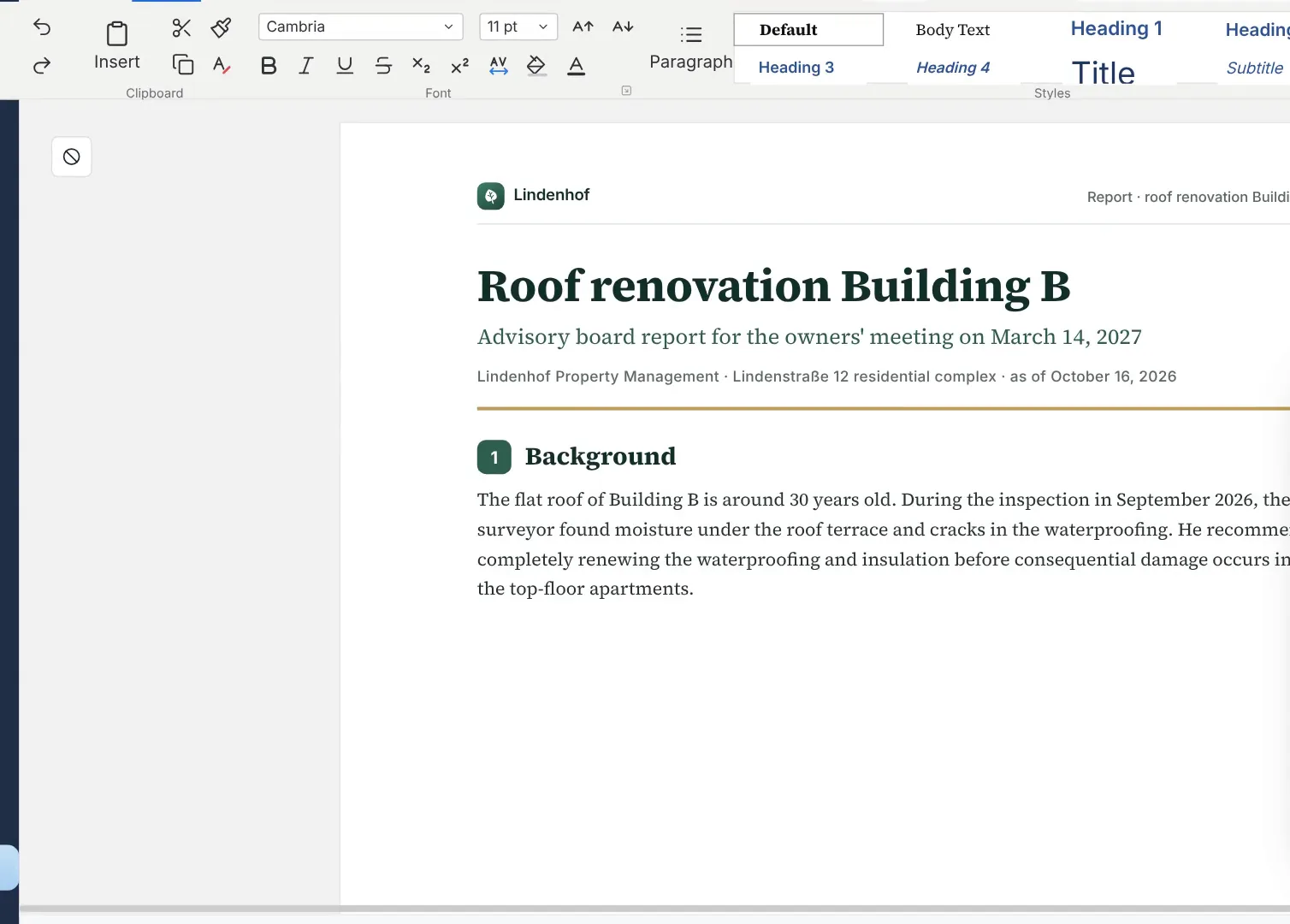
Nexoria Doc: continue editing a draft
A draft report in Nexoria Doc. Scene from the explainer film with a recreated interface and fictitious sample data.
What is a Word alternative for businesses?
Nexoria Doc is the word processor in Nexoria Office. You open, edit and save your DOCX files and assess the switch using your existing templates. What matters is whether letters, reports and contracts still look and work the way your team needs after editing. The template test shows how your most important documents perform in everyday use.
Doc is based on LibreOffice. VBA macros, Word add-ins and connected mail merge workflows therefore need to be checked separately. This page helps with the decision on word processing. Switching the entire environment is covered in Microsoft 365 alternative: switching the whole suite.
Check your most demanding template in DocMicrosoft Word and Doc compared
| Criterion | Microsoft Word | Doc |
|---|---|---|
| Existing documents | Starting point for your existing DOCX templates | Open and save DOCX; check breaks and features against your own files |
| Templates | Use existing styles and automated workflows as a reference | Compare numbering, tables of contents, fonts and field codes |
| Macros and add-ins | Office extensions depending on application and platform | Check VBA code and Word extensions individually for any need for adjustment |
| AI | Check scope based on Microsoft plan and Copilot offer | Nex is part of the platform; test the writing tasks you need in practice |
| Costs | Word in the selected Office plan; consider a possible AI add-on licence or bundle offer separately | Doc together with Calc and Slides in the Nexoria core product |
The word processing features are described in Doc in detail. For document creation based on shared documents in the chat, see Documents and presentations in the Nex AI chat.
What matters when switching from Word
Styles and page layout
Start with a copy of your most demanding template. Check heading hierarchy, spacing, headers and footers, page numbers, tables and embedded graphics. Compare the result with your existing reference. In particular, test documents where an extra page or a different break affects the workflow.
Numbering, tables of contents and fields
Update tables of contents, cross-references and field codes after making a change. Add and remove paragraphs in nested lists. Record whether numbering and references are still correct afterwards. Also check these processes after changes and after saving again.
Mail merges and recipient sources
Note where recipient data comes from and which steps are needed to produce the finished letter. Test field mapping, salutations, special characters and output with suitable sample data. If your process depends directly on existing Outlook or Exchange workflows, clarify whether they can still be used before switching. Plan the setup of these connections as a separate step.
Macros and add-ins
The LibreOffice Help on Office files and macros describes differences between the macro environments and the adjustments required. Besides checking that the macro code is preserved, check that it runs and plan for any necessary adjustments.
Word extensions also need their own inventory. Microsoft distinguishes modern web-based Office Add-ins from older COM/VSTO extensions for Office on Windows. Check each contract, citation or specialist application workflow you need separately.
Round trip and acceptance
Save the test file and reopen it in Word. Check the same points and the exchange with your external partners. Document discrepancies and the decision of the person responsible. Only then switch over suitable document groups step by step.
Consider files and AI processing separately
According to the operator, documents are stored in Germany. For AI answers, relevant content may be transferred to the Mistral AI API. Technical error monitoring runs via Sentry, based in the USA, without access to document content. For the optional VoiceBot, Telnyx (headquarters USA, EU branch Ireland) provides the telephone connection. Check the features you need and the data flows under Security and privacy.
ChatGPT, Claude, Gemini and Langdock can optionally be connected via your own provider account and a Nexoria MCP after approval by the company administrator. For transmitted content, the terms and settings of the respective provider must be checked. You choose the optional connections that suit your business.
Doc as part of Nexoria
At the core are Nexoria Drive, document search and Nex for working with existing documents. Nexoria Office adds Doc, Calc and Slides. Workspaces, OCR and transcription, tasks, automations and chatbots are part of the wider platform scope; the workflows you need and their setup are agreed specifically. Mail, Meet and VoiceBot are optional add-ons.
SharePoint, OneDrive and Google Drive can be connected as knowledge sources on request. We set up the integration depending on your environment and permissions. On request, we also look into connecting other storage, CRM, ERP and in-house systems.
How much does the Word alternative cost?
Doc is offered as part of Nexoria. Base costs €29 net per user per month, Pro €299 net per month for five users; on Pro, each additional user costs €20 per month. Nex is included. Mail and Meet are booked in addition if needed. Take a look at the pricing.
For comparison: Microsoft lists €11.00 per user per month for Apps for Business on an annual subscription billed annually with automatic renewal. Business Standard with Teams costs €12.13 per user per month on an annual subscription billed annually with automatic renewal, or €14.56 per user per month on a monthly subscription. All Microsoft prices mentioned are plus VAT. These are Office package prices. Retrieved: 29 September 2026.
Assess the Microsoft base licence, the Copilot add-on licence and combined offers separately; included features and promotional terms may differ. The AI distinction is explained in Microsoft 365 Copilot and Nex compared. Besides licences, also take into account storage requirements, template adaptation, training and setup.
Safeguard existing Word workflows in a targeted way
Record key macros, add-ins, mail merge processes and your partners' mandatory layout requirements. Use your existing Word workflow as a reference and agree on clear acceptance criteria. Switch over each document group once the test in Doc meets these criteria and any necessary adjustments are complete.
When you should take a closer look at Doc
Doc is worth a concrete template test if you want to continue editing existing DOCX files and connect your writing work with your knowledge platform. Choose representative documents, check the features you actually need and factor data flows and contract documents into your decision. Record the results as the basis for your rollout.
Frequently asked questions about the Word alternative
Can I keep using my Word files in Doc?
Doc opens and saves DOCX files. Using copies of your documents, check page breaks, numbering, tables of contents and field codes in particular. Also reopen the edited result in Word and compare rendering and features against your acceptance criteria.
Does Doc carry over styles, mail merges and macros?
Test your letter, report and contract templates, including the recipient sources for mail merges. Check VBA macros and Word add-ins individually for any need for adjustment and test the required workflows before switching. Costs, Microsoft account and AI: answers on the Microsoft 365 alternative.
How do I prepare the switch from Word to Doc?
Start with copies of your most frequently used and most demanding templates. Document discrepancies in layout, form fields and automated workflows. After a successful template test, switch over step by step and plan the setup of your automated workflows separately.
Where are my documents stored with Doc?
According to the operator, documents are stored in Germany. AI answers may transmit relevant content to the Mistral AI API. Optional integrations with ChatGPT, Claude, Gemini and Langdock use your own provider account and a Nexoria MCP after admin approval. For these, check data flows, contractual terms and settings.
How does Nex help with writing in Doc?
Nex is the AI assistant of the Nexoria platform and supports work with texts and shared documents. Check the features your writing process needs in Doc using your own tasks. AI output requires expert review. The separate comparison explains how licences and features differ from Microsoft 365 Copilot. Microsoft 365 Copilot and Nex compared.
Which template should I bring for a test?
Choose a document with the styles, numbering, tables of contents and field codes you actually need. Remove confidential content or use suitable sample data. Record which rendering and which workflow must still work unchanged after saving.
More comparisons
- Excel alternative: workbook test with Calc
- PowerPoint alternative: Slides and .pptx
- Microsoft 365 alternative: switching the whole suite
Sources and as-of date
The competitor information was checked on 29 September 2026 against the following primary sources. LibreOffice documentation describes the technical foundation, not automatically every feature available in Nexoria.
- Microsoft: Business plans and pricing: Apps for Business and the distinction between combined Copilot offers.
- Microsoft: Business Standard: plan with Teams, annual and monthly subscription, taxes.
- Microsoft: Office Add-ins platform overview: extension models and platform dependency.
- LibreOffice Help on Office files and macros: file formats and differences between the macro environments, help version 26.8.
Offers and product scope may change. The specific offer is binding. Microsoft and Word are trademarks of Microsoft Corporation; they are mentioned for the purpose of objective comparison.
Check your most demanding template
Bring a suitable copy of your contract template, report or mail merge letter. Together, we check the key requirements and record which points need to be clarified before switching.