




Nexoria
Get started

Workspaces: limit AI access to your team's documents

Access is not controlled at the model but at the knowledge space. In Nexoria, this space is called a workspace: each workspace has its own members, its own roles and its own knowledge base. Nex, document search and every chatbot answer questions only from the workspace to which they are assigned. Anything a team has not shared does not appear in any answer.

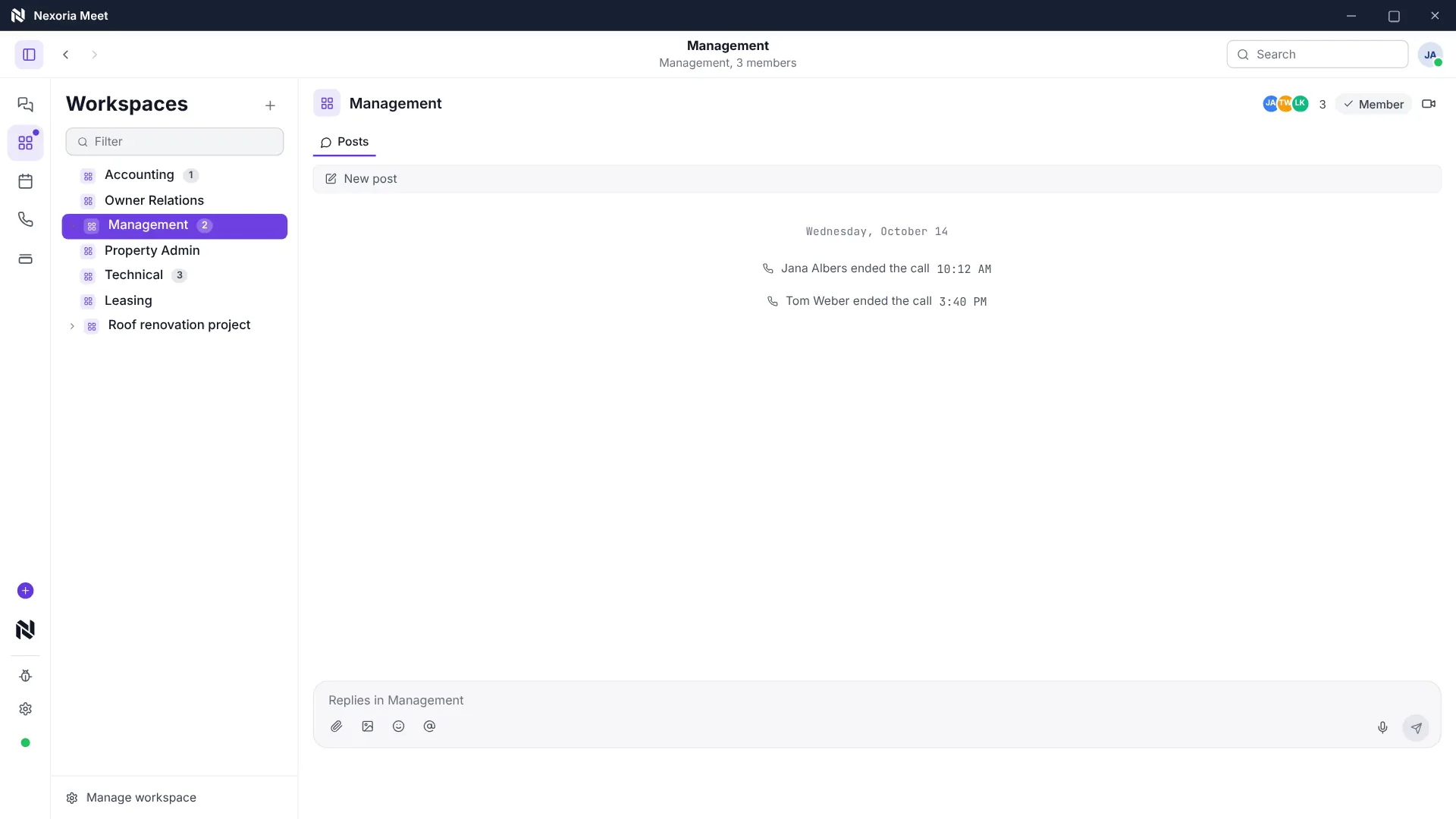
Compared with Confluence · Team knowledge See members and roles, plus an example of how Nex takes the accessible knowledge areas into account.

Workspaces in everyday work

The right knowledge for the right team.

Organise content by team and project. Roles and sharing permissions determine who may work with it.

Compared with SharePoint · Team files

Share knowledge with the right people

Workspaces, roles and sharing permissions determine who may use which content. These permissions also apply to search, Nex and assigned chatbots.

During a business handover, you make documented processes, documents and responsibilities accessible to the new management.

Scene from the explainer film: Nex searches only workspaces you are a member of. Fictitious sample data.

Watch video: Workspaces and knowledge areas

INTEGRATE YOUR TOOLS

Project knowledge: what you can work with.

Drive and assigned chatbots use the workspace framework. Connections to external databases or calendars are assessed for each project.

Custom integrations depend on the interface and permissions of your system.

WHAT THIS LOOKS LIKE DAY TO DAY

Bring documents and tasks together.

Each workspace has its own knowledge base. Organise files and structured data, assign tasks and calendars, and keep the project context together.

  • Files
  • Databases
  • Tasks
  • Calendar
Organise project knowledge
Planning
01Files
In progress
02Databases
Review
03Tasks
Functional diagram · Sample data

This is Nexoria

Your teams. In shared workspaces.

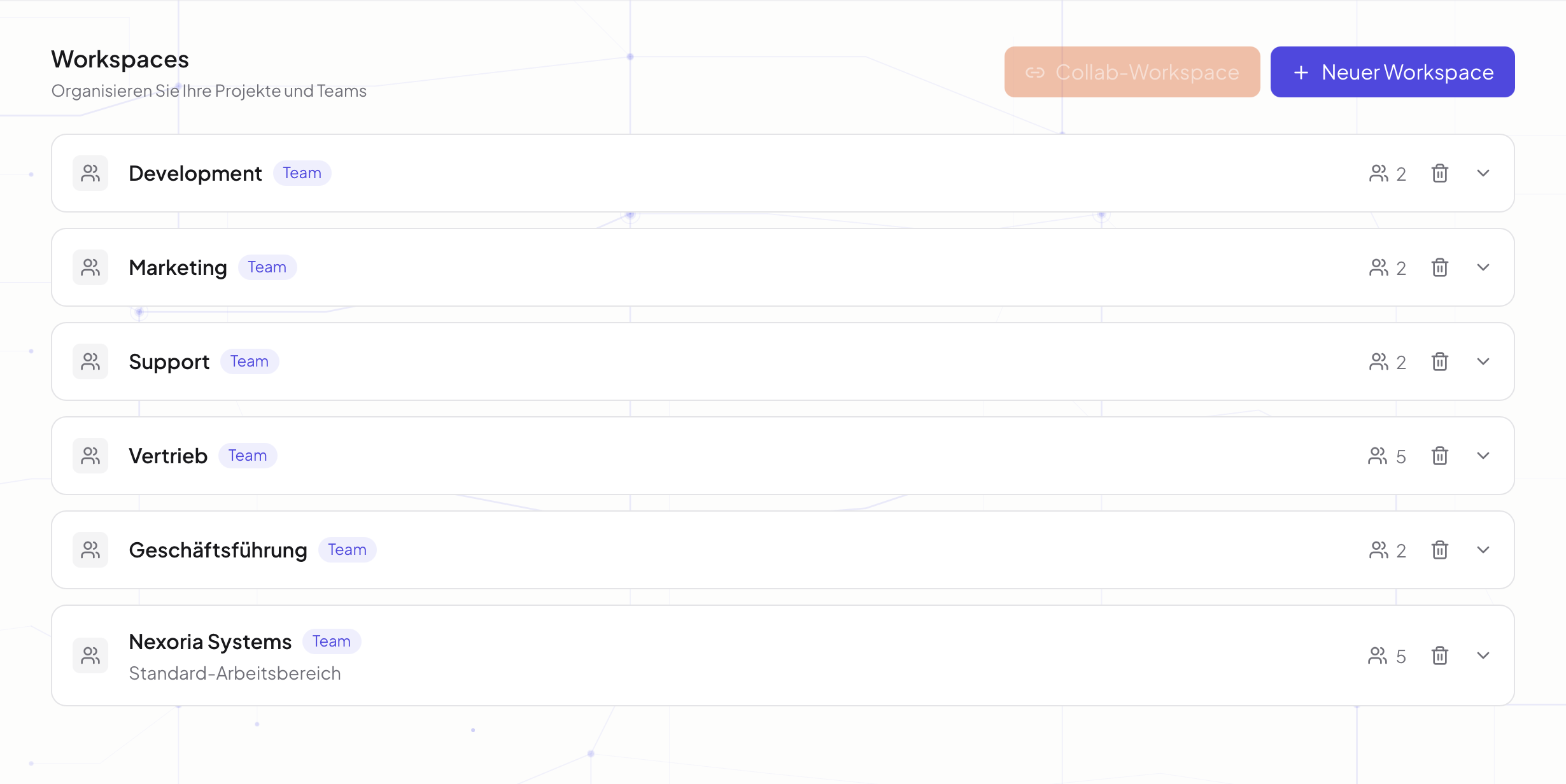
The Workspaces overview in Nexoria: teams, work areas and members at a glance.

The Workspaces overview in Nexoria: teams, work areas and members at a glance.
Real product view
Project knowledge: all the detailsPrerequisites, background and frequently asked questions

Definition

What are Workspaces?

Workspaces determine which people and which chatbots may see which content; databases structure the knowledge within them.

A workspace is a self-contained work and knowledge space within a tenant. It has its own knowledge base with folders and documents, its own databases, tasks, an assignable calendar and a member list with roles. It is therefore not a folder with sharing checkboxes but the object to which permissions are attached.

The difference is practical. A folder share describes who may open a file. A workspace describes which body of knowledge exists at all for which people and which programs. Only the second question determines what an AI assistant can use in an answer.

Problem

The problem

Company knowledge should be findable in one central place, yet not everyone may see everything. Personnel files, draft contracts, cost calculations and client documents belong to different circles. In folder structures that have grown over time, this conflict is resolved through hundreds of individual shares that, after a few years, nobody can fully keep track of any more.

An AI assistant makes the situation worse. A semantic search finds content by its meaning, not by file name. As a result, it also brings to light things that nobody would have searched for deliberately. Anyone who points an AI at an undivided collection of all content makes every accidental share from past years retrievable in one go.

How it works

How the separation works

The restriction is not an instruction to the language model but a check that comes before it. A model that is supposed to ignore a passage has already seen the content. A check that applies beforehand never delivers it in the first place. Four levels work together.

  1. Step 1

    Tenant

    The top-level boundary runs between customer companies. Data isolation takes place per tenant at database and vector store level, and no two companies share an index.

  2. Step 2

    Workspace

    Within a tenant, the workspace separates knowledge spaces by team, department or project. Each workspace has its own knowledge base, which forms the complete search space for searches and answers.

  3. Step 3

    Role

    Within a workspace, a distinction is made between the roles Admin, Member and Viewer. The role is assigned per workspace, so the same person can have different roles in different spaces.

  4. Step 4

    Individual request

    With every access, the server checks the permission again, on every API endpoint. The check therefore does not sit in the interface but behind it.

Nexoria solution

What Nexoria does with this

The workspace boundary applies to every point of access to company knowledge, not just the file browser. This affects three places that would otherwise each need their own permissions model.

  • Nex, the AI assistant, answers from the workspace in which the question is asked and cites the source from exactly that content.
  • The semantic document search searches the same restricted index, both in the chat and in its own search window.
  • A Chatbot is assigned to exactly one workspace. A bot for website visitors therefore receives only the knowledge space intended for the public.

Collaboration across company boundaries

For projects with external parties, there are Collab workspaces. Invited partners see the shared space and nothing beyond it. Tasks and calendars can also be assigned to a workspace, so that collaboration does not move into another tool at the permissions boundary.

Logging

Security-relevant actions such as logins, changes and deletions are logged with a timestamp, user ID and IP address. This is set out in the Data processing agreement under § 6. Further information on security and operations can be found on Security and privacy.

Product data

Workspaces fact sheet

Product fact sheet

Workspaces and databases

Workspaces determine which people and which chatbots may see which content; databases structure the knowledge within them.

Category
Permissions and knowledge space management for businesses
Problem
Replaces rigid folders and global sharing; not every employee gets access to all of the company's content.
Target group
Businesses; the offer is aimed at business customers within the meaning of Section 14 of the German Civil Code (BGB).
Core features
  • Separate knowledge spaces for teams and projects
  • Structured databases per workspace
  • Team collaboration with roles and permissions
  • Cross-company Collab workspaces
Input
Members and roles, documents, links and databases per workspace
Output
Separate knowledge spaces with access permissions that also apply to chatbots
Integration in Nexoria
Included in the core product; a workspace's permissions apply equally to search, Nex and chatbots.
Privacy
Role model with Admin, Member and Viewer, strict data isolation per tenant at database and vector store level.
Hosting
Files, the knowledge index and semantic search run on dedicated servers in Germany.
Status
Feature available. Registration and online purchase of the Base and Pro plans have been available since 15 September 2026.

Requirements

Requirements

  • A Nexoria core product, Base or Pro plan. Workspaces are included and are not an add-on. The terms are on the pricing page.
  • Content intended to serve as company knowledge is stored in Nexoria Drive and is assigned to the respective workspace.
  • A decision on which knowledge spaces there should be. This structure is an organisational question and cannot be derived from a folder structure that has grown over time.
  • Members are added by email address and are given a role. People outside your own company can also be invited.

Processing

Data protection and infrastructure

Access separation is also a data protection measure. Art. 5(1)(f) and Art. 32 of the General Data Protection Regulation require personal data to be protected against unauthorised access. The division into knowledge spaces is the part of this that a company configures itself.

Levels of access separation in Nexoria. As of .
LevelEffectSource
TenantStrict data isolation per tenant at database and vector store level, a role model with Admin, Member and Viewer, server-side permission checks on every API endpoint.processing register
checked on
WorkspaceA separate knowledge base for each team or project. Search and answers access only the content of the respective workspace.Product overview, Workspaces and databases section
checked on
ChatbotA chatbot receives only the knowledge of the workspace assigned to it.Product overview, Chatbots section
checked on
EncryptionTLS 1.3 for all connections, WireGuard VPN between servers, AES-256 for OAuth tokens, daily encrypted backups with AES-256.processing register
checked on
Processing locationFiles, the knowledge index and semantic search run on dedicated servers in Germany.Security and privacy
checked on

Evidence

In Nexoria's verified Mistral organisation, the use of new API interactions for model training is disabled (account check of 26 September 2026). This setting applies to new interactions processed there. For your own optionally connected AI accounts, the settings of the respective account apply.

Source: Mistral training setting. Checked on .

Legal citations substantiate the content of the provision, not Nexoria's compliance with it. The information on the company's own architecture is provided by Nexoria Systems UG (haftungsbeschränkt) itself and has not yet been externally audited.

Features

Specific features

  • Separate knowledge spaces for departments and projects, each with its own knowledge base.
  • Structured databases per workspace, for content that does not exist as a file.
  • Member management with the roles Admin, Member and Viewer.
  • Invitation by email address, including across company boundaries.
  • Collab workspaces as a shared area with external partners.
  • Assignment of a chatbot to exactly one workspace.
  • Tasks and calendars can be assigned to a workspace and are visible to its members.
  • Automatic indexing of a workspace's content for document search and Nex.

Where this component fits into the overall picture is shown in the component overview.

Comparison

Comparison with the conventional approach

The comparison is between categories, not specific products: storage with per-folder sharing versus a knowledge space with its own permissions. Product-specific comparisons can be found on the comparison pages.

Per-folder sharing and workspaces in Nexoria. As of .
AspectPer-folder sharingWorkspace in Nexoria
Where permissions are attachedOn the individual folder or the individual fileOn the knowledge space, which includes documents, databases, tasks and calendars
Effect on searchThe index knows the entire content; the permission check is a second stepThe index searched is already that of the workspace
Effect on an AI assistantNot provided for; the separation has to be rebuilt in the AI toolNex and document search work on the same restricted content
External collaborationIndividual shares or links per folderCollab workspace with a clearly defined shared area
Publicly accessible chatbotNot part of the modelThe bot receives the knowledge of exactly one workspace

FAQ

Frequently asked questions about Workspaces

Can Nex access documents that belong to another team?

No. Nex answers questions from the knowledge base of the workspace in which the question is asked. Content from a workspace that the person asking does not belong to is available neither as an answer nor as a source reference.

What does a workspace include?

Its own knowledge base with folders and documents, its own databases, tasks, an assignable calendar and the members with their roles. A workspace is therefore not a folder but the area to which permissions are attached.

What roles are there in a workspace?

Admin, Member and Viewer. The role is assigned per workspace, not once for the entire company. The same person can be an Admin in one workspace and not appear at all in another.

Can external partners be invited to a workspace?

Yes. For collaboration across company boundaries, there are Collab workspaces. Invited people see only the content of that one workspace, not the rest of the inviting company's content.

Do workspace permissions also apply to chatbots?

Yes. Each chatbot is assigned to exactly one workspace and answers only from its knowledge base. A bot on the public website therefore receives only the knowledge that has been shared for it.

Where does the separation end, technically?

Data isolation takes place per tenant at database and vector store level, and the permission check runs on the server side on every API endpoint. Both are documented in the processing register under the technical and organisational measures.

How are workspaces billed?

Workspaces are included in the Nexoria core product and are not an add-on. Billing is based on users and storage; the terms are on the pricing page. You decide how to divide up your knowledge spaces during setup.

Contact

Next step

Which knowledge spaces a company needs is decided before the first indexing. In a conversation, we go through the division with you, together with the roles and the content that is to move to Nexoria Drive.

Sources

As of

  1. Regulation (EU) 2016/679, General Data Protection Regulation. Publications Office of the European Union, 2016. https://eur-lex.europa.eu/eli/reg/2016/679/oj Retrieved on .Source for Art. 5(1)(f) and Art. 32, to which the statements on access restriction refer.
  2. Processing register under Art. 30 GDPR. Nexoria Systems UG (haftungsbeschränkt), 2026. /legal/verzeichnis Retrieved on .Source for tenant separation, the role model, server-side permission checks and encryption.

As of

Think further. Discover more.

Connect knowledge.
Discover Nexoria

Manage files

Learn more ↗
Work together.
Discover Nexoria

Consulting

Learn more ↗
Next step.
Discover Nexoria

Security & privacy

Learn more ↗

Knowledge that
moves you forward.

Discover Nexoria