





Excel alternative for businesses: Nexoria Calc
Nexoria Calc is a spreadsheet application based on LibreOffice. You edit XLSX files with formulas, charts and pivot tables. Whether Calc suits your company depends on your actual workbooks: are results, data retrieval and exchange with other parties still correct after the switch?
Nexoria for Excel alternative
Excel alternative: what it brings to your team.
WHAT THIS LOOKS LIKE DAY TO DAY
Keep calculating with your existing workbooks.
Calc opens and saves XLSX files and supports formulas across multiple worksheets. Use charts, pivot tables and conditional formatting for your own data.
- XLSX
- Cell references
- Pivot tables
- Charts
Check the calculations in your own workbook.
Compare result cells, rounding and cell references against predefined target values. Document discrepancies before switching over.
- Formulas
- Target values
- Result check
Check more than the visible worksheet.
Note the macros, add-ins and external data connections you need. You can arrange a test of your key workbooks with us before switching.
- VBA
- Add-ins
- Data connections
- Test workbook
This is Nexoria
Nexoria Calc: Analyse figures
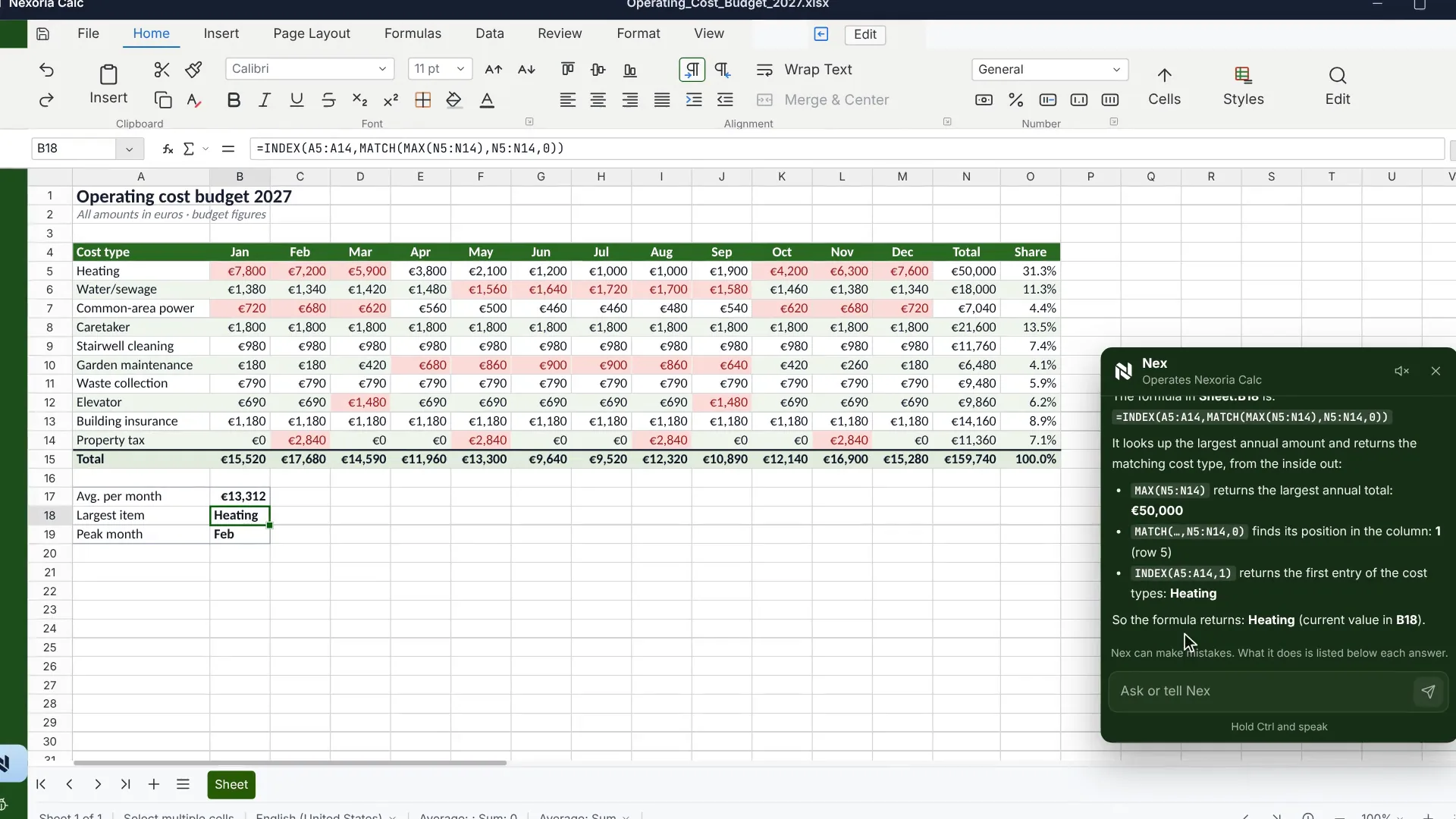
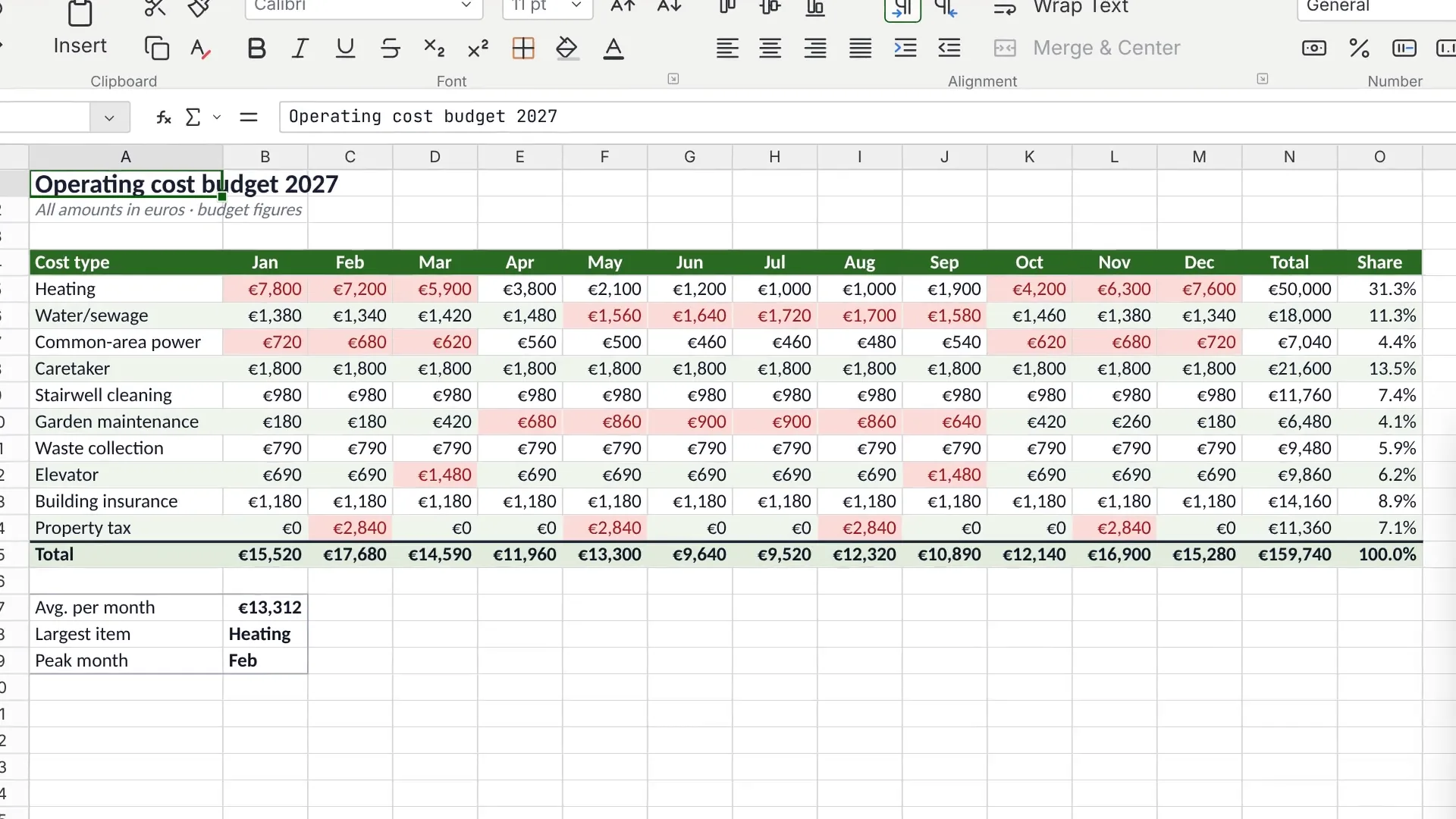
An operating cost plan in Nexoria Calc with monthly values, totals and shares. Scene from the explainer film with a recreated interface and fictitious sample data.
Which Excel alternative suits your company?
For spreadsheets within another online suite, see Google Workspace with Gemini compared. For the options of a self-hosted suite, see Self-hosting open-source suites: Nextcloud comparison for context. This page focuses on the specific workbook test with Calc.
Get to know Nexoria Calc in a demo: edit XLSX files, work with formulas and create analyses with charts and pivot tables. We show you Calc and discuss how it supports your spreadsheet work.
Calc is part of Nexoria Base: €29 per user per month plus VAT, billed monthly. We agree setup and customisations individually based on your workflow.
Editorially updated on
Is the Excel alternative free and suitable for commercial use?
Calc is part of the paid Nexoria business platform and is intended for use in companies. Base costs €29 per user per month, excluding VAT. Pro costs €299 per month for five users, excluding VAT; each additional user in this package costs €20 per month. Calc is included in the platform price. Take a look at the pricing.
The scope of Calc at a glance
Calc opens and saves XLSX files. Formulas, references across multiple worksheets, charts and pivot table analyses are part of the described scope. Details are shown in Nexoria Calc in detail. Check the features that matter to your team with a representative workbook.
Record VBA macros, add-ins, data sources, Power Query and Power Pivot separately. Plan a functional test for these workflows and, if necessary, adjustments. For any AI support you want, also define specific tasks and test results.
Excel and Calc side by side
| Checkpoint | Current Excel workflow | Test in Calc |
|---|---|---|
| Formulas | Record expected results and the functions used | Compare identical inputs, result cells and rounding |
| Pivot tables and charts | Document source ranges, filters and refresh | Recheck the analysis after changing the data |
| Macros and add-ins | Record the required extensions and automated steps | Check the execution and results of each required workflow |
| Data sources | Record queries, permissions and refresh steps | Check Power Query and Power Pivot as separate migration tasks |
| File exchange | Keep the original workbook as an unchanged reference | Save the edited copy and check it again in Excel |
Your log for the workbook test
The comparison table lists the checkpoints. This template records your actual results. Work with an approved copy and note the file version, test date and the Excel and Calc versions used in your own documentation.
| Review | Expected result | Observation / open task |
|---|---|---|
| Result cells and rounding | … | … |
| Pivot table and chart after data changes | … | … |
| Required macro or add-in | … | … |
| Refresh external data source | … | … |
| Reopen the saved copy in Excel | … | … |
| Business sign-off for the workflow | … | … |
Mark each check as passed, open or not relevant for this workbook. One workbook that works says nothing yet about other workbooks. Discuss open dependencies before you switch over a production workflow.
What matters when switching from Excel
Opening XLSX files is where the comparison begins
A meaningful workbook test covers opening, calculating, editing and passing files on. Check number and date formats, cell references, named ranges and the functions that matter for your workflow. Choose traceable target results before you change any data. For large files, also measure opening, calculation and saving times with your actual files.
Pivot table analyses and charts
Change the underlying test data and refresh your analysis. Compare groupings, filters, grand totals and chart axes. Also check the printout or output that your team actually passes on. Use changed test data and traceable target results for this.
VBA, add-ins and external data
The LibreOffice help on VBA support explains the supported scope and the adjustments required. You should therefore check each VBA macro you need individually in Nexoria Calc and plan for the effort of adapting them.
Microsoft describes Power Query as a data preparation tool with repeatable queries. So record not only the visible result sheet, but also data retrieval, transformations, sign-ins and refresh. Calc has no equivalent for Power Query and Power Pivot. For a move to Calc, the entire required workflow must have been successfully tested or suitably replaced.
Responsibilities and approval
Assign a responsible person to each important workbook. They define the test criteria and decide on the switch based on documented results. The organisation of access areas via Workspaces and access permissions should be checked separately from questions about simultaneous spreadsheet editing. Include the features you need for co-editing and versioning in your hands-on test.
Files, search and AI
Nexoria Drive, document search and Nex form the core of the platform. Calc complements this with spreadsheet editing, and Doc and Slides with work on texts and presentations. Further workflows can involve workspaces, OCR and transcription, tasks, automations and chatbots. Mail, Meet and VoiceBot are optional add-ons.SharePoint, OneDrive and Google Drive can be connected as knowledge sources on request. We set up the integration depending on your environment and permissions. On request, we also look into connecting other storage, CRM, ERP and in-house systems.
Your documents are stored in Germany. For AI answers, the Mistral AI API processes relevant content. Technical error monitoring runs via Sentry, based in the USA, without access to document content. For the optional VoiceBot, Telnyx (headquarters USA, EU branch Ireland) provides the telephone connection. You can find the data flows of the individual services in our privacy overview. ChatGPT, Claude, Gemini and Langdock can optionally be connected via your own provider account and a Nexoria MCP integration after admin approval. Check Security and privacy, contractual terms and account settings for the features you need.
What does the Excel alternative cost?
Calc is part of the Nexoria core product; the prices are in the “free of charge” section above. Also take into account any additional storage you need, optional products, training and adaptations to your workbooks. This lets you compare the total cost of your actual workflow.
For comparison, Microsoft lists €11.00 per user per month for Apps for Business, billed annually on an automatically renewing annual subscription. Business Standard with Teams costs €12.13 billed annually or €14.56 on a monthly subscription, in each case plus VAT. These are Office package prices, not standalone prices for Excel. Retrieved: 29 September 2026.
Distinguish between the Microsoft base licence, the Copilot add-on licence and combined offers. The distinction between features and plans is explained in Microsoft 365 Copilot and Nex compared. Nex is part of the Nexoria platform; specific AI features within Calc must nevertheless be checked against the workflow you need.
Targeted safeguards for existing Excel workflows
Test key macros, add-ins, Power Query queries and Power Pivot models before switching. Only switch these workflows after a successful test or a verified replacement solution. For large workbooks, also include run times, and for external interfaces, the complete data exchange.
When you should take a closer look at Calc
Calc is a candidate for a workbook test if you want to continue editing existing XLSX files and connect them to your knowledge platform. Start with a representative calculation or analysis. Factor data flows, responsibilities and the round trip back to Excel into your decision.
Frequently asked questions about the Excel alternative
Can I keep using my Excel files in Calc?
Check copies of your XLSX workbooks in Calc. Compare result cells, formats, charts, pivot table analyses and external links. Save the copy and open it again in Excel to check the round trip as well.
How do I prepare VBA macros, Power Query and Power Pivot for the switch?
Record macros and data connections as separate migration tasks. Check execution, refresh and results with your workbooks. Plan for adjustments or a replacement solution if necessary, and switch the workflow over after a successful test.
Is Calc a viable Excel replacement for businesses?
That depends on your workbooks and processes. Test the most important formulas, pivot table analyses, macros and data sources against traceable target results. Switch the workflow over after a successful test and business sign-off.
Where are my spreadsheets stored?
Your documents are stored in Germany. For AI answers, the Mistral AI API processes relevant content. You can find the data flows of the individual services in our privacy overview. Optional integrations with ChatGPT, Claude, Gemini and Langdock use your own provider account and a Nexoria MCP after admin approval. For these, check the data flows, contractual terms and settings.
How do I incorporate Nex into my work with spreadsheets?
Calc adds spreadsheet editing to the Nexoria platform; Nex supports work with shared company knowledge. Define the spreadsheet tasks you want for a hands-on test and check the results for subject-matter accuracy. The Copilot comparison helps you assess features and licence scope. Microsoft 365 Copilot and Nex compared.
How do I plan the switch from Excel to Calc?
Make a list of the workbooks, data sources and automated steps you use. First test a representative copy, document discrepancies and check the round trip back to Excel. Costs, accounts and general AI questions are covered in the comparison of the whole suite. Costs, Microsoft account and AI: answers on the Microsoft 365 alternative.
Check the switch using your own workbook
- Back up a starting copy: Use a representative workbook as a test copy and keep the original unchanged.
- Record target results: Document important result cells, formulas, charts and pivot table analyses.
- Record dependencies: Note macros, add-ins, external data sources, Power Query and Power Pivot. Check execution and refresh individually.
- Check file exchange: Save the edited copy and open it again in Excel. Check the same result cells, formats and links.
- Document the decision: Note the result and any discrepancy for each criterion. Only switch over once discrepancies have been resolved and the responsible person has given approval.
More comparisons
- Microsoft 365 alternative: switching the whole suite
- Word alternative: Doc and .docx
- PowerPoint alternative: Slides and .pptx
Sources and as-of date
Primary sources, retrieved on 29 September 2026:
- Microsoft: Business plans and pricing: Apps for Business and combined Copilot offers.
- Microsoft: Business Standard: plan with Teams, annual and monthly subscription, taxes.
- LibreOffice help on VBA support: scope and limits, help version 26.8. The documentation of the underlying software does not automatically confirm every Nexoria feature.
- Microsoft: What is Power Query?: data preparation, queries and different deployment environments, page as of 20 August 2026.
The specific offer and the scope of features actually agreed are binding. Microsoft and Excel are trademarks of Microsoft Corporation; they are mentioned for the purpose of objective comparison.