





Cloud storage with AI for businesses: store files and make their content usable
Cloud storage with AI does not just store company files but indexes their content, so that search and AI can work with it. At Nexoria, Nexoria Drive is the file storage. From the same content, document search finds information with source citations, and the AI assistant Nex answers questions on that basis. Files and the index are stored on servers in Germany, and search runs there too.
Nexoria for Cloud storage with AI
Cloud storage with AI: what it brings to your team.
WHAT THIS LOOKS LIKE DAY TO DAY
Keep working with your familiar folders.
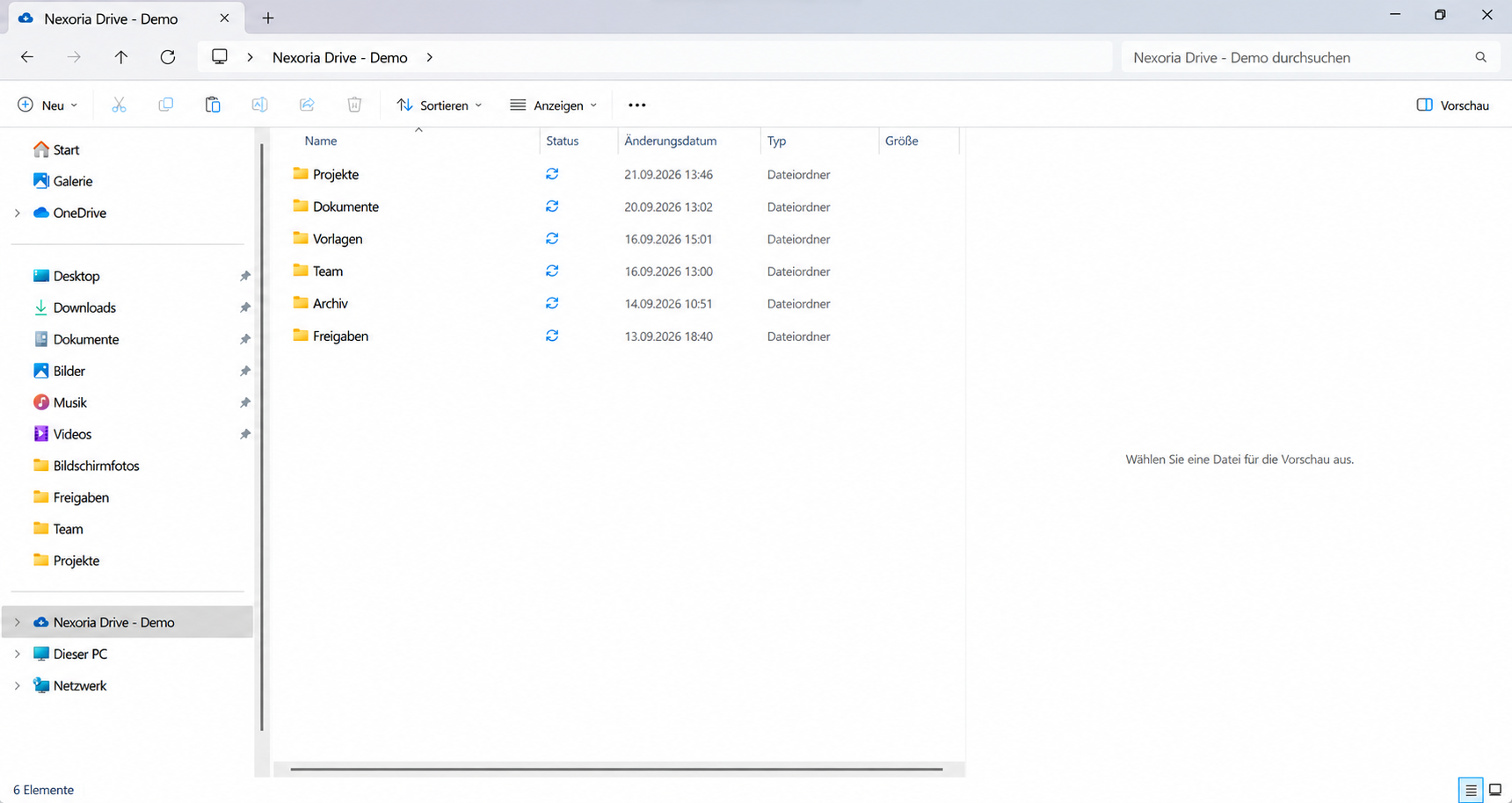
Nexoria Drive appears as a drive in Windows File Explorer. Store files and edit documents in your familiar folders.
- File Explorer
- Folders
- Files
- Edit
Search for content instead of file names.
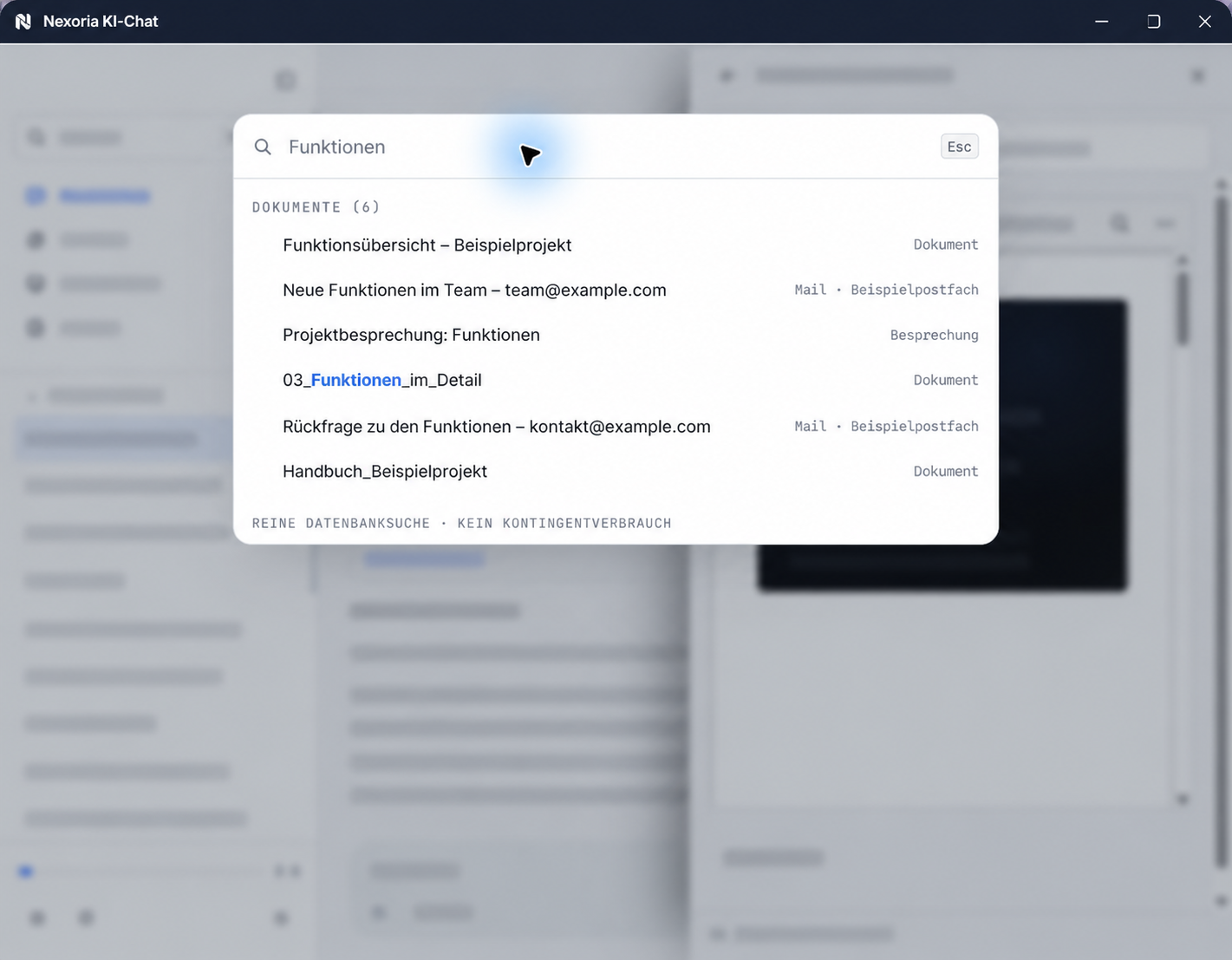
Shared files are indexed and made available for document search. Questions in natural language lead to relevant passages with references to the original document.
- Approval
- Index
- Source
Use files for your next task.
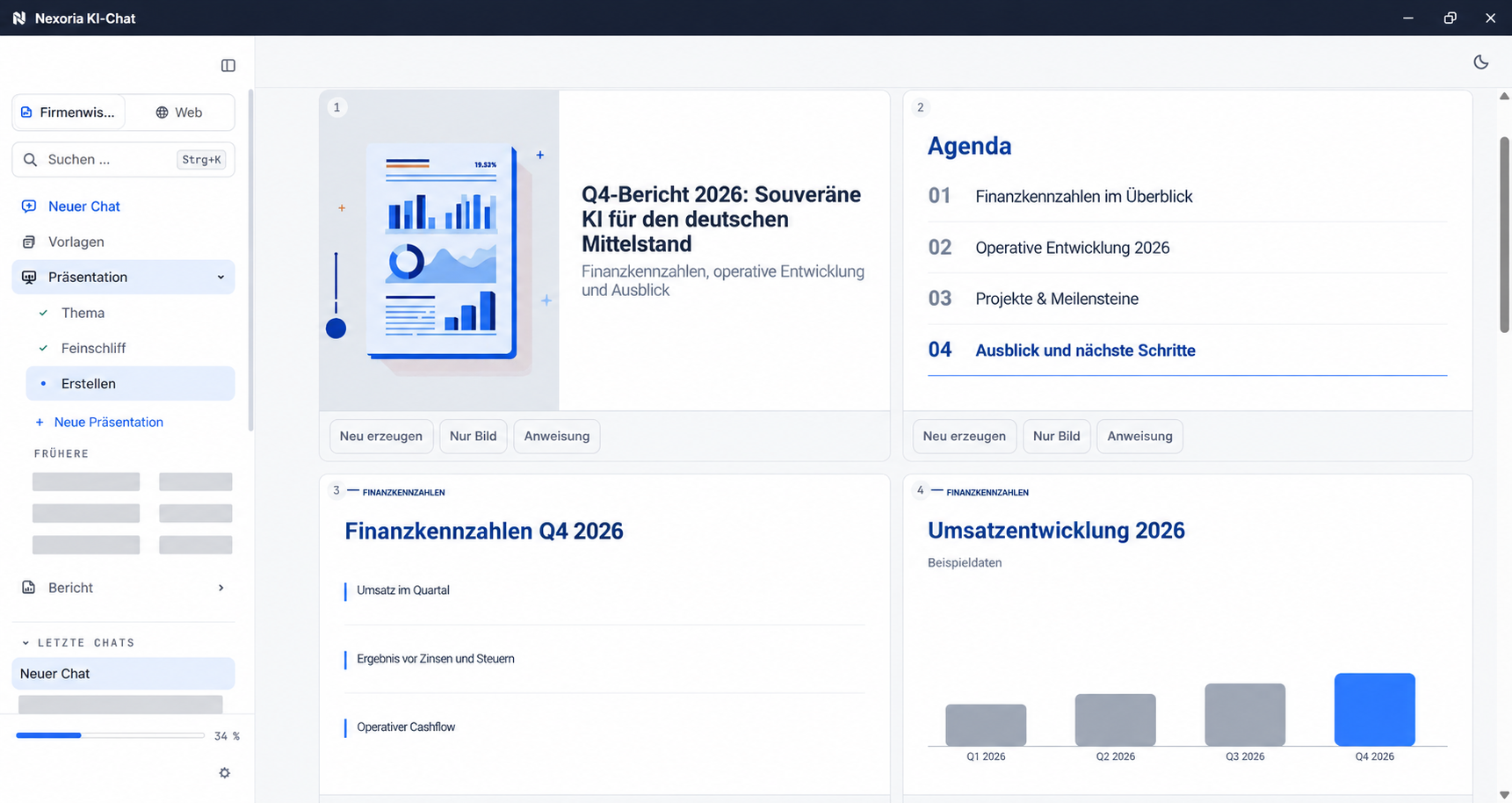
Nex accesses the shared body of knowledge. Have content summarised or create new documents from selected sources directly in the AI chat.
- Summary
- Source document
- New draft
What is cloud storage with AI?
Cloud storage with AI is file storage whose content is also indexed automatically. The difference from ordinary storage lies not in the storage itself but in what becomes possible with the content afterwards: a search by meaning instead of by file name, and an answer that comes from your own documents and cites its source.
The term is used inconsistently. It makes sense to tell them apart using three questions: does the AI work on the same content as the file storage, or on a second copy? Do the access permissions of the file storage also apply to AI answers? And where are the index, search and answer processed? Offerings differ far more on these three points than in their feature lists.
From stored document to the right answer
Well-organised file storage makes files accessible. A content index complements this access: your team searches by topics and questions from everyday work and goes from the matching passage to the source document. This means existing knowledge can be used even when the file name or the exact wording is unknown.
If files are copied manually into an additional AI tool, the copies and their access permissions have to be maintained separately. With connected systems, check how changes and permissions are carried over. The data protection question thus shifts from the file storage to a tool that often nobody has approved.
How file storage and AI work together
There are four steps between the stored file and an answer. They look similar with every provider; what matters is whether all four run on the same content.
- Store. The file reaches the storage via a drive, a sync or an upload.
- Index. The storage reads the text from the file, splits it into sections and creates an embedding for each section, a sequence of numbers that represents its meaning. For this, scans first need text recognition, and recordings need transcription. This creates the content index.
- Find. A question is converted in the same way and matched against the index. Some systems add a keyword search. Check with your own examples whether numbers, reference numbers and proper names are found reliably.
- Answer. A generative language model formulates an answer from the sections found and refers to the source. This method is called Retrieval Augmented Generation, abbreviated to RAG.
A generative language model is used for the answer. Indexing and search can also use their own models. You should therefore check the services used and the processing locations separately for each step.
Which cloud storage services combine file storage and AI?
There are three common architectures. Which one fits depends on the operating model, not on the range of features. The add-on layer and integrated platform architectures, along with the in-house build, are put in context in the glossary entry AI knowledge management .
Storage from a major provider plus its AI add-on: the add-on layer
If you already use Microsoft 365 or Google Workspace, you can use that provider's AI in your familiar environment: Copilot at Microsoft, Gemini at Google. The existing file storage remains and an AI function is added; the route is short because nothing has to move. Check in advance which AI functions your plan includes, where the index and answers are processed and whether the same permissions apply to AI answers as to the file storage. If you want to replace Microsoft's file storage, you will find the comparison with Nexoria Drive and a five-step migration check under OneDrive alternative.
Open-source storage with retrofitted AI: the self-operated add-on layer
Nextcloud is open-source software for files and collaboration that you run in-house or with a hosting provider. The AI assistant is built into the interface; the models behind it are added via additional backend apps, either on your own server hardware with documented requirements for CPU or GPU and memory, or via a connected AI service. If you want full control over operations, this approach suits you well; updates and operations are then the responsibility of you or your hosting provider. What this involves is covered in the Nextcloud comparison.
One platform in which file storage and AI are the same system: the integrated platform
Here, the storage is also the knowledge base. Storage, index, search and assistant come from one provider and work with the same permissions; there is no export to a second tool. This is the approach Nexoria takes, described in the next section.
The providers named are those for which a comparison is available on this website; the vendors' information is listed under “Sources for context”.
Whether storage with AI is the right type of tool at all, or rather a wiki or a document management system, is compared in the guide Choosing knowledge management software.
How Nexoria connects file storage and AI
In Nexoria, Nexoria Drive is the file storage and at the same time your own knowledge store. On Windows, the drive appears in File Explorer; whatever you store and share there is indexed without anyone having to upload it a second time. The Nexoria Drive page describes the features the drive offers in everyday work.
Two access points work on this index. The Document search finds content by its meaning, cites the source for every result and is available in the AI chat and in a dedicated search window; it does not consume AI tokens. The AI assistant Nex answers questions based on the shared content, with source citations and within the permissions of the person asking.
You define who sees which content in Workspaces , with the roles Admin, Member and Viewer. Search, Nex and chatbots answer questions only from the workspace they are assigned to. File storage, search and AI answers are therefore subject to the same permissions model, and this is exactly what distinguishes an integrated platform from storage with a bolted-on AI tool.
Nexoria is a European work platform. Its core consists of your own knowledge store with Nexoria Drive, document search (enterprise search) and the AI assistant Nex. Built on top of this are: Nexoria Office with Doc, Calc and Slides, Documents in Nex, workspaces and permissions, text recognition (OCR) and transcription, tasks, chatbots and configurable automations. Nexoria Mail, Nexoria Meet and the VoiceBot optionally extend the platform; the VoiceBot requires a Nexoria subscription. For an overview of all components, see Platform.
Connect existing file stores
SharePoint, OneDrive and Google Drive can be connected as knowledge sources on request. We set up the integration depending on your environment and permissions. On request, we also look into integrating other storage, CRM, ERP and in-house systems. Scope, updates and permissions are defined for each integration. For details, see Integrations with SharePoint, OneDrive and Google Drive.
How to select your initial content, set permissions and deal with a folder structure that has grown over time is shown in Implementing knowledge management in a company.
Example: finding the notice period without knowing the file name
The team knows that a maintenance contract exists. They are looking for the notice period; nobody knows which folder it is in or under which file name. For this task, Nexoria combines file storage in Drive with document search and Nex.
The following example uses a fictitious sample contract. It shows step by step how to check an answer together with its source.
| Step | Specific example |
|---|---|
| Store the document | The shared contract is stored in Nexoria Drive and is indexed for the relevant workspace. |
| Ask a question | How long before the end of the contract do we have to give notice? |
| Check the source passage | The sample document states: “The contract can be terminated with three months' notice to the end of the term.” |
| Check the answer | A suitable answer must state this notice period correctly and refer to the document. For a specific termination date, the end of the contract is also needed. |
| Check access | Workspaces control access: a person without access to the relevant workspace receives the contract content neither as a search result nor through an AI answer. |
Document search helps you find and check the source, and Nex formulates an answer based on the content found. The best way to check how both work with your documents is with your own shared sample documents, for example with the document search test tasks or a Pilot with 20 test cases.
Nobody needs to know the folder structure to find things this way. Whether file storage that has grown over time should still be reorganised, for example because of permissions and responsibilities, is answered in the section Folder structure that has grown over time: reorganise or make it searchable?
Comparison with traditional cloud storage
The left-hand column describes the typical pattern of a cloud storage service without a content index, not a specific product. Individual providers, with sources and review dates, are covered on the comparison pages linked under the architectures above.
| Criterion | Traditional cloud storage | Nexoria |
|---|---|---|
| Purpose of the storage | Store, sync and share files | Store files and index their content at the same time |
| Search | File name, folder, full text | Search by meaning, with the source cited for each result |
| Route to AI | Additional tool, content is transferred to it | No export, Nex works on the stored content |
| Permissions for AI answers | Depends on the added tool, often a second permissions model | Workspaces apply equally to storage, search and answers |
| Scans and recordings | Can be stored as a file, content not searchable | Text recognition and transcription bring them into the index |
| Cost of AI | Usually as a separate product per user | Included in the core product, plans under Pricing |
| Search when the AI allowance is used up | Not affected, there is no AI allowance | Document search keeps running and consumes no tokens |
Sources for the right-hand column: plan and token details on Pricing, feature details on Platform, processing locations in the privacy policy, each checked on 24 September 2026.
What should be settled before deployment
- Content: Decide which folders go into Nexoria Drive first or are indexed via a configured integration, and which workspace they are assigned to.
- Storage: Each company receives a storage volume depending on the plan; additional storage is charged based on the source bytes transferred. The volumes for each plan are given under the question “How much storage is included?” below.
- Setup: It is charged individually according to the work involved, depending on the amount of data to be indexed.
You can find plans, storage volumes and terms under Pricing.
Where files are stored and where processing takes place
With storage whose content is also indexed, two questions need to be kept apart: where are the files stored, and where does the processing take place?
Files and the knowledge index are stored on servers in Germany, and search runs there too. Document embeddings and semantic search run on servers in Germany, using models that Nexoria operates there itself. Text recognition and transcription make content from scans and recordings usable for search. Answers from Nex are generated by Mistral AI by default. You can find details of the services involved and the data flows under Security and privacy.
ChatGPT (OpenAI), Claude (Anthropic), Gemini (Google) and Langdock can optionally be connected to Nexoria; Nexoria also works without these integrations, and when one is connected, the terms, processing locations and settings of the respective provider apply. Technical error monitoring and enabled add-on services such as Nexoria Mail, Nexoria Meet or the VoiceBot also have their own data flows; the service providers involved are listed in the processing register.
For your data protection review, you can view the data processing agreement, the processing register and the data protection impact assessment in advance. The information on this page is provided by Nexoria itself; the data flows for each processing step are described in the privacy policy and the processing register.
The data flow step by step, from storage to answer, is shown in the table Data flow by processing step. For processing locations and safeguards for each component, see Security and privacy.
Frequently asked questions about cloud storage with AI
How does cloud storage with AI differ from normal cloud storage?
A normal cloud storage service manages files and finds them by name, folder and full text. Cloud storage with AI also makes the content accessible and builds an index that can be searched by meaning. At Nexoria, shared content from Nexoria Drive is indexed and is then available in document search and in the AI assistant Nex, each time with the source document cited.
How are my files indexed and where is the index stored?
Nexoria reads the text from the shared files, splits it into sections and calculates embeddings for them; scans and recordings first go through text recognition or transcription. The document embeddings are calculated on servers in Germany using models that Nexoria operates itself. The upstream text recognition and transcription are separate processing steps. Like the files themselves, the index is stored on servers in Germany, separated per tenant at database and vector store level.
How much storage is included?
The Base plan includes 10 GB per company, the Pro plan 20 GB per company. Additional storage can be booked and is charged based on the source bytes transferred. Current prices are listed under Pricing.
Can Nexoria Drive be used like a familiar drive?
Yes. On Windows, Nexoria Drive appears as a drive in File Explorer; creating folders and moving and renaming files works as usual. Shared content is indexed without you having to upload it a second time. For details of the features the drive offers, see Nexoria Drive.
Does every search consume AI tokens?
No. Document search does not consume AI tokens and keeps running even when the token allowance has been used up. In that case, Nex does not accept any further requests, but access to your own knowledge through search remains available. The allowances for each plan are listed under Pricing.
Where are the files stored and who processes them?
Files and the knowledge index are stored on servers in Germany, and search runs there too. Answers from Nex are generated by Mistral AI by default. Technical error monitoring and enabled add-on services such as Nexoria Mail, Nexoria Meet or the VoiceBot have their own data flows; the service providers involved are listed in the processing register.
Sources for context
- Lewis et al., Retrieval-Augmented Generation for Knowledge-Intensive NLP Tasks (Advances in Neural Information Processing Systems 33, NeurIPS, 2020). Research paper on the RAG method mentioned in the section “How file storage and AI work together”. Retrieved on 24 September 2026.
- Microsoft Copilot overview (Microsoft Learn). Copilot in Microsoft 365 apps such as Word, Excel and PowerPoint; features depend on tenant configuration and licence. Retrieved on 24 September 2026.
- AI tools for business (Google Workspace). Gemini in the Workspace apps, in Drive for finding and summarising information in files. Retrieved on 24 September 2026.
- Nextcloud Hub (Nextcloud GmbH). Open-source platform for files and collaboration, operated on premises, with a hosting provider or as a hybrid; integrated AI assistant. Retrieved on 24 September 2026.
- Nextcloud Administration Manual: AI Overview and App: Local large language model (llm2) (Nextcloud). AI features via backend apps, on your own server hardware or via connected services; requirements for CPU or GPU and memory. Retrieved on 24 September 2026.
Your next step
A good approach is to test with the folder that is hardest to search. In a conversation, we clarify which documents move to Nexoria Drive or are connected, how much storage you need and what setup effort your amount of data involves.
Plans, storage volumes and terms: Pricing
Further reading
- Implementing knowledge management in a company: from the first process through the folder structure that has grown over time to the data flow.
- Choosing enterprise search solutions: types of enterprise search and criteria for choosing one.
- Document search: how Nexoria's enterprise search finds results with their source.
- Nexoria Drive: the drive in Windows File Explorer and its features.
- OneDrive alternative: replacing Microsoft's file storage.
- Nextcloud comparison: self-hosting and Nexoria compared.