





Knowledge management in companies: find answers in your own documents
Knowledge management in a company means making existing knowledge findable, verifiable and accessible to the right people. Start with a recurring process: define the valid documents, a responsible person and the access permissions, and check the result with real questions from your day-to-day work. A folder structure that has grown over time continues to govern filing and permissions; with search by content, nobody needs to know it to find things.
Start with your documents
Find the right document.
Put it straight to work.
Prepare a proposal, answer a project question or hand over knowledge to new colleagues: make your team's shared documents usable in the right workspace.
- 01
Find information
Search by the content of your documents. Document search cites the source for each result.
- 02
Ask Nex
Ask a question about the stored documents. Nex provides an answer with sources cited.
- 03
Continue working as a team
Use the context you have found for your next text, analysis or handover. Doc, Calc and Slides are part of the platform.
A question about the report. The answer with sources.
Nex summarises a sample report and shows the related document references.
Getting started with Nexoria
Start with one workflow.
One company, one recurring task and one agreed data source. We set up the starting point to suit your day-to-day work.
Your contribution
You provide the shared documents, the necessary access and a responsible person. Your team checks the results for subject-matter accuracy.
Setup
Together, we define the workflow, workspace and permissions. Setup is quoted according to the agreed scope and work required.
Costs
Before you start, you receive a quote covering setup, your chosen Nexoria plan and agreed additional services. Current prices apply to the subscription.
Nexoria for Knowledge management
Knowledge management: what it brings to your team.
INTEGRATE YOUR TOOLS
Knowledge management: what you can work with.
Shared content in Nexoria Drive forms the body of knowledge. SharePoint, OneDrive and Google Drive can be connected as knowledge sources on request; we check the integration of further systems on request.
Windows File Explorer
Manage files via the virtual Nexoria Drive.
Learn more ↗File formatsDoc, Calc and Slides
Edit Word, Excel and PowerPoint files (DOCX, XLSX, PPTX) directly.
Learn more ↗On requestYour database
Agree on access and the data required for your project.
Check integration ↗On requestYour specialist software
Review the existing API, permissions and specific actions together.
Check integration ↗Custom integrations depend on the interface and permissions of your system.
WHAT THIS LOOKS LIKE DAY TO DAY
Give scattered documents a common context.
Collect project documents, policies and manuals in the right knowledge space. Shared content forms the basis for document search and answers from Nex.
- Project documents
- Guidelines
- Manuals
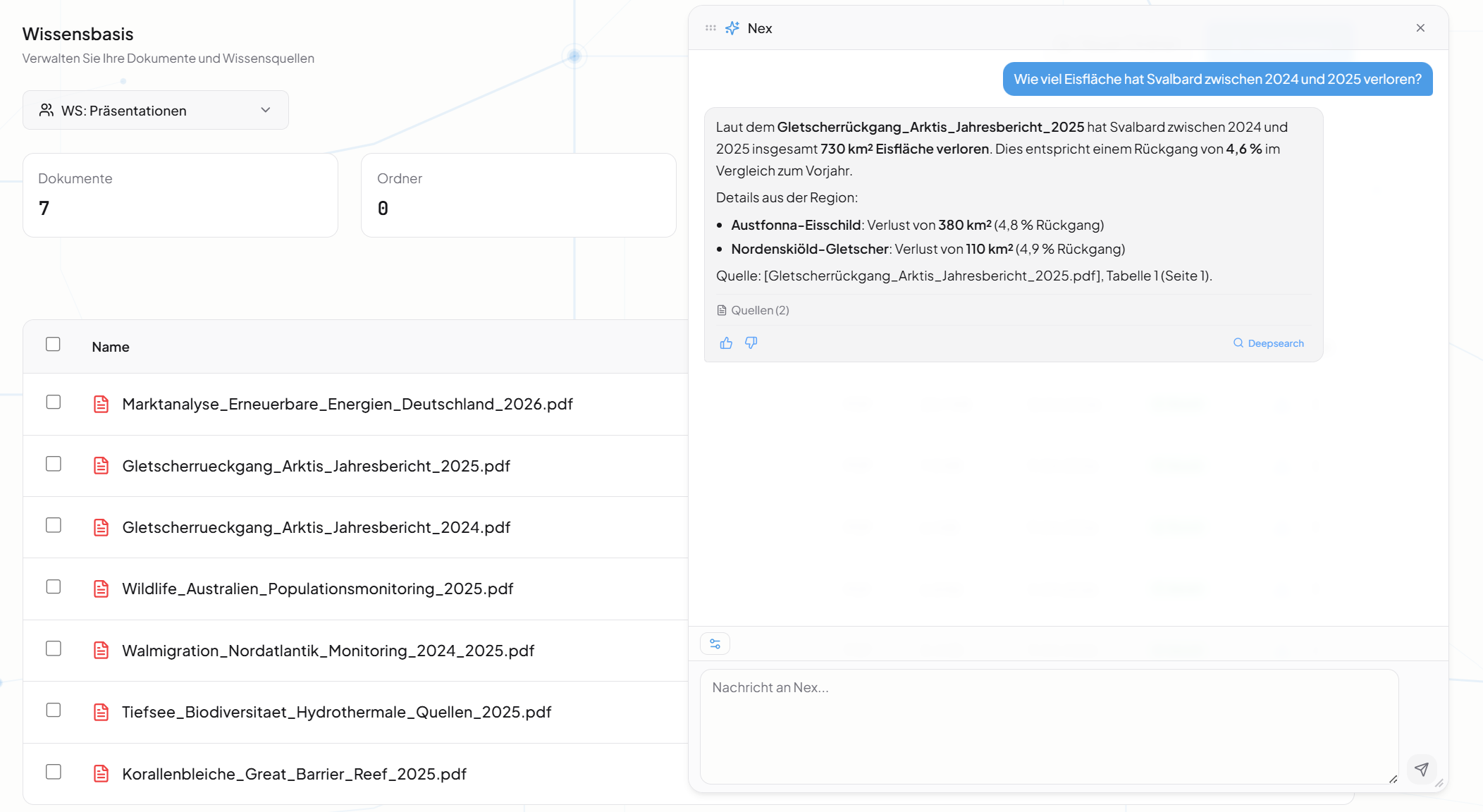
Find content by its meaning.
Ask questions in your own words. Document search finds relevant content in the shared collection and points to the related documents for verification.
- Question
- Source
- Source document
Make experience accessible to others.
Record processes and decisions in documents. Assign responsibilities and, at handovers, check whether the next team member can continue working with them.
- Processes
- Decisions
- Responsibility
- Handover
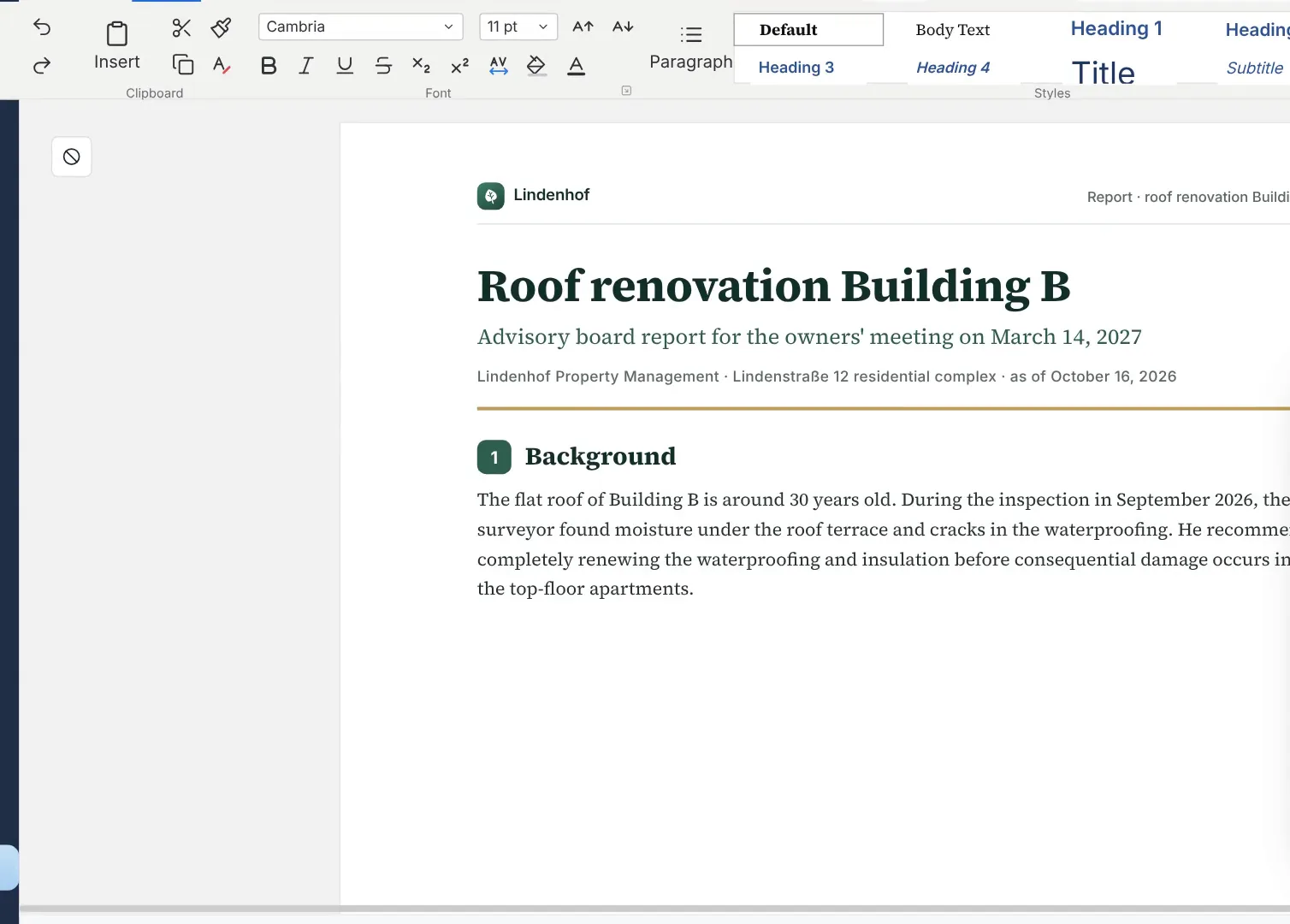
This is Nexoria
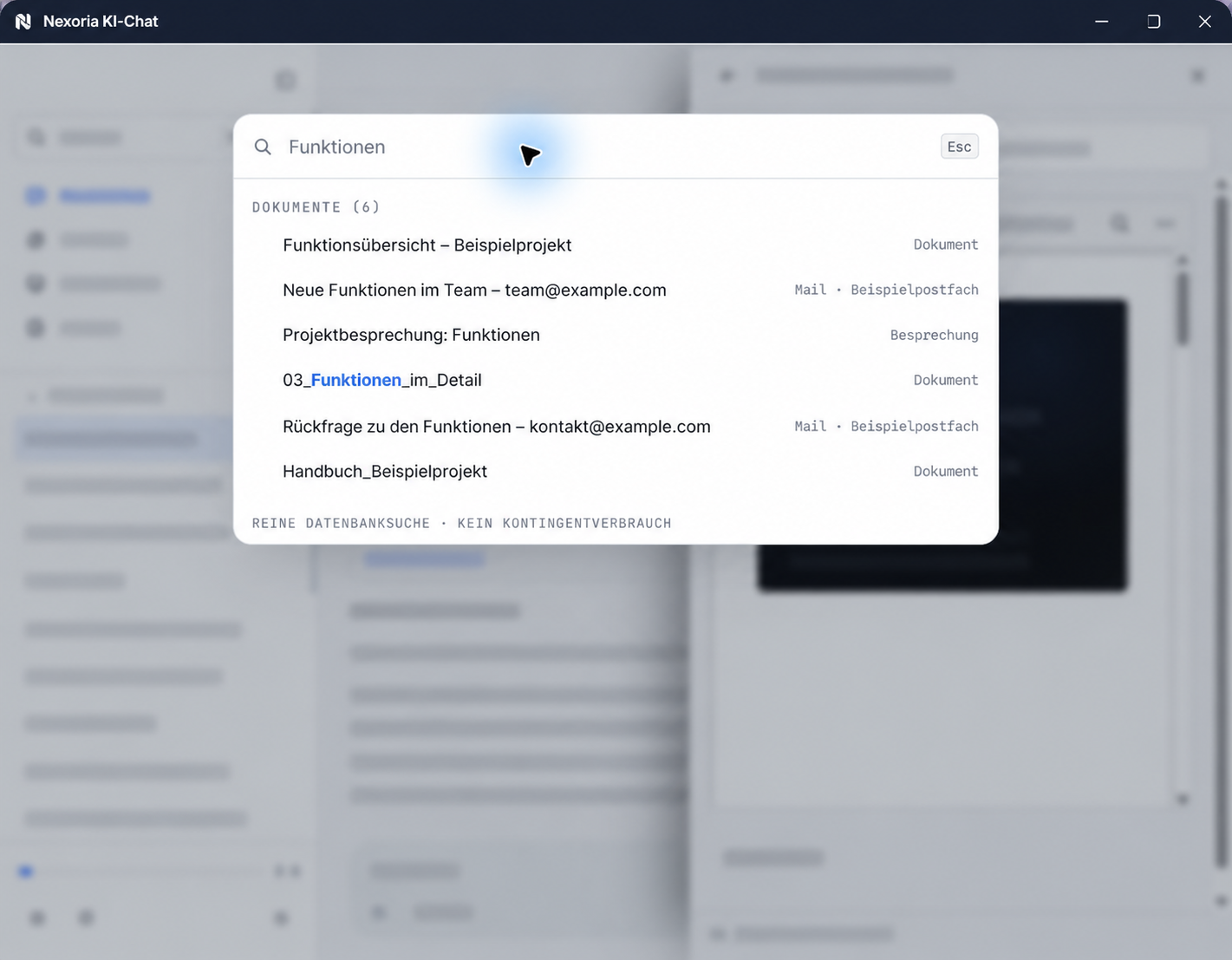
Nex: Document search
Document search in Nex: results from documents, emails and meetings. Sample content anonymised for publication.
In brief: how do you implement knowledge management in your company?
In Nexoria, the core consists of your own knowledge store with Nexoria Drive, document search as the platform's enterprise search, and the AI assistant Nex. Document search cites the source for every result and Nex answers with sources cited, both within the permissions you set via workspaces.
What does knowledge management in a company involve?
Knowledge management deals with the acquisition, development, transfer, storage and use of knowledge, and therefore goes further than managing information. That is how Gabler Wirtschaftslexikon describes it; how AI supports these tasks is explained in the glossary entry AI knowledge management.
Three goals help with implementation in your own business:
- Make knowledge findable, so that employees can search instead of asking.
- Avoid duplicate work, because existing results are found.
- Secure handovers, so that knowledge stays in the company when responsibilities change.
Consider methods and tools separately
Knowledge exists as explicit knowledge, which can be recorded in words and numbers, and as tacit knowledge, which is tied to people and their experience. The best-known model of knowledge management, the knowledge spiral of Nonaka and Takeuchi, distinguishes four ways of passing on knowledge:
- Socialisation: Knowledge is passed on through observing, imitating and practising, for example when a new team member grows into a group's processes.
- Externalisation: Experience is put into words and recorded in conversation, for example in quality circles or interdisciplinary teams.
- Combination: Existing, recorded knowledge is brought together.
- Internalisation: Recorded processes become routine by being applied.
The combination of documented knowledge can be supported by information technology. The other forms also require suitable processes and exchange between people. You therefore organise onboarding and the exchange of experience within your team, while a tool makes documented knowledge accessible. Experiential knowledge can only partly be documented. Record transferable experience and complement documentation with personal exchange. Which type of tool, such as a wiki, document management system or enterprise search, suits your documents is shown in the guide Choosing knowledge management software.
Introducing knowledge management in your company: start with one process
Start with a recurring process rather than all your content, for example the proposal handover: the valid template, customer agreement and internal approval. This way, you connect filing, responsibility and your team's specific questions.
- Choose a process: a workflow that occurs regularly and where people currently ask rather than search.
- Define valid documents: which documents apply and which document version is authoritative.
- Assign responsibility: who keeps the documents up to date and answers queries.
- Define workspace and permissions: who may see the documents; this determines what document search and Nex display.
- Provide your content: store the documents in Nexoria Drive or make them accessible through a configured integration.
- Check with real questions: ask questions from day-to-day work and check important answers against the original.
How to test answers, sources and access systematically is described in the Pilot with 20 test cases. Examples from day-to-day operations are shown in Nexoria for SMEs: five tasks from day-to-day operations.
Company knowledge in Nexoria: indexed and permission-checked
In Nexoria, company knowledge is what is contained in a company's documents: proposals, contracts, minutes, manuals and correspondence. This content becomes usable when two conditions are met:
- Indexed: The contents of the files are indexed, not just their names and folder paths. Anyone asking a question does not need to know which document contains the answer.
- Permission-checked: On retrieval, it is checked who is allowed to see the content.
The content index and workspace sharing combine finding relevant information with the defined access permissions. What else the term covers, such as employees' experiential knowledge, is explained in the glossary: What is company knowledge?
Why scattered files are not yet company knowledge
In many companies, content is not kept in one place but spread across network drives, personal cloud folders, mailboxes and local computers. It is searched by file name and full text. Both require the person searching to know the right words: the project name, the customer number, the wording actually used in the document.
This leads to three recurring patterns. People ask instead of searching, because a colleague answers faster than the search. Work is done twice, because the existing result was not found. And content migrates to tools that nobody has approved, because it seems easier to find there; as a result, the content slips out of control.
An editorially maintained knowledge base makes sense when employees are to document and approve processes together; AI search complements it when existing files are hard to find. Which approach suits which task is shown in the guide Choosing knowledge management software; how a wiki and Nexoria differ is shown on the page Confluence and Nexoria compared.
Folder structure that has grown over time: reorganise or make it searchable?
Both have their place, for different tasks. A folder structure governs where things are filed and who sees what. You do not need to know it to find things by content once your content is in Nexoria Drive or made accessible through a configured integration: you search in natural language, and every result cites its source. Reorganising is therefore worthwhile where filing or access permissions no longer fit the organisation.
What the folder structure still does
Whether your file storage follows a fixed scheme, such as a 7-folder system, or has grown over the years: a folder structure defines levels, rules for naming files, metadata, the route to the archive and access permissions. These tasks remain even when you search by content. This applies particularly to permissions: if an AI is connected to content with unclear access permissions, previously unnoticed sharing settings can make confidential content easier to find. So before searching, define who may see what; in Nexoria, this is done via Workspaces.
What finding by content looks like in practice in a file store is shown in the Example: finding the notice period without knowing the file name; how the search works is described on the page Document search.
Which file stores you carry over or connect
Store documents that should become searchable in Nexoria Drive; on Windows, your team continues to work in the familiar File Explorer, and shared content is indexed. You decide during the rollout which documents are carried over, which version applies and who sees what.
SharePoint, OneDrive and Google Drive can be connected as knowledge sources on request. We set up the integration depending on your environment and permissions. On request, we also look into integrating other storage, CRM, ERP and in-house systems. Scope, updates and permissions are defined for each integration. For details, see Integrations with SharePoint, OneDrive and Google Drive.
If your content sits on a file server that has grown over time, the product page shows the way: Make file server content searchable with document search. Whether a document management system, a wiki or enterprise search is better suited to a task is set out in the overview Enterprise search, DMS or wiki: which does what? .
Your first step
Start with the folder that is hardest to search. Ask the questions your team currently resolves by asking around, and open the cited source for every result. Setup is charged individually according to the work required, depending on the volume of data to be indexed. How to set up and evaluate the test is described in the Pilot with 20 test cases; you can do this together with us via Test Nexoria with your own documents.
How files become company knowledge
The technical process is similar across systems of this kind and can be described in five steps, regardless of provider:
- Store: The files are brought together in one shared location.
- Index: The text is extracted from each file, split into passages and converted into a mathematical representation that captures meaning. These representations are called embeddings.
- Search: A question is converted into the same representation and compared with the passages. The search finds whatever matches in content, even if no word matches exactly.
- Cite sources: The source document is cited for every result. Without this step, an answer cannot be verified.
- Answer: A language model formulates an answer from the passages found. This method is called RAG, Retrieval Augmented Generation; it was described by Lewis and others in 2020.
What matters is the point at which access permissions take effect. Content that has not been shared must neither be returned as a result nor passed on to answer generation. Check, therefore, whether the permission check covers all access paths. Clarify this question with every provider before looking at the feature list.
Which approach suits your content?
Which type of tool suits your documents is shown in the Types of knowledge management tools at a glance; free, open-source and Microsoft 365 options are compared in the section Free, open source or in a Microsoft 365 environment. Nexoria is one of the integrated platforms: storage, index, search and assistant come from one provider, with uniform permission checks; the individual architectures are explained in the glossary entry AI knowledge management. This is worthwhile if the content is to be moved anyway, if access permissions must also apply to AI answers and if files, index and search are to be processed in Germany. Answers from Nex are generated by Mistral AI by default; further services are listed under Security and privacy.
How does Nexoria implement knowledge management in companies?
Nexoria is a European work platform. The core consists of your own knowledge store with Nexoria Drive, document search (enterprise search) and the AI assistant Nex, which answers with sources cited, within the permissions of the person asking. Building on this: Nexoria Office with Doc, Calc and Slides, Documents in Nex, workspaces and permissions, text recognition (OCR) and transcription, tasks, chatbots and configurable automations. Nexoria Mail, Nexoria Meet and the VoiceBot optionally extend the platform.
Files as a source of knowledge
Nexoria Drive is the platform's cloud storage and at the same time your own knowledge store. The drive integrates into Windows File Explorer, where files are managed. There is no second storage location just for Nex: whatever is stored and shared is the knowledge base.Indexing
Shared content is indexed and is then available in document search and in Nex. Scans, images and recordings are made accessible by Text recognition (OCR) and transcription, before the recognised content goes into the same index. Document embeddings and semantic search run on servers in Germany. Text recognition and transcription are separate processing steps.
Semantic search
The Document search is the platform's enterprise search. It searches a workspace's content by meaning, is available in the AI chat and also as a separate search window, and does not consume any AI tokens. This means access to your own knowledge remains available even when the token allowance has been used up.
Source citations
Every result cites the source document, and answers from Nex refer to the documents used. This means a statement can be traced back to the original file.
AI chat
Nex is the AI assistant and the platform's main interface. Nex answers questions based on the shared content of the relevant workspace, refers to the documents used and summarises long documents. From the conversation, you create tasks and appointments and trigger automations. On request, internet research with sources cited is added.Permissions and workspaces
Workspaces determine which people and which chatbots may see which content. The roles are Admin, Member and Viewer; for projects with external partners, cross-company Collab workspaces are available. Permissions are checked server-side on every access, and Nex, document search and every chatbot answer questions exclusively from the workspace to which they are assigned.Building on this
This core is extended by further building blocks that work with the same content and permissions:
- Doc, Calc and Slides in Nexoria Office: edit Word, Excel and PowerPoint files (DOCX, XLSX, PPTX) directly. Before switching, it is best to test layouts, formatting, formulas and macros with your own sample files.
- Documents in Nex: You create presentations, reports and document comparisons directly in the Nex AI chat from the shared content; you check any values taken over against the underlying documents.
- Tasks: You create tasks from the Nex AI chat and assign them to a workspace.
- Chatbots: They answer questions on your website based on a workspace's shared content, with source references.
- Automations: configurable, with company knowledge as context for recurring workflows.
Optional additions:
- Nexoria Mail: connects existing inboxes via SMTP and IMAP; you selectively add relevant attachments to your company knowledge.
- Nexoria Meet: video meetings with live transcription after each participant has consented; live transcription is performed with Mistral. You store the transcript and summary in the shared workspace.
- VoiceBot: answers calls and books appointments; the VoiceBot requires a Nexoria subscription.
Together, Nexoria Mail and Nexoria Meet form one add-on.
An overview of all building blocks is provided on the page Platform. What the search can do in detail is shown in the Document search features.
How file storage with searchable content differs from traditional file storage is shown in the comparison Cloud storage and traditional file storage compared.
Requirements for rollout
What should be decided before the rollout, with sources. Checked on 24 September 2026.
| Requirement | Detail | Source |
|---|---|---|
| Availability | Registration and online purchase of the Base and Pro plans have been available since 15 September 2026. | Pricing |
| Workstations | One user corresponds to one device. The same user cannot be used on several devices at the same time. | Nexoria at a glance |
| File storage | On Windows, Nexoria Drive integrates into File Explorer as a drive. | Nexoria Drive |
| Organisation | Before the rollout, it must be decided which teams and projects get their own workspaces, because access permissions depend on this. | Workspaces |
| Setup | Charged individually according to the work required, depending on the volume of data to be indexed. | Pricing |
Plans, storage allowances and add-ons can be found under Pricing.
Knowledge management with AI and data protection
Anyone who makes knowledge findable centrally brings content together in one place. That is why the question of where each step is processed belongs at the start of your data protection review under the GDPR. The table shows Nexoria's data flow for each processing step. Checked on 24 September 2026.
| Step | Processing | Source |
|---|---|---|
| Files and knowledge index | On servers in Germany; search also runs there. | privacy policy |
| Document embeddings and semantic search | Document embeddings and semantic search run on servers in Germany, using models that Nexoria operates there itself. | privacy policy |
| Text recognition and transcription of files | Scans and recordings are made accessible; the recognised content is then available for search. | privacy policy |
| Answers from Nex | Answer generation by Nex uses Mistral AI by default. | Security and privacy |
| Live transcription in Nexoria Meet (optional) | Performed with Mistral, only with the consent of every participant. | Security and privacy; Nexoria Meet |
| VoiceBot (optional) | The VoiceBot uses Telnyx (headquarters USA, EU branch Ireland) for telephony and Voxtral from Mistral AI for speech recognition and speech output. | privacy policy |
| Email integration (optional) | When the Gmail or Outlook integration is active, email metadata is transferred to Google or Microsoft respectively. | privacy policy |
| Technical error monitoring and payment processing | Error monitoring via Sentry, based in the USA, with technical error data only; payment processing via Stripe. | processing register |
| Optionally connected external AI | ChatGPT (OpenAI), Claude (Anthropic), Gemini (Google) or Langdock: when connected, shared content is transferred to the respective provider; that provider's terms, processing locations and settings apply. Nexoria also works without these integrations. | privacy policy |
The overview Security and privacy describes processing locations and safeguards. The processing register lists the services involved. The details on this page are Nexoria's own statements; the data flows for each processing step are described in the privacy policy and the processing register. Questions from your evaluation are answered in the Evaluator FAQ.
Secure knowledge for onboarding and handover
When staff change, tasks, exceptions and the reasons behind decisions must first be documented. If these documents are stored in Nexoria Drive, they are indexed and become findable for the next team member. A handover template and a practical acceptance test are included in the Guide to preserving knowledge.
Frequently asked questions about knowledge management in companies
What is meant by knowledge management in a company?
According to Gabler Wirtschaftslexikon, knowledge management deals with the acquisition, development, transfer, storage and use of knowledge. In a company, this means in practice making existing knowledge findable, verifiable and accessible to the right people, avoiding duplicate work and securing handovers.
What methods are there in knowledge management?
According to Gabler Wirtschaftslexikon, the best-known model is the knowledge spiral of Nonaka and Takeuchi, with four forms of knowledge transfer: socialisation through observing and taking part, externalisation of experience in conversation, for example in quality circles, combination of recorded knowledge, and internalisation, in which recorded processes become routine. Tools can support the exchange and the work with documented knowledge; you organise the appropriate processes within your team.
How do we introduce knowledge management in our company?
Start with a recurring process rather than all your content: define the valid documents and document version, name a responsible person, determine access permissions, store the documents in Nexoria Drive or make them accessible through a configured integration, and check the result with real questions. How to set up this test is described in the Pilot with 20 test cases.
Do we have to rebuild our folder structure to be able to find documents again?
Not for finding things. If your content is in Nexoria Drive or made accessible through a configured integration, you search by content in natural language; you do not need to know the folder structure for this, and every result cites its source. The folder structure keeps its role for filing and access permissions. Where permissions no longer fit the organisation, reorganise before searching; in Nexoria, you set permissions via workspaces.
How do we use AI in knowledge management with data protection in mind?
Clarify the data flow for each step and set access permissions before an AI accesses your content. At Nexoria: files and the knowledge index are stored on servers in Germany, and search runs there too. Text recognition and transcription make content from scans and recordings usable for search. Answers from Nex are generated by Mistral AI by default. ChatGPT (OpenAI), Claude (Anthropic), Gemini (Google) and Langdock can optionally be connected to Nexoria; Nexoria also works without these integrations, and when one is connected, the terms, processing locations and settings of the respective provider apply. The individual steps are shown in the section Knowledge management with AI and data protection.
What counts as company knowledge at Nexoria?
At Nexoria, company knowledge is the content of the files that are stored in Nexoria Drive or made accessible through a configured integration and shared for a workspace. This content is indexed and is then available to document search and the AI assistant Nex. Text recognition and transcription additionally make scans, images and recordings accessible; the recognised content is also indexed.
Do we have to maintain our content twice for the AI?
No. The knowledge base is built from the files that are already in Nexoria Drive. There is no second storage location in which knowledge articles would have to be maintained separately. If a file is changed, the basis for search and answers changes with it.
Will every employee then see all company knowledge?
No. Workspaces determine which people and which chatbots may see which content. Permissions are checked server-side on every access, and Nex, document search and every chatbot answer questions exclusively from the workspace to which they are assigned.
How do I know what an AI answer is based on?
Document search cites the source document for every result, and answers from Nex refer to the documents used. For documents, reports and presentations created directly in the Nex AI chat, check any values taken over against the underlying documents. Check important answers against the original.
Are emails and meetings also part of company knowledge?
They can be added with the optional Mail and Meet add-on. Nexoria Mail connects inboxes via SMTP and IMAP; you selectively add relevant attachments to your company knowledge. Nexoria Meet transcribes video meetings after each participant has actively consented; live transcription is performed with Mistral. You store the transcript and summary in the shared workspace. Without this add-on, Nexoria works with the files in Nexoria Drive and in configured integrations. Terms are available under Pricing.
How long does setup take?
Setup is charged individually according to the work required and depends on the volume of data to be indexed. We clarify the timeframe in the initial meeting, based on your existing content.
Sources
The sources describe terms and methods from the perspective of the respective publishers. Third-party information may change. Sources retrieved on: 24 September 2026.
- Knowledge management (Gabler Wirtschaftslexikon; author Prof. Dr. Jetta Frost, University of Hamburg). Definition, explicit and tacit knowledge, knowledge spiral according to Nonaka and Takeuchi.
- Lewis et al., Retrieval-Augmented Generation for Knowledge-Intensive NLP Tasks (NeurIPS 2020). Research paper on the RAG method.
Your next step
The most reliable test is your own content. Choose a process and the folder that is hardest to search. Together, we clarify which file stores are carried over or connected, how the workspaces are divided up and what indexing your volume of data costs.
More help for your evaluation: Evaluator FAQ · Pricing
Nexoria in action
See how companies use Nexoria in our Customer stories. CSA Group describes its use of company knowledge, interfaces and individually implemented email automation in the customer story. New Fire reports on a chatbot and an individually developed maturity assessment platform. For your team, in a demo, we discuss which components suit your tasks.
Further reading
- AI for business: put tasks, requirements and a suitable starting point in context.
- Choosing knowledge management software
- Choosing enterprise search solutions
- Cloud storage with AI: file storage whose contents become searchable.
- Team knowledge: project context in workspaces.
- Confluence and Nexoria compared
- SharePoint and Nexoria compared
- Nextcloud comparison: self-hosting and Nexoria compared.
- OneDrive comparison