




Nexoria
Get started

Nexoria Meet

Nexoria Meet: meetings as searchable company knowledge

Hold meetings and preserve their knowledge. Find transcripts and summaries again in the shared workspace.

Discover Meet

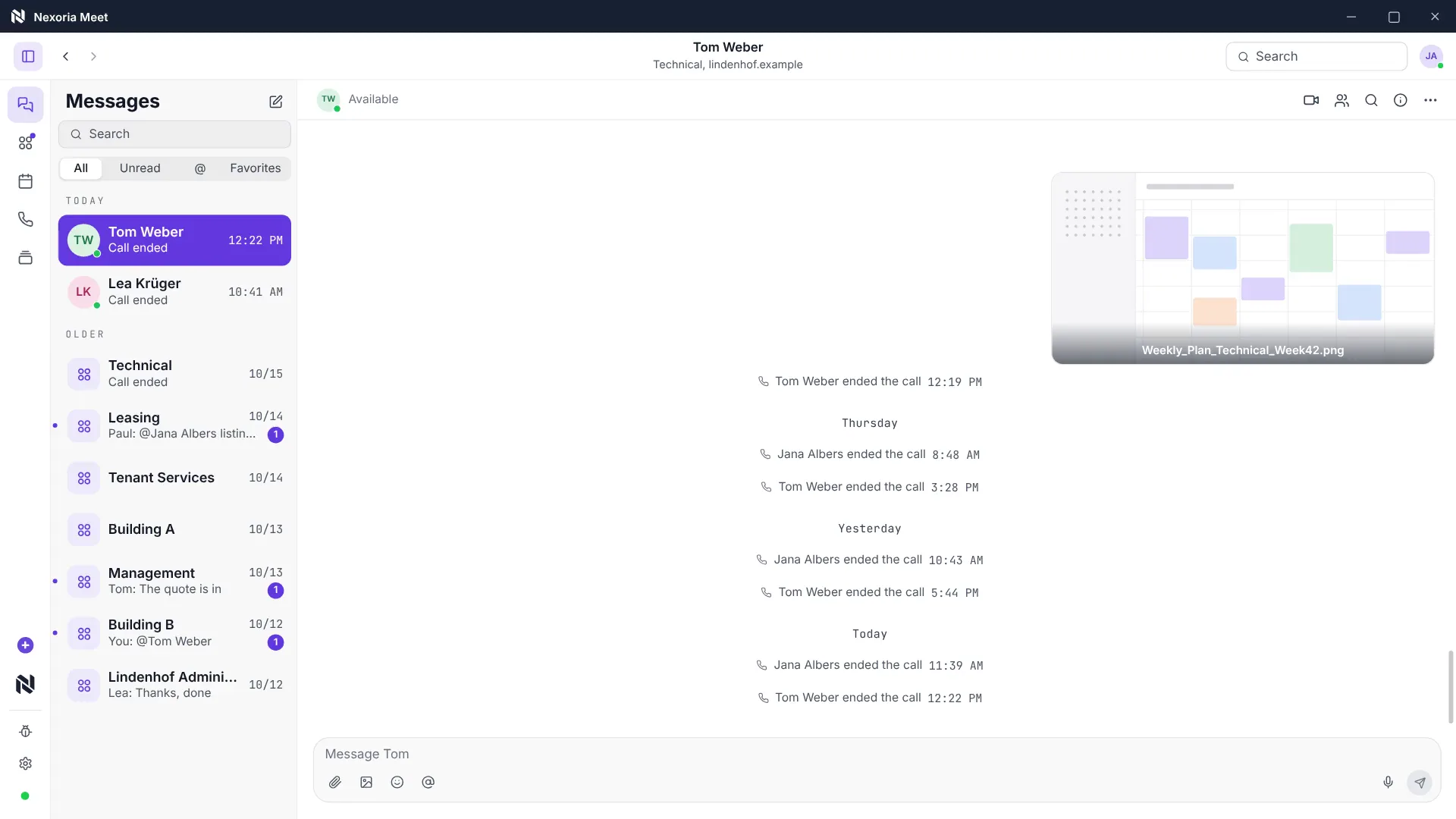
Teams/Zoom alternative · Meetings See team chat and pre-join preparation, and open a meeting in the archive with its summary, consent status and transcript.

Nexoria Meet in everyday work

Stay in the conversation. Take the knowledge with you.

Meet combines video conferencing, screen sharing and meeting knowledge as an optional add-on.

Compared with Fireflies/Otter · Minutes

Transcribe meetings

With the active consent of all participants, Meet creates a live transcript of the meeting.

Still image: Meet.

Watch video: Meet

Come together.

Video conferencing, calls and screen sharing in one application.

Capture what is said.

Live transcription accompanies the conversation with the participants' consent.

Preserve knowledge.

The transcript and summary become searchable in the workspace.

Nexoria Meet · Conversation

One meeting.
One shared view.

  • Hold video conferences and calls in the same application.
  • Go through content together via screen sharing.
  • Speaker view follows whoever is speaking.
View all features

A look inside the application

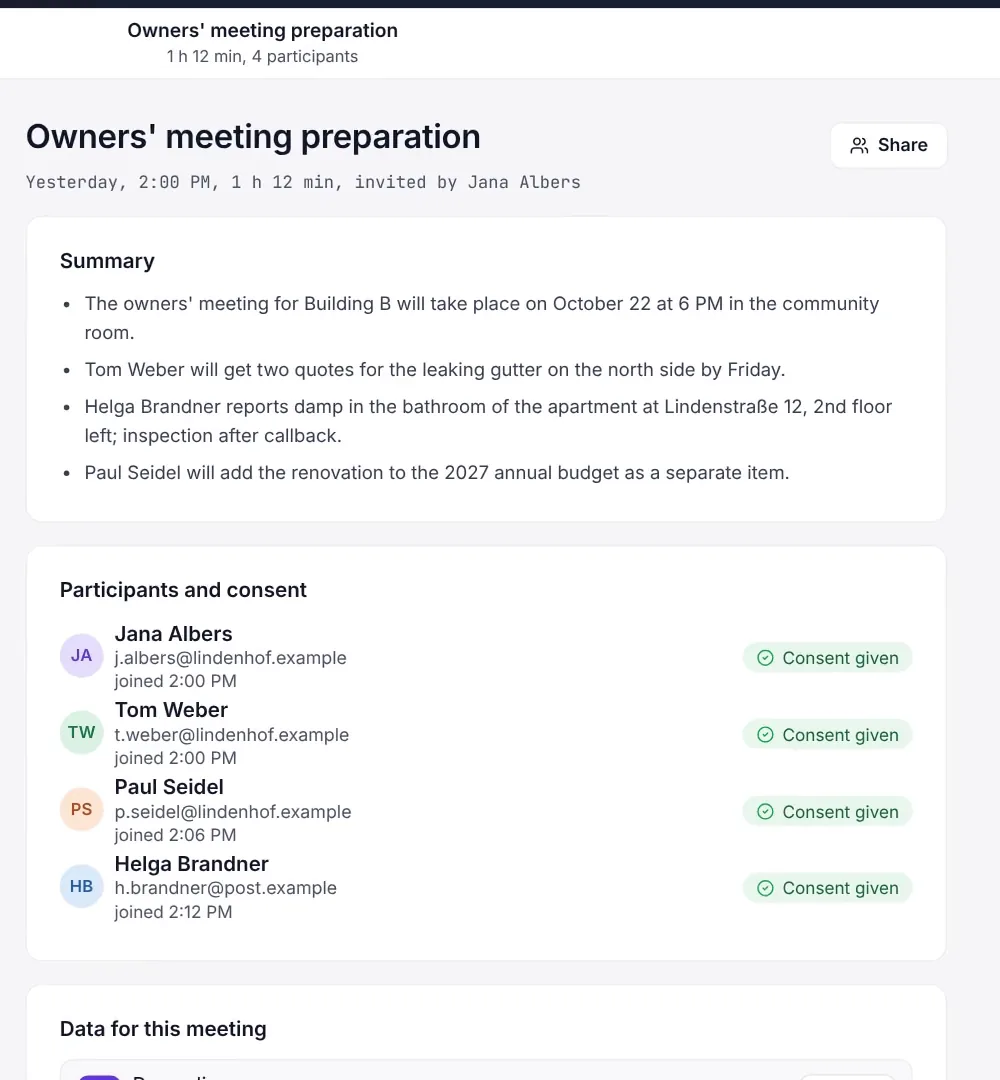
Meetings with summary and consent

Archive view of a meeting in Nexoria Meet with a summary and the participants' consent status. Scene from the explainer film with a recreated interface and fictitious sample data.

Archive view of a meeting in Nexoria Meet with a summary and the participants' consent status. Scene from the explainer film with a recreated interface and fictitious sample data.

Enlarge view

Nexoria Meet · Minutes

The conversation ends.
The knowledge remains.

  • Use AI-powered live transcription with Mistral, with consent.
  • Store the transcript and summary in the workspace.
  • Find meeting content again as searchable company knowledge.
From conversation to company knowledge

Nexoria Meet · Consent

Each person decides.
Even after the meeting.

  • Record each participant's consent individually in the consent dialogue.
  • Process separate audio tracks for each speaker.
  • Delete individual people from an existing transcript if they withdraw consent.
Consent and data protection

How it works

  1. Step 1

    Enable

    Transcription is disabled by default for each tenant. It is only enabled by a tenant admin. Without this step, Meet remains a conferencing tool without transcription.

  2. Step 2

    Consent

    Before the start, each participant decides individually in the consent dialogue. Recording only takes place after active consent, and the consent status is recorded for each person.

  3. Step 3

    Transcribe

    During the conversation, live transcription runs with Mistral. A separate audio track is recorded for each speaker, and the playable mix is derived from these tracks.

  4. Step 4

    Make usable

    The transcript and summary move into the knowledge base of the associated workspace and are indexed. They can then be queried through Nex and document search, with source citations as for any other document.

Nexoria Meet · Process
01of 4 steps
  1. 1EnableThis step is open
  2. 2Consent
  3. 3Transcribe
  4. 4Make usable
Explanatory graphic · Process for the selected step

Nexoria Meet in detail

Everything you want to know.

Nexoria Meet is an optional add-on for video conferences and calls. On request, it transcribes the conversation live, and the minutes go into the knowledge base, where they can later be queried through Nex and document search. Live transcription is carried out with Mistral. Recording only takes place if every participant consents individually. The Nexoria core product also works without this add-on.

Product video

Nexoria Meet on video

View all videos under Resources

Definition

What is Nexoria Meet?

Nexoria Meet handles video conferences and calls with live transcription; the minutes go into the knowledge base and can be queried with AI.

Nexoria Meet is the meetings part of the Mail and Meet add-on. It handles video conferences and calls in one application, with speaker view and screen sharing. The difference from a pure conferencing tool lies beyond the meeting itself: on request, a transcript is created and stored permanently as searchable company knowledge.

As an optional add-on, Meet adds another source of knowledge to the platform: your meetings.

Problem

The problem

Decisions are made in meetings that are then not documented anywhere. Anyone who wants to recall them later asks the people who were there. With every staff change, part of this knowledge is lost.

Minutes written up afterwards only partly solve this. They sit somewhere as a file, are rarely complete and usually do not show up in a search for the subject, because they use different words from the question.

Nexoria solution

What this means for company knowledge

This turns a meeting into a source of the same quality as a document: findable by the meaning of the question rather than by file name, and always with an indication of where the statement comes from. Anyone who wants to manage the content does so through the Workspace, in which the minutes are stored.

Together with Nexoria Mail the add-on covers the two channels in which knowledge is created without anyone writing it down. Both are queried through the same interface, the AI assistant Nex.

Data protection from the outset

Transcription is safeguarded twice: by the tenant's default setting and by the consent of every single participant. If you wish, Meet can also be used without transcription.

Product data

Nexoria Meet fact sheet

Product fact sheet

Nexoria Meet

Nexoria Meet handles video conferences and calls with live transcription; the minutes go into the knowledge base and can be queried with AI.

Category
Video conferencing with AI transcription, optional add-on
Problem
Replaces Microsoft Teams and prevents meeting content from being lost after the meeting.
Target group
Businesses; the offer is aimed at business customers within the meaning of Section 14 of the German Civil Code (BGB).
Core features
  • Video and calls in one application
  • Speaker view and screen sharing
  • Live transcription with Mistral
  • Consent per participant
Input
Video and audio calls with screen sharing
Output
Live transcript and minutes in the knowledge base, queryable with AI
Integration in Nexoria
Mail and Meet add-on, the transcripts become part of company knowledge.
Privacy
Transcription only after active consent from every participant, no silent recording. After the contract ends, recordings and transcripts are stored for 180 days by default, and this period can be adjusted individually. Separate audio tracks per speaker, transactional deletion, internal access only via short-lived signed tokens.
Hosting
Storage on Nexoria's own infrastructure in Germany and the EU. Live transcription in Nexoria Meet is carried out with Mistral.
Status
Feature available. Registration and online purchase of the Base and Pro plans have been available since 15 September 2026.

Requirements

Requirements and price

  • A Nexoria core product, Base or Pro plan. Mail and Meet are booked in addition.
  • For transcription, activation by a tenant admin, as it is disabled by default for each tenant.
  • For recordings of employees, a clarified basis under employment law and, where there is a works council, usually a works agreement.
  • The Mail and Meet add-on costs €19 on the Base plan and €9 on the Pro plan per user per month. All prices are net; the offer is aimed at businesses within the meaning of Section 14 of the German Civil Code (BGB). The full terms are on the pricing page.

Processing

Data protection and infrastructure

The following information comes from the processing register. For meeting transcription, Nexoria processes data as a processor on behalf of the customer organisation. The tenant remains responsible for the recordings it initiates.

Meeting recording and AI transcription: the documented facts. As of .
DetailContentSource
Default settingTranscription disabled by default for each tenant, can only be enabled by a tenant adminProcessing register, section on meeting recording
checked on
ConsentRecording only after active consent from each participant, implemented as a consent dialogue before the startProcessing register, section on meeting recording
checked on
Legal basisExternal guests: Art. 6(1)(a) GDPR. Employees: subject to co-determination under Section 87(1) No. 6 BetrVG and Section 26 BDSG.Processing register, section on meeting recording
checked on
Data categoriesSeparate audio track per speaker, playable mix as a derivative, transcript and segments, AI summary, participant identifier, consent status, search vectors, timestampsProcessing register, section on meeting recording
checked on
RecipientsStorage on Nexoria's own infrastructure in Germany and the EU. Live transcription in Nexoria Meet is carried out with Mistral.Processing register, section on meeting recording
checked on
Withdrawal and deletionName replaced throughout the transcript, own audio track deleted, mix and search index regenerated, no re-identification key, confirmation email to the person concernedProcessing register, section on meeting recording
checked on
RetentionNo automatic deletion for active tenants, as the minutes are permanent company knowledge. After the contract ends, recordings and transcripts are stored for 180 days by default, and this period can be adjusted individually. This is followed by tenant-wide deletion, including the search index.Processing register, section on meeting recording
checked on

Evidence

In Nexoria's verified Mistral organisation, the use of new API interactions for model training is disabled (account check of 26 September 2026). This setting applies to new interactions processed there. For your own optionally connected AI accounts, the settings of the respective account apply.

Source: Mistral training setting. Checked on .

Legal citations document the content of the provision, not compliance with it in an individual case. Whether a recording is permissible in your organisation depends on your legal basis, not on the technology. The data protection impact assessment under Art. 35 GDPR can be found under Data protection impact assessment.

Features

Specific features

  • Video conferencing and calls in one application, without switching tools.
  • Speaker view that automatically follows whoever is speaking.
  • Screen sharing for going through content together.
  • Live transcription with Mistral during the conversation.
  • Consent dialogue with individual consent from each participant.
  • Separate audio track per speaker, playable mix as a derivative.
  • Summary and transcript as searchable company knowledge in the workspace.
  • Deletion of individual people from an existing transcript upon withdrawal of consent.

Where this component fits into the overall picture is shown in the component overview.

Comparison

Comparison with the conventional approach

The comparison is between categories, not specific products: a conferencing tool with separate storage of the recording versus a meeting whose minutes flow into the same knowledge base. The product-specific comparison can be found on Nexoria and Teams compared.

Traditional conferencing tool and Nexoria Meet. As of .
AspectTraditional conferencing toolNexoria MeetSource
What remains after the meetingRecording as a file in separate storageTranscript and summary as indexed company knowledgeStatement by Nexoria
FindabilityBy the title and date of the meetingBy the meaning of the question, with source citationStatement by Nexoria
ConsentOften a central setting with a notice to the groupActive consent from every single participant, feature disabled in advance for each tenantProcessing register, section on meeting recording
checked on
Withdrawal by an individualUsually only by deleting the entire recordingName replaced in the transcript, own track deleted, mix and search index regeneratedProcessing register, section on meeting recording
checked on
Position in the productUsually the core of the collaboration suiteOptional add-on, the core product runs without itStatement by Nexoria

Sources

As of

  1. Processing register under Art. 30 GDPR. Nexoria Systems UG (haftungsbeschränkt), 2026. /legal/verzeichnis Retrieved on .Source for the default setting, consent, data categories, recipients, withdrawal procedure and retention of meeting transcription.
  2. Regulation (EU) 2016/679, General Data Protection Regulation. Publications Office of the European Union, 2016. https://eur-lex.europa.eu/eli/reg/2016/679/oj Retrieved on .Source for Art. 6(1)(a) (consent), Art. 17 (erasure) and Art. 35 (data protection impact assessment).
  3. German Works Constitution Act (Betriebsverfassungsgesetz), Section 87(1) No. 6. Federal Ministry of Justice and Federal Office of Justice, 2001. https://www.gesetze-im-internet.de/betrvg/__87.html Retrieved on .Source for co-determination on technical equipment capable of monitoring behaviour or performance.
  4. Nexoria platform pricing. Nexoria Systems UG (haftungsbeschränkt), 2026. /preise Retrieved on .Source for the terms of the Mail and Meet add-on.

As of

FAQ

Frequently asked questions about Nexoria Meet

Is Nexoria Meet included in the core product?

No. Nexoria Meet is an optional add-on and is booked together with Nexoria Mail. Nexoria Drive, Nex, document search and the Office apps continue to work unchanged if the add-on is not booked.

Is every meeting recorded automatically?

No. Transcription is disabled by default for each tenant and can only be enabled by a tenant admin. Recording only starts when every participant actively consents in the consent dialogue. Recording without the participants' knowledge is not provided for.

What happens to the minutes after the meeting?

The transcript and summary become part of the knowledge base and can then be queried through Nex and document search. The same access permissions apply as for any other content in the respective workspace.

What applies under employment law to internal employees?

Recording employees is subject to co-determination under Section 87(1) No. 6 of the German Works Constitution Act and Section 26 of the German Federal Data Protection Act. Depending on the situation, a works agreement is required or, where there is no works council, a documented legal basis. For external guests, consent under Art. 6(1)(a) GDPR is decisive.

Can a person withdraw their consent?

Yes. If consent is withdrawn or a request is made under Art. 17 GDPR, the name is replaced throughout the transcript, the person's own audio track is deleted and the playable mix, including the AI search index, is regenerated. No re-identification key remains, and the person concerned receives a confirmation email.

Who processes the recordings?

Nexoria processes recordings, transcripts and summaries as a processor on behalf of your company. They are stored on Nexoria's own infrastructure in Germany and the EU. Live transcription in Nexoria Meet is carried out with Mistral. The providers involved are listed in the processing register.

How long are recordings and transcripts stored?

For active tenants, minutes are retained as permanent company knowledge. After the contract ends, recordings and transcripts from Nexoria Meet are stored for 180 days by default. This period can be adjusted individually. Separately, there is a period of 30 days after the contract ends during which customers can request an export of their data under the general terms.

Contact

Next step

The technology is the easier part. Whether meetings with employees may be transcribed depends on your legal basis and, where applicable, on a works agreement. We clarify this in a conversation, together with the question of which minutes belong in the knowledge base at all.