





Choosing knowledge management software: which type of tool suits your documents?
Find the right type of tool for your team's questions: wiki, document storage or AI search. Compare using your own use case and get to know Nexoria through a product video, team costs and a specific demo.
Nexoria for Organise knowledge
Organise knowledge: what it brings to your team.
WHAT THIS LOOKS LIKE DAY TO DAY
Start with your team's questions.
Note which information is missing, where content is stored and who maintains it. Distinguish between creating knowledge, storing it and finding it again in everyday work.
- Create knowledge
- Store content
- Find information
- Maintenance
Organise tools by their actual task.
Compare wiki, file storage and AI knowledge search using the same use case. Take into account sources, permissions, data flows and the existing systems your team already works with.
- Wiki
- File storage
- AI search
- Existing systems
Test your selection with real content.
Use your own documents and typical search queries for a limited test. Document results, limits and maintenance effort before you make the decision for your team.
- Your own content
- Test questions
- Limits
- Maintenance effort
This is Nexoria
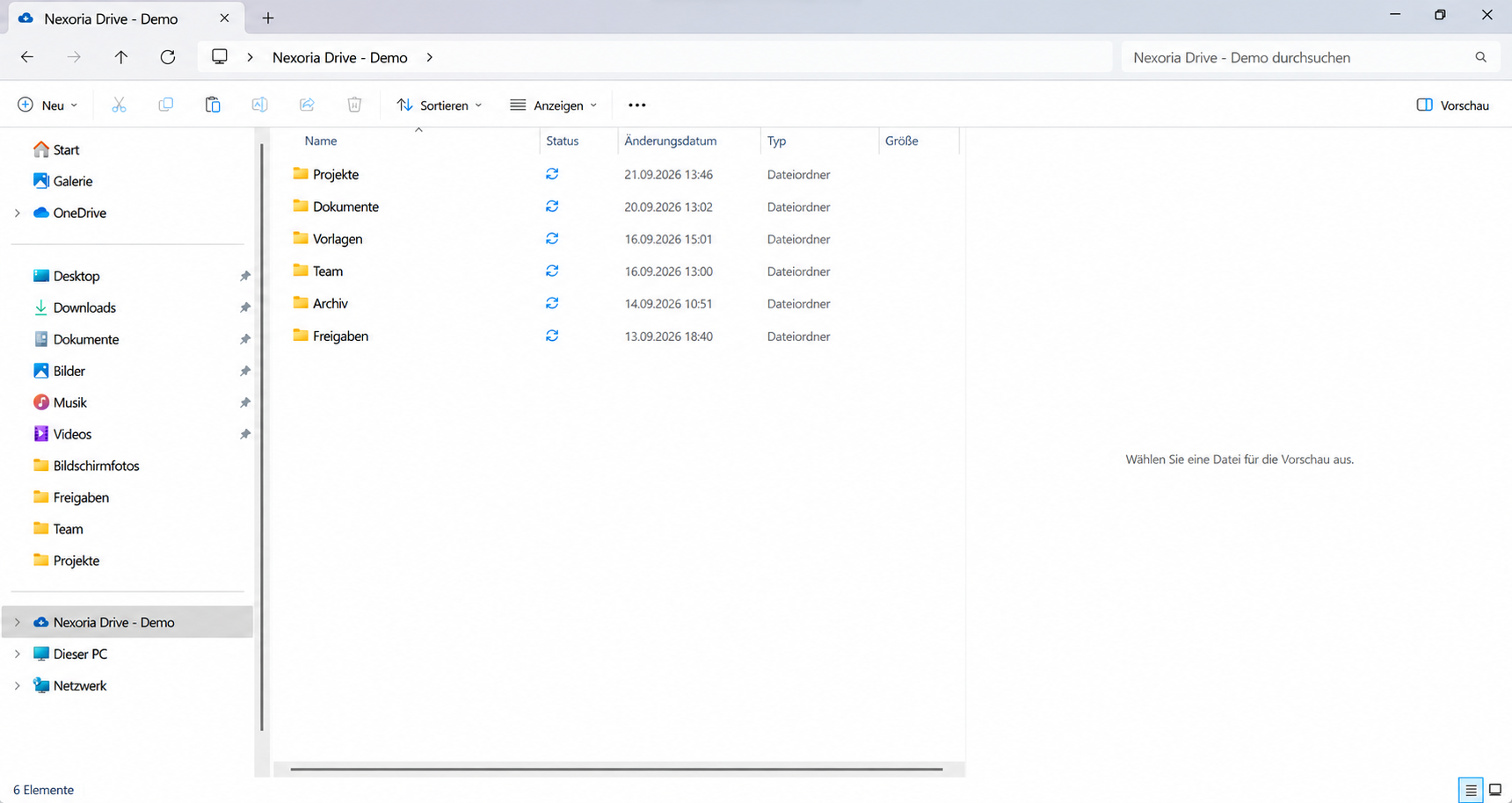
Your files. In the familiar File Explorer.
Nexoria Drive in Windows File Explorer: folders and sync status in one view.
In brief: which knowledge management software is right for you?
Knowledge management software is an umbrella term: knowledge management tools perform different tasks. A company wiki helps with writing and maintaining knowledge together. Document storage or a DMS organises files, versions and document-related workflows. Enterprise search with AI makes existing documents accessible and answers questions with source citations. Which solution suits you depends on your task, your sources, the access permissions and the data flow. Test your shortlist with your own content rather than judging by the longest feature list.
Your path from question to the right tool decision:
- Describe your business needs: Which recurring question should your team be able to answer, and in which documents can the answer be found? Name a specific use case.
- Classify the type of tool: Compare wiki, document storage and AI search for this use case. The ten criteria and the linked pilot guide with 20 test cases will help you choose.
- See Nexoria in a product example: The 15-second product video shows a question about a sample report, Nex's answer and the related document references.
- Plan team costs: Match your team size and intended scope of use to the current plans and allowances .
- Discuss your own use case: If Nexoria fits your shortlist, book a specific demo. In the demo, we will go through your typical question, your existing documents and your team size together.
Name the actual task
Start by describing a recurring situation: a new colleague is looking for the approved procedure for a complaint. A project manager needs the latest agreed version. A service team is looking for an exception in a work instruction. Note where the answer is today and why it is hard to find.
If the information is missing entirely, a better search alone will not help. Someone first has to document the knowledge. If the information exists but is spread across many files, it is worth evaluating an internal document search. If a team needs to create clear instructions together, a well-maintained wiki is a sensible approach.
This guide is aimed at teams and companies that want to make shared knowledge findable. Different criteria apply to personal notes and individual learning.
From buying trigger to first test case
Start with the outcome your team should achieve in everyday work. When switching from Confluence, choose an area that is actually in use, with pages, attachments and internal links, as your comparison content. If knowledge is spread across several repositories, record which source the answer to your typical question should come from. If the main concern is how content is presented to colleagues who read it, check how they get to the current instructions and how much maintenance the person responsible has to do. This turns “We need an alternative” into a clearly defined first use case.
For AI knowledge search, add an answer that subject experts expect, together with its current source passage, and have a future user work through the case themselves. Open the source together, note the version actually used and repeat the case after an approved test change. The selection checklist with buying-trigger matrix links these starting cases to the ten selection criteria. The AI pilot test log with 20 cases then continues the source, version and permission checks in detail. This means reliability and acceptance can be discussed on the basis of observed use cases.
To get started, name a person responsible for the subject matter, the approved sample content and the next date for reviewing the results. If knowledge first needs to be recorded before the rollout, you can use the available knowledge handover template. For a Nexoria demo , bring your typical question, the intended user roles and the sources you want to use. Together, we will clarify the right rollout scope and the next steps for your use case.
Which task should be handled where in future?
For your first use case, record what you will keep, what you will migrate and which result your team wants to use afterwards. This also makes a step-by-step introduction easy to compare.
| Task | What you check with your own example |
|---|---|
| Pages and guides | Where is the current version? How do colleagues who read it find it, and who keeps it up to date? |
| Files and knowledge search | Which question should be answered from which shared documents? Which source-backed content is then needed for the work? |
| Databases and operational workflows | Which records, relationships and views do you need? Who is allowed to carry out which step, and where should the result end up? |
Note the expected work result before the demo: for example, the right instructions in their current version or the right document for a subject-matter follow-up question. Check with the future users whether this lets them carry out the next step in their work. For databases or system actions, use a representative test dataset with the required roles and workflows as a comparison case. Use controlled test content that has been approved for this test.
Also record which existing systems will still be needed. Compare the current plans, agreed integrations, setup and maintenance for this specific scope. Source checking and the available pilot template make the decision traceable on your own content.
Types of knowledge management tools at a glance
Knowledge management tools can be organised by their main task. The table is not a ranking. Many companies combine two types of tool.
| Type of tool | Best suited when … | What you organise in addition |
|---|---|---|
| Company wiki or knowledge base | employees should write, structure and comment on knowledge together. | Authors, approval, maintenance of outdated pages and clear navigation. |
| Document storage or DMS | files, versions and document-related workflows such as approvals or retention are the focus. | Filing structure, naming rules and permissions; check retention and archiving against the specific product. |
| Enterprise search with AI | existing documents should be searched and questions answered based on their content. | Data access, indexing, source checking and handling of missing or contradictory information. |
| Customer service knowledge base | customers should find answers themselves or your service team should answer recurring questions quickly, for example via a help centre or a chatbot. | Selection of publicly shared content, keeping answers up to date and handover to your team when questions remain open. |
| Collaboration tools | team coordination is the priority, for example via chat, in shared notes or in project rooms. | Transfer important results from conversations into permanent storage or a wiki so that they can be found later. |
Examples based on vendor information (retrieved 29 September 2026): Confluence from Atlassian and Notion for wikis, SharePoint from Microsoft for file storage and intranet in a Microsoft 365 environment, Nextcloud as an open-source platform for self-hosting, iFinder from IntraFind for enterprise search with AI, and Nexoria as a work platform that combines a knowledge store, enterprise search with AI and Office.
The boundaries are not rigid: wikis can include AI features, and search systems can connect existing repositories. That is why “wiki or AI” is not a universal either-or decision. Check the scope on offer and the specific operating model. How Nexoria differs from Confluence and Notion, which according to vendor information (retrieved 29 September 2026) add AI search to their wikis, in the case of Confluence from the Standard plan, is shown in our comparisons Confluence alternative and Notion alternative. What matters in enterprise search is described in the guide Choosing enterprise search solutions.
What is a knowledge management system?
The term is used on two levels. In everyday use, it refers to the software a company uses to capture, store and retrieve knowledge. The international standard ISO 30401 uses it to mean an organisation's management system: it sets out requirements and guidelines for establishing, implementing, maintaining, reviewing and improving knowledge management. The standard applies to organisations of every type and size and addresses the organisation, not a product. Within it, software is a tool. You define goals, roles and maintenance within your organisation. You can read more about the term and the standard in the glossary entry AI knowledge management.
Three architectures for AI features
There are three architectures for AI features: the add-on layer (the existing wiki, drive or DMS stays and an AI feature is added), the integrated platform (storage, index, search and assistant from one provider with uniform permission checks) and the in-house build (vector database, embedding model and language model assembled and operated yourself). How the architectures differ in effort and control is explained in the glossary entry AI knowledge management, and the underlying method in the entry RAG.
Knowledge management software: free, open source or in a Microsoft 365 environment
If you are looking for a solution without licence costs or with licences you already have, there are three common routes. The effort shifts to operation, maintenance and permission management. Factor this effort into your comparison.
- Free entry-level plans: Some vendors have free plans with limits. According to Atlassian, Confluence Cloud, for example, has a free plan for up to 10 users with 2 GB of file storage; permissions and restrictions cannot be customised on it, and Rovo's AI features and data residency are only included from the Standard plan (retrieved 29 September 2026). Check such limits before your team builds on them. More on this in the comparison Confluence alternative.
- Open source for self-hosting: Open-source wikis and collaboration platforms such as Nextcloud are run on your own or rented servers. Open-source software usually involves no licence fees; vendors such as Nextcloud also offer paid Enterprise subscriptions with support. Installation, updates, backups and permissions are the responsibility of you or a service provider. AI features come with their own requirements: for its Context Chat feature, for example, Nextcloud describes a minimum version and hardware requirements (retrieved 29 September 2026). More on this in the comparison Nextcloud alternative.
- In a Microsoft 365 environment: If your company already uses Microsoft 365, SharePoint is an obvious choice for file storage and intranet. Microsoft describes SharePoint as a “knowledge platform for Copilot and agents” (retrieved 29 September 2026). Clarify with Microsoft or your licensing partner which search and AI features your licence plan includes. You organise the structure, permissions and maintenance of the sites yourself. More on this in the comparison SharePoint alternative.
Nexoria is available as a subscription that can be cancelled monthly. You can find the current plans and allowances under Pricing.
Building a knowledge base: editorially or from existing documents
A knowledge base is created in two ways that complement each other well: your team deliberately writes knowledge down, or you make existing documents accessible.
Editorially maintained knowledge base
- Inventory: Collect the questions that come up again and again in everyday work, and the places where the answers are today.
- Structure: Choose a flat, clear structure and consistent templates for recurring page types.
- Roles: For each area, define who writes, who gives subject-matter approval and who answers follow-up questions.
- Maintenance: Schedule review dates and mark or archive outdated pages.
A knowledge base should mainly contain work instructions and procedures, responsibilities and contacts, answers to frequently asked questions, templates, and decisions with their rationale. The strength of this approach is editorial quality. In return, it needs ongoing time for maintenance.
Knowledge base with AI from existing documents
Many answers are already contained in contracts, minutes, proposals and guides. A knowledge base with AI unlocks this content: shared documents are indexed, the search finds passages by meaning even when different wording is used, and an AI assistant formulates answers with a reference to the source. Pay attention to three points:
- Source for each answer: Check whether every answer refers to a document and passage so that you can verify it against the original.
- Permissions before the answer: Check whether the AI only uses content that the person asking is also allowed to open.
- Close gaps: What has not been documented anywhere cannot be found by AI either. Record such experiential knowledge in writing first.
In Nexoria, you store files in Nexoria Drive or make existing repositories accessible through a configured integration. Shared content is indexed and made available to document search and Nex. How to try out this approach with real documents is described in the pilot guide with 20 test cases. How to preserve experiential knowledge before a staff change is shown in the Guide to preserving knowledge during staff changes.
Selection criteria and questions for providers
Before a demo, decide what is essential. Also record which answers are still missing: an open point is not a met requirement. The ten criteria apply to every type of tool. The selection checklist contains the same ten criteria in the same order.
| No. | Criterion | Question for the provider | Evidence in the pilot |
|---|---|---|---|
| 1 | Sources and integrations | Are files migrated or are existing systems connected? Which integrations are actually available for your environment? | An approved sample dataset is accessible; the maintenance route is known. |
| 2 | Findability | Does the search find a passage even when different wording is used? | A direct question and a rephrased question lead to the matching source. |
| 3 | Traceability | Can the source passage be opened, and does it support the answer? | Check the answer, document, passage and current version separately. |
| 4 | Access permissions | What does a person without access to the document see? | Check with one authorised and one unauthorised test account. |
| 5 | Changes and deletions | What happens after a new version, a deletion or a change in sharing permissions? | Make a change and log the observed time of the update. |
| 6 | AI answers | Does every answer cite its source? Are access permissions checked before the answer? How does the assistant respond when the content contains no answer? | Ask a question that has no answer in the content and a question about restricted content. |
| 7 | Data protection and processing location | Where are files and the search index stored, where does the search run, and where are the AI answers generated? Which service providers and optionally connected services are involved? Is your data used for model training? Does the provider supply a data processing agreement, a processing register and documentation for your data protection impact assessment? | Compare the information with the contract documents and discuss it with your data protection officer. |
| 8 | Operating model | Is it a cloud service, a self-hosted solution or a managed service? Who operates the storage, search index and language model? | Compare the technical description with the contract documents offered. |
| 9 | Effort and costs | Which setup, users, storage, AI usage and add-on modules are included, and what effort for operation, maintenance and permission management remains with you? | Compare a written quotation for the same intended scope of use and estimate your own effort for operation and maintenance. |
| 10 | Export and switching | How can documents and the results you need be taken out again? | Try out a documented export route with test data. |
Use the selection checklist as a text file, to assess several solutions against the same ten criteria. In Part A, each criterion lists the question for the provider and the evidence in the pilot from the table above, with additional checkpoints for criteria 6 to 8. In Part B, you enter for each criterion whether it is a must-have or a nice-to-have for you, its status (met, partially met, not met, not checked), the evidence with the test date, and open questions with the person responsible. The checklist contains no pre-assigned vendor scores.
Create a shortlist
- In the checklist, mark your must-have requirements, for example access permissions, data protection and processing location, or a specific integration.
- Only take forward candidates that demonstrably meet all must-have requirements. “Not checked” does not count as met.
- Limit your shortlist to as many solutions as you can test thoroughly with reasonable effort.
- Test all candidates with the same documents, questions and test accounts.
Compare using your own test cases
Have all candidates work with the same approved documents and questions. Alongside simple hits, also use an outdated version, a scan, a question with no answer in the content and a restricted item. A convincing demo with someone else's sample data does not replace this comparison.
Assess the correct answer, matching source, access behaviour and processing time separately. Measure the time including rereading and corrections. Do not award an overall score that allows an attractive interface to compensate for a critical access error. The pilot guide with 20 test cases describes the process in detail.
Where Nexoria fits in this selection
This guide was written by Nexoria Systems, one of the providers in this selection. The criteria, test cases and checklist apply to every solution, including Nexoria.
Nexoria is the European work platform: knowledge store, enterprise search, AI assistant and Office in one product. Of the three AI architectures above, Nexoria is one of the integrated platforms; Nex's answers are generated by Mistral AI by default. The core consists of three components:
- Nexoria Drive is the platform's cloud storage. Shared content is indexed and forms your own knowledge store. On Windows, Nexoria Drive integrates into File Explorer as a drive.
- Document search is the platform's enterprise search. It finds content by meaning and cites the source for every result.
- Nex, the AI assistant, answers questions based on the shared content, with source citations and within the permissions of the person asking.
Further components build on this:
- Nexoria Office with Doc, Calc and Slides lets you edit text, spreadsheets and presentations on the same content.
- Documents in Nex: You create documents, reports and presentations directly in the Nex AI chat, as well as document comparisons, in each case from shared content and attached documents. You then continue editing the results in Doc or Slides.
- Workspaces and permissions determine which people and which chatbots see which content.
- Text recognition (OCR) and transcription make scans, images and audio recordings searchable.
- Tasks can be created directly from the Nex AI chat and assigned to a workspace, so that next steps stay with the related knowledge.
- Chatbots make shared knowledge usable on your website.
- Configurable automations use company knowledge as context for recurring workflows.
Nexoria Mail, Nexoria Meet and the VoiceBot optionally extend the platform. An overview of all components is given on the page Platform. How documents, reports and presentations are created in the chat is shown on the page Documents and presentations in the Nex AI chat.
Integrations with your systems
SharePoint, OneDrive and Google Drive can be connected as knowledge sources on request. We set up the integration depending on your environment and permissions. On request, we also check integrations with further storage, CRM, ERP and own systems. Scope, updates and permissions are defined for each integration.
- Nexoria Drive: Cloud storage and knowledge source, on Windows as a drive in File Explorer. More about Nexoria Drive
- Doc, Calc and Slides: Edit text, spreadsheets and presentations in Nexoria Office. More about Nexoria Office
- SharePoint, OneDrive, Google Drive: Connect as knowledge sources on request, depending on environment and permissions. View integrations
- Further storage, CRM, ERP and own systems: Check integration on request; define scope, updates and permissions for each integration. Check integration
Your data and the right AI integrations
Files, knowledge index and search are hosted together on servers in Germany. By default, Nex uses Mistral AI to answer questions about your shared content. An overview of processing for each feature can be found under Security and privacy.
ChatGPT (OpenAI), Claude (Anthropic), Gemini (Google) and Langdock can optionally be connected to Nexoria; Nexoria also works without these integrations. To do this, you use your own account with the respective provider and an MCP integration from Nexoria. When connected, shared content is transferred to the respective provider, and that provider's terms and processing locations apply. Technical error monitoring and enabled add-on services such as Nexoria Mail, Nexoria Meet or the VoiceBot also have their own data flows; the service providers involved are listed in the processing register.
For your data protection review, you can view the processing register in advance. Processing locations and safeguards for each component are described on the page Security and privacy. Questions from your evaluation are answered in the Evaluator FAQ. You can find the current plans under Pricing.
How a wiki, a DMS and Nexoria complement each other
- If knowledge is mainly to be newly written, edited together and maintained as a handbook, a company wiki is the obvious starting point.
- If audit-proof archiving, statutory retention periods or formal approval workflows for documents are the focus, a DMS offers the archiving and document processes designed for this.
- A wiki and Nexoria can be combined: the wiki holds your editorial content, while Nexoria makes searchable the documents that you store in Nexoria Drive or make accessible through a configured integration, and provides answers with sources.
Would you like to test Nexoria with your own documents? Book an appointment: we will agree the scope and setup with you based on your existing content.
For choosing an AI application in general, you will find Tool types and evaluation questions for AI in business.
Frequently asked questions about choosing knowledge management software
What knowledge management tools are there?
Knowledge management tools can be divided into five types: company wikis and knowledge bases for writing together, document storage and DMS for files and versions, enterprise search with AI for questions about existing documents, customer service knowledge bases for recurring customer questions, and collaboration tools for team coordination. Examples based on vendor information (retrieved 29 September 2026) are Confluence and Notion for wikis, both of which also offer AI search (Atlassian Rovo from the Standard plan, Notion Enterprise Search), SharePoint in a Microsoft 365 environment, Nextcloud as an open-source platform, iFinder from IntraFind for enterprise search, and Nexoria as a work platform with a knowledge store, enterprise search and Office. Which type suits you depends on your task.
Is knowledge management software the same as a DMS?
Not quite. A document management system (DMS) manages documents with versions, approval workflows and retention. Knowledge management software makes knowledge findable and usable, for example as a wiki for writing together or as enterprise search across existing documents. The two can be combined. If audit-proof archiving and statutory retention periods are the focus, a DMS offers the archiving and document processes designed for this. The individual tasks are mapped out in the section Enterprise search, DMS or wiki: which does what? .
Is there free or open-source knowledge management software?
Yes. According to Atlassian, Confluence Cloud has a free plan for up to 10 users with 2 GB of file storage, in which permissions cannot be customised (retrieved 29 September 2026). Open-source platforms such as Nextcloud can be run on your own servers. If your company already uses Microsoft 365, SharePoint is an obvious choice; according to Microsoft, SharePoint is included in paid Microsoft 365 plans (retrieved 29 September 2026). With free and open-source solutions, the effort shifts to operation, maintenance and permission management. So compare not only the price but also the effort for your team.
What selection criteria and requirements apply to knowledge management software?
Check ten criteria: sources and integrations, findability, traceability, access permissions, changes and deletions, AI answers, data protection and processing location, operating model, effort and costs, and export and switching. For data protection, ask specifically where files, search index, search and AI answers are processed, which service providers and optionally connected services are involved, whether your data is used for model training, and whether a data processing agreement, a processing register and documentation for your data protection impact assessment are available.
How do you create a shortlist for knowledge management software?
Mark your must-have requirements and only take forward solutions that demonstrably meet them. Then test your shortlist with the same documents, questions and test accounts of your own. Points that have not been checked do not count as met. The selection checklist with the same ten criteria helps you do this.
How do you build a knowledge base with AI?
Decide which existing documents the AI may use, and make them available in a repository or connect your existing repository. The content is indexed; an AI assistant then answers questions with a reference to the source. Check whether access permissions apply before every answer. Knowledge that has not been written down anywhere yet should be documented first. In Nexoria, Nexoria Drive or a configured integration, document search and Nex take on these tasks.
Do small teams already need enterprise search?
That depends more on the document collection and the search task than on team size. For a few well-maintained guides, a wiki may be enough. Recurring questions across many files are a reason to test document search with your own content.
Can AI replace missing documentation?
AI search unlocks the knowledge that is documented and accessible. That is why you first gather and document experiential knowledge that has not yet been recorded anywhere, and have it approved by subject experts; after that, it is also available to search. An approach for this is shown in the Guide to preserving knowledge during staff changes.
Sources for context
The sources describe tool types and terms from the perspective of their respective publishers. Third-party information may change. All sources retrieved on 29 September 2026.
- ISO 30401:2018, Knowledge management systems, Requirements (ISO). Management system standard for knowledge management, applicable to organisations of every type and size; according to ISO, with two amendments (2022, 2024); a revised edition (ISO/DIS 30401) has been announced, no date is given (retrieved 29 September 2026).
- Knowledge management with Confluence (Atlassian). Describes Confluence as a knowledge management system for creating, organising and sharing information.
- Confluence Pricing (Atlassian). Free plan for up to 10 users with 2 GB of file storage; Rovo from the Standard plan.
- What are Confluence Cloud permissions and restrictions? (Atlassian). Permissions cannot be customised on the Free plan.
- Understand data residency (Atlassian). Data residency for Confluence on the Standard, Premium and Enterprise plans.
- Rovo (Atlassian). AI search, chat and agents for the Standard, Premium and Enterprise cloud plans.
- Wikis in Notion (Notion). Describes Notion as a connected workspace for wikis, documents and projects.
- Enterprise Search (Notion). Permission-based search across connected apps such as Slack, Google Drive and Jira.
- Microsoft SharePoint (Microsoft). Describes SharePoint as a knowledge platform for Copilot and agents; available in paid Microsoft 365 plans.
- iFinder (IntraFind). Describes permission-based search across connected sources such as file storage systems, intranets and wikis.
- Nextcloud Hub and App: Context Chat, Administration Manual (Nextcloud). Open-source platform for self-hosting, plus Enterprise plans with support; requirements for the Context Chat AI feature.
Your next step
You have worked out your needs, the right type of tool and your must-have requirements. If Nexoria fits your shortlist, get to know the platform in a demo for your use case. In the demo, we will go through your typical question, your existing documents and your team size together.
More help for your evaluation: Download the selection checklist · Evaluator FAQ
Further reading
- Implementing knowledge management in a company
- Introducing AI knowledge search: pilot with 20 test cases
- Choosing enterprise search solutions
- Glossary: AI knowledge management
- Comparisons: Confluence alternative · Notion alternative · SharePoint alternative · Nextcloud alternative
- Workspaces and permissions